Run vLLM on Runpod Serverless: Deploy Open Source LLMs in Minutes
Learn when to use open source vs. closed source LLMs, and how to deploy models like Llama 3 or Qwen3 with vLLM on Runpod Serverless for high-throughput inference.
In this blog you'll learn:
When to choose between closed source LLMs like ChatGPT and open source LLMs like Llama or Qwen
How to deploy an open source LLM with vLLM on Runpod Serverless
How to call your deployed model using the OpenAI- and Anthropic-compatible API
If you're not familiar, vLLM is a fast LLM inference engine built around PagedAttention, a memory-management technique that lets it serve far more requests per GPU than naive implementations. If you'd like to learn more about how vLLM works, check out our blog on vLLM and PagedAttention.
Choosing Between Closed Source and Open Source LLMs
When deciding between a closed source LLM like OpenAI's API and an open source LLM like Meta's Llama or Alibaba's Qwen, it's crucial to consider cost efficiency, performance, and data security. Closed models are convenient and powerful, but open source LLMs offer tailored performance, cost savings, and enhanced data privacy.
Open source models can be fine-tuned for specific applications, ensuring accuracy on niche tasks. While the initial setup costs might be higher, ongoing expenses can be lower than standard APIs, especially for high-volume use cases. These models also provide greater control over data, which is essential for sensitive information, and offer scalability and adaptability to meet evolving needs. Here's a table to help you understand the differences better:
Criteria
Open Source LLMs
Closed Source LLM APIs
Tailored Solutions
Domain-specific
General-purpose capabilities
Cost
Lower long-term costs
Lower short-term costs
Data Privacy
Greater control
Limited control
Scalability
Flexible and adaptable
Fixed
Performance
Superior for specific tasks
Robust general performance
Now that we've established why open source LLMs could be the right fit for your use case, let's explore a popular open source LLM inference engine that will help run your LLM much faster and cheaper.
What is vLLM and why should you use it?
vLLM is a fast LLM inference engine that lets you run open source models at significantly higher throughput than naive serving setups.
vLLM achieves this performance using a memory allocation algorithm called PagedAttention. For a deeper understanding of how PagedAttention works, check out our blog on vLLM.
Here are the key reasons why you should use vLLM:
Performance: vLLM's continuously updated performance dashboard tracks throughput and latency across models and hardware on every commit, so you can check current numbers for your specific model and GPU rather than relying on a single static benchmark. vLLM has continued to add performance work since then (chunked prefill, speculative decoding, FP8/quantized KV cache, etc.), so actual gains depend heavily on your model, hardware, and traffic pattern. Benchmark your own workload rather than relying on these figures alone.
Compatibility: vLLM supports thousands of models on Hugging Face and an ever-growing list of transformer architectures, including Llama, Mistral, Qwen, Gemma, Phi, and DeepSeek. It's also GPU-agnostic, working with both NVIDIA and AMD hardware.
Developer ecosystem: vLLM has a large, active open source community that constantly improves its performance, compatibility, and ease of use. New open source model releases are typically vLLM-compatible within days.
Ease of use: vLLM is easy to install and get started with, and Runpod's pre-built worker image means you don't need to manage any of the underlying setup yourself.
Now let's dive into how you can start running vLLM in a few minutes.
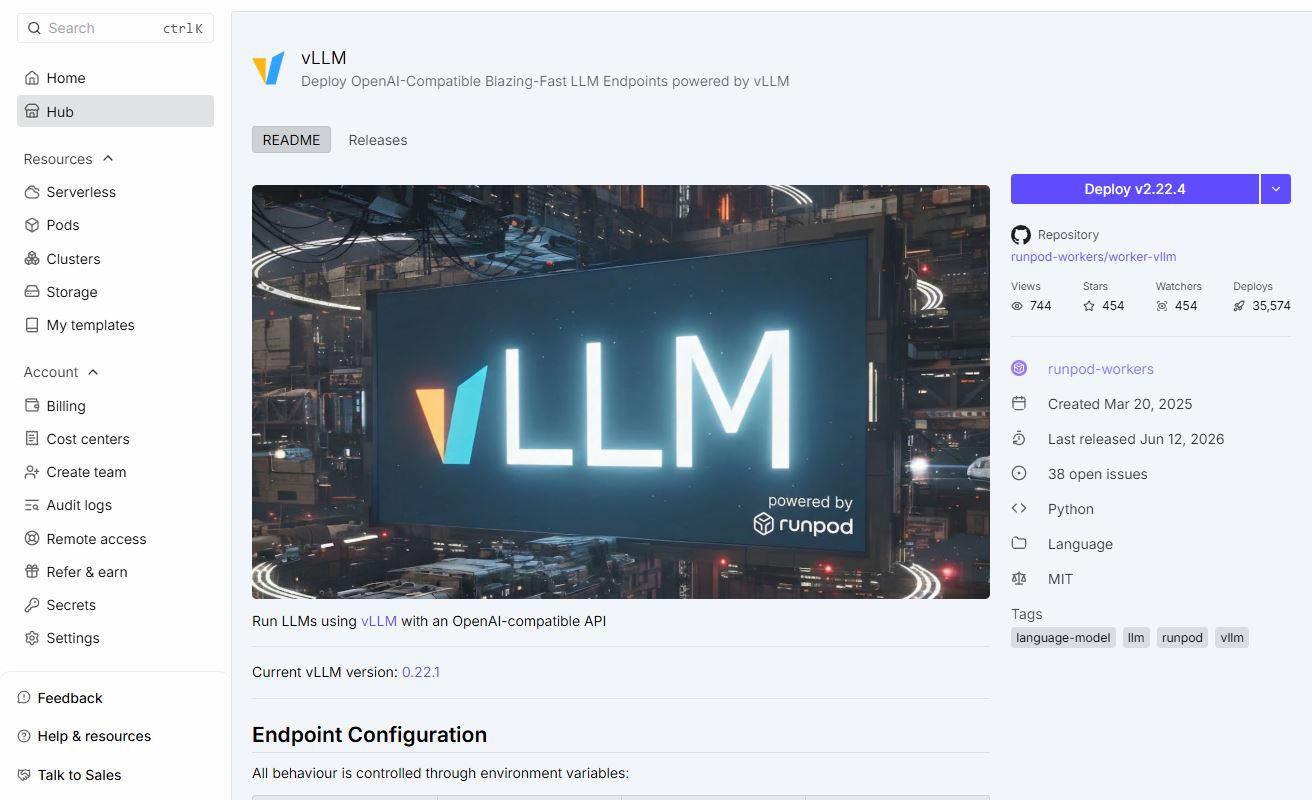
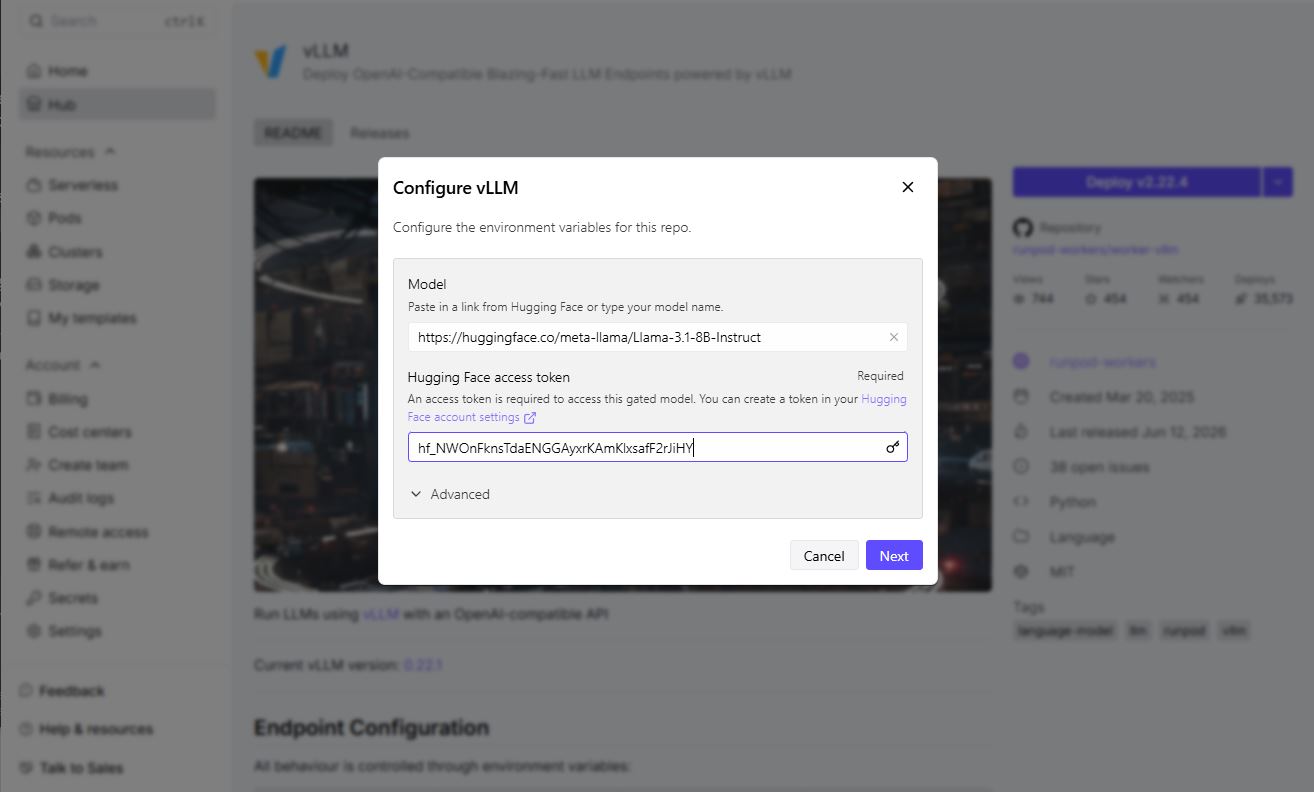
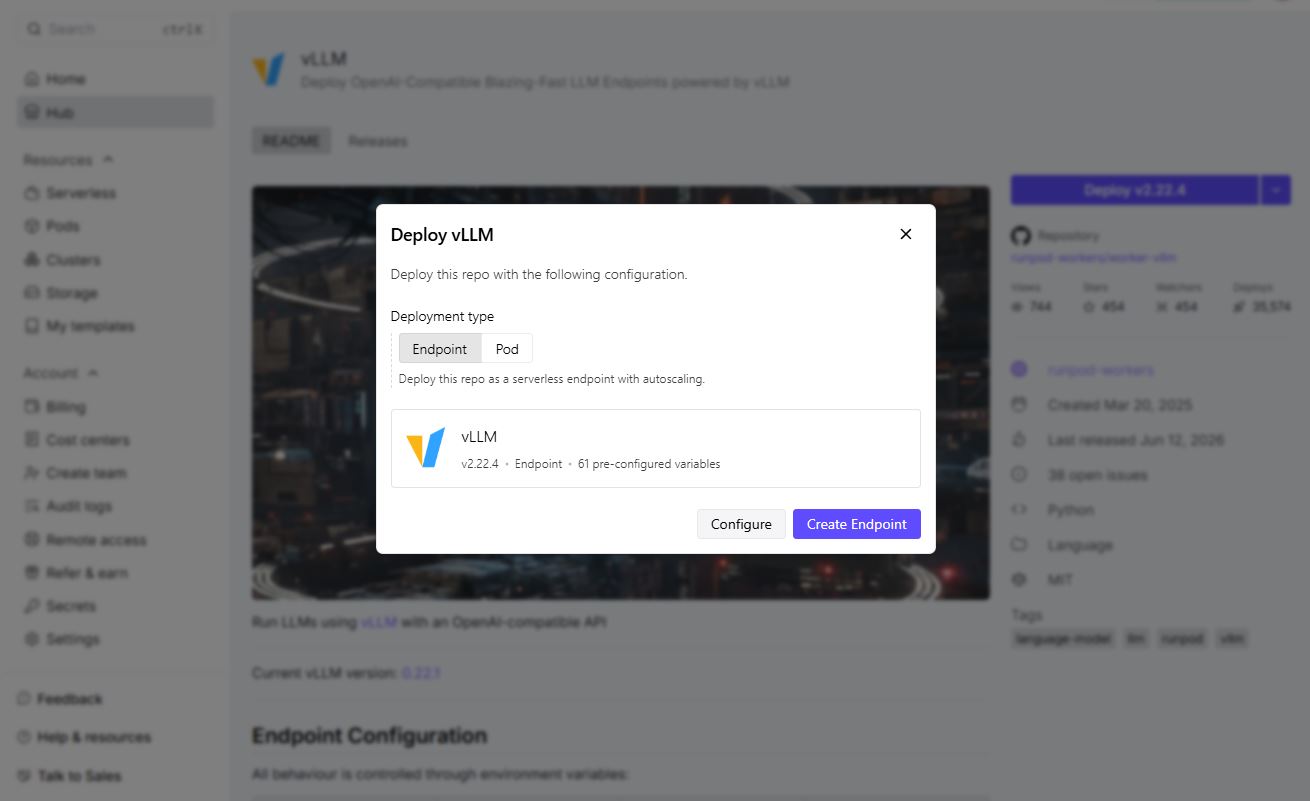
How to deploy your model with vLLM on Runpod Serverless
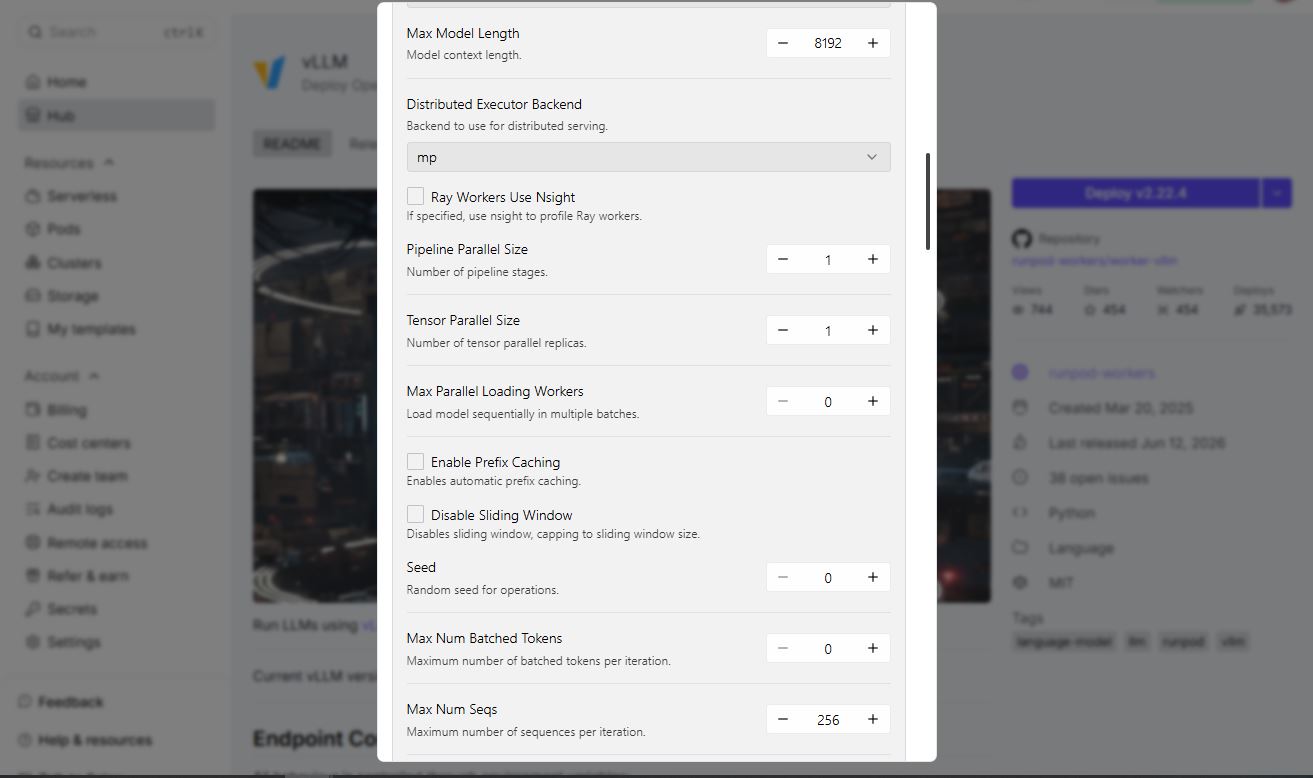
Depending on the model you choose, you may need to configure your endpoint with additional environment variables (see below) - for example, to set a quantization type if you're using a quantized checkpoint like AWQ or GPTQ.
You now have a powerful, scalable LLM inference API that's compatible with both Runpod's native API and the OpenAI client.
How to Use the OpenAI- and Anthropic-Compatible API for vLLM Inference Requests
The vLLM worker is fully OpenAI-compatible, and as of recent worker versions also supports the OpenAI Responses API and the Anthropic Messages API, so you can point existing OpenAI or Anthropic SDK code at your endpoint with minimal changes.
OpenAI-style chat completions (Python):
from openai import OpenAI
import os

client = OpenAI(
    api_key=os.environ.get("RUNPOD_API_KEY"),
    base_url="https://api.runpod.ai/v2/<YOUR_ENDPOINT_ID>/openai/v1",
)

response = client.chat.completions.create(
    model="<YOUR_DEPLOYED_MODEL_REPO/NAME>",
    messages=[{"role": "user", "content": "Why is Runpod the best platform?"}],
    temperature=0,
    max_tokens=100,
)

print(response.choices[0].message.content)
Only the api_key and base_url need to change from a standard OpenAI integration. The rest of your code stays the same.
This makes it straightforward to swap a vLLM-on-Runpod endpoint into a project originally built against either OpenAI's or Anthropic's API.
vLLM Environment Variables for Runpod Serverless
You can customize your deployment by setting environment variables on your endpoint. Some of the most commonly used:
Variable
Purpose
Example
MAX_MODEL_LEN
Maximum context length
16384
GPU_MEMORY_UTILIZATION
Fraction of GPU memory vLLM can use
0.95
QUANTIZATION
Quantization method
awq, gptq, bitsandbytes
TENSOR_PARALLEL_SIZE
Number of GPUs to split the model across
2
ENABLE_AUTO_TOOL_CHOICE / TOOL_CALL_PARSER
Enable function/tool calling
true / hermes
OPENAI_SERVED_MODEL_NAME_OVERRIDE
Rename the model as it appears in API responses
my-model
Beyond this list, the worker auto-discovers any environment variable that matches a vLLM engine argument (uppercased), so you can pass most vLLM options directly without waiting on explicit worker support. To add these, go to your endpoint's Manage → Edit Endpoint → Public Environment Variables.
Troubleshooting Your vLLM Deployment on Runpod
When sending a request to your LLM for the first time, your endpoint needs to download the model and load the weights. If the output status remains "in queue" for more than 5-10 minutes:
Check the worker logs to pinpoint the exact error. Make sure you didn't pick a GPU with too little VRAM for the model and context length you chose.
If your model is gated (e.g., Llama), make sure you have access on Hugging Face and have supplied your access token as the HF_TOKEN environment variable.
If you're getting out-of-memory errors, try a larger GPU or reduce MAX_MODEL_LEN.
Conclusion: Deploying Open Source LLMs with vLLM on Runpod
Open source LLMs let you fine-tune for specific applications, reduce inference costs at scale, and keep control over your data. To run your open source LLM, we recommend vLLM - an inference engine that's compatible with thousands of models and is built for high-throughput serving, now with OpenAI- and Anthropic-compatible API support built in.
Hopefully by now you have a stronger grasp of when to use closed source vs. open source models, and how to deploy your own open source model with vLLM on Runpod Serverless.
Which models are supported by vLLM, and how do I choose the right one?
vLLM supports most causal language models on Hugging Face, including Llama 3, Mistral, Qwen3, Gemma, Phi-4, and DeepSeek-R1 distillations. When choosing a model, match its size to your available GPU VRAM and set MAX_MODEL_LEN to the context length you actually need (larger context windows use more memory). See vLLM's supported models list for the full set.
How can I run a downloaded Hugging Face model using vLLM?
On Runpod, enter the model's Hugging Face repo name (e.g., meta-llama/Llama-3.1-8B-Instruct) in the Model field when deploying from the Hub. If the model is gated, supply your Hugging Face access token as the HF_TOKEN environment variable. The worker downloads and loads the model automatically on first request.
How can I optimize vLLM for faster inference?
A few of the most effective levers: raise GPU_MEMORY_UTILIZATION to give vLLM more room for the KV cache, use TENSOR_PARALLEL_SIZE to split larger models across multiple GPUs, and pick a GPU with enough VRAM for your model and context length to avoid memory pressure. For current, measured numbers across configurations, check vLLM's performance dashboard rather than relying on a fixed benchmark figure.
How does quantization affect vLLM performance?
Quantization formats like AWQ, GPTQ, and bitsandbytes (set via the QUANTIZATION environment variable) reduce the memory footprint of model weights. This lets you fit larger models on smaller GPUs or run bigger batches, generally trading a small amount of accuracy for lower VRAM use and often faster inference. Actual gains vary by model and hardware, so it's worth testing your specific case.
What are the best practices for deploying vLLM in a production environment?
Set MAX_MODEL_LEN to what your application actually needs rather than the model's maximum context (which increases memory use unnecessarily), pin a specific worker image version instead of "latest" for reproducibility, pass HF_TOKEN as a secret environment variable for gated models, and monitor worker logs to catch out-of-memory errors or slow cold starts early.
What's new in Runpod Serverless: Faster cold starts, batch inference, and no-Docker deploys
Whether you're already running production endpoints on Runpod or you're sizing us up for the first time, here's a plain-language tour of what Runpod Serverless does today, why it's faster and cheaper than it was six months ago, and how to deploy your first endpoint in minutes.
Beyond the Notebook: The Engineering Realities of Production AI Agents
Shift from stateless inference to stateful architectures to resolve infrastructure bottlenecks like memory management, concurrency limits, and runaway jobs in production AI agents.



.jpeg)