
AutoGen agents that execute code carry a straightforward security implication: the process that runs generated Python needs isolation from everything else. When an agent produces arbitrary code and your executor runs it inside the same container as your orchestration logic, or directly on the host, you have handed an LLM the keys to your infrastructure. This guide builds the architecture that prevents that, with both Dockerfiles, the orchestration service, and every deployment step from code to live endpoint.
The design runs AutoGen's orchestration on a privileged Runpod Pod that also hosts a local Docker daemon, your open-source LLM on a separate GPU endpoint, and every generated code block in a throwaway execution container. Local Docker Compose walkthroughs stop at the happy path; this one carries through to a deployed system, including the two spots where the naive version quietly breaks: the protocol the orchestrator uses to reach the model, and the Docker daemon the executor needs to sandbox code.
1. Why Isolated Containers Are Non-Negotiable for Code-Executing AutoGen Agents
Isolated containers are the only reliable security boundary for AutoGen agents that execute LLM-generated code. Without one, a single malformed or adversarial output reaches your host filesystem, your secrets, and your network directly.
AutoGen's execution model is deceptively simple: a UserProxyAgent takes the code an assistant agent generates, hands it to an executor, and runs it. The safety of that step depends entirely on which executor you configure.
The permissive default is LocalCommandLineCodeExecutor, which spawns a subprocess on the host. In local development that is convenient. In production it means a model-generated subprocess.run(["rm", "-rf", "/"]) runs with the permissions of whatever process owns it, against your real filesystem, with nothing between the model and the disk.
DockerCommandLineCodeExecutor closes that hole by running each code block inside a Docker container instead of on the host. When the executor stops, the container is removed. Picking it over the local executor is the single most important decision in this build, and it has been part of AutoGen's code-execution toolkit since the classic autogen package.
There is a common way to get this wrong. Teams put orchestration logic, executor, and LLM calls inside one container and call it isolated. That collapses the boundary: DockerCommandLineCodeExecutor only protects you when the code it runs lands in a separate container from the orchestration process. Nest them and the outer container still holds everything, so the sandbox protects nothing.
The architecture that actually holds gives each concern its own boundary:
- One container runs AutoGen's conversation orchestration.
- A second serves LLM inference on a GPU.
- Each code execution spins up its own short-lived container, launched by the executor and torn down after the block finishes.
Any of the three can fail, scale, or be rebuilt without disturbing the others. Section 2 turns that separation into concrete Runpod endpoints; the rest of the guide wires them together and stress-tests the boundary.
2. Architecture: Two Containers, One Coherent System
The build is two long-lived containers connected over HTTPS, with no VPC, service mesh, or private networking to configure. Container A runs AutoGen's orchestration, a FastAPI service, and a local Docker daemon on one privileged Pod: the agent graph, conversation state, LLM dispatch, and the code executor all live here, and the executor launches its throwaway containers on the Pod's own daemon. Container B serves your open-source LLM behind an OpenAI-compatible HTTP API on a GPU.
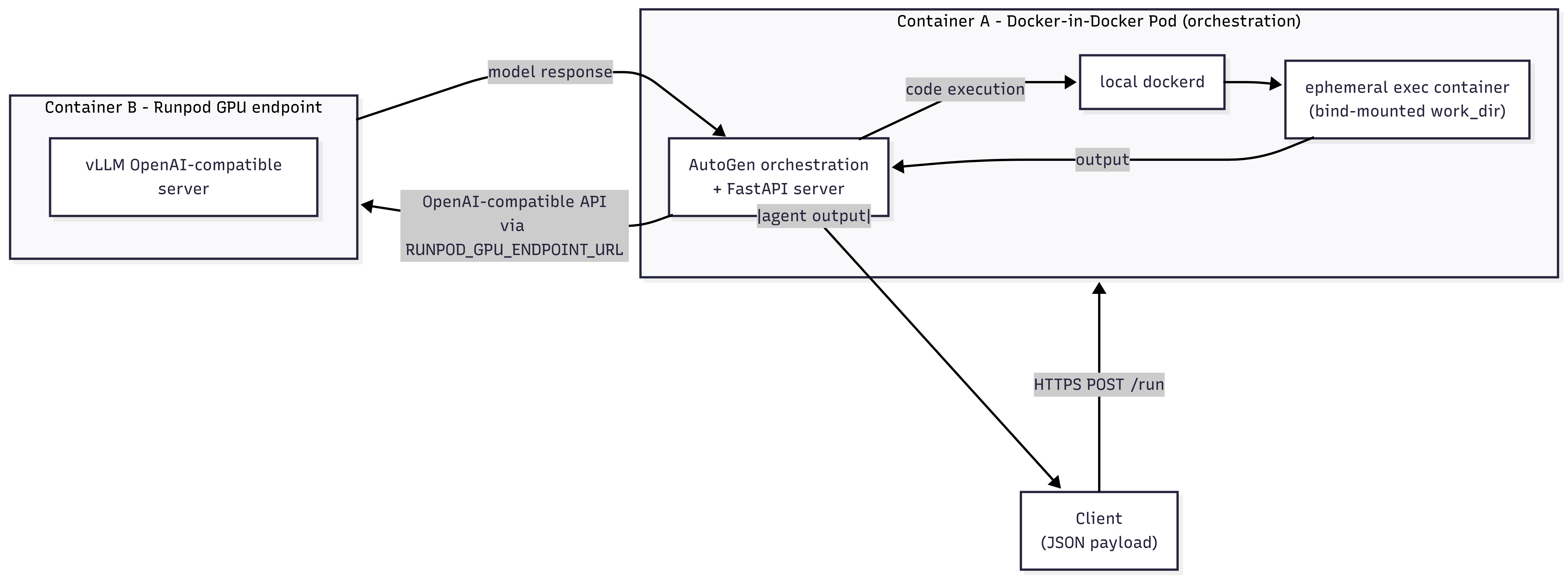
The link from A to B is a plain HTTPS call. AutoGen's llm_config takes a base_url, and you point it at Container B's OpenAI-compatible route, injected at runtime as an environment variable. Because that route speaks the OpenAI protocol, AutoGen talks to your self-hosted model exactly as it would talk to api.openai.com, and no container-to-container networking is involved.
The split also keeps cost honest. The GPU endpoint is the expensive half; on a Runpod Serverless endpoint it bills per second and scales to zero between requests, so bursty agent traffic pays for the bursts rather than an idle GPU. Container A is a persistent CPU Pod (Section 4 explains why the daemon has to live alongside the orchestrator), and a GPU cold start never stalls it. Neither layer's cost bleeds into the other, and Runpod runs both from one console, one API, and one billing account. The AWS equivalent is Lambda plus SageMaker plus a VPC and security groups; here you create two endpoints from the same dashboard and paste one URL into the other's environment variables.
3. Building the Inference Container (GPU Layer)
Build the inference container first, because the orchestration container needs its URL before it can be configured. Container B has one job: serve your model over an OpenAI-compatible API so AutoGen's OpenAI client can call it unchanged. vLLM ships exactly that server, so you write no custom request handler at all.
Pin the CUDA, vLLM, and Python versions rather than tracking latest, which is a fast path to CUDA/PyTorch/vLLM incompatibilities on GPU images.
That CMD gives you an endpoint at http://<host>:8000/v1 that answers POST /v1/chat/completions in the OpenAI schema. On a GPU Pod, that URL (via the Pod's public proxy) becomes base_url in Container A directly.
On a Serverless GPU endpoint, Runpod fronts vLLM with its own OpenAI-compatible route instead of an exposed port. You deploy the vLLM worker and call it at:
That /openai/v1 suffix is the load-bearing detail. The plain Serverless job routes (/run, /runsync) speak Runpod's job-queue protocol ({"input": {...}}), which an OpenAI client cannot parse. Point base_url at /openai/v1, never at /runsync.
GPU sizing:
- 7B-13B models (Mistral-7B-Instruct, Llama-3-8B): an RTX 4090 with 24 GB of VRAM serves these comfortably at gpu_memory_utilization=0.90.
- 70B models (Llama-3-70B, Qwen-2-72B): full bfloat16 weights exceed 140 GB, but 4-bit AWQ or GPTQ quantization brings the footprint to roughly 35-45 GB depending on the method, which fits a single A100 80GB with headroom.
Keep model weights out of the image. A 7B model in bfloat16 is about 14 GB, and baking it in means every cold-start image pull drags 14+ GB across the wire. Point HF_HOME (and TRANSFORMERS_CACHE) at a mounted Runpod network volume instead: the weights download once, later workers read from the cache, the image stays small, and cold starts drop to seconds.
4. Building the Orchestration Container (AutoGen + Docker-in-Docker)
Container A runs three things on one Pod: the AutoGen orchestration, a small FastAPI service that accepts tasks, and a local Docker daemon for the executor to launch containers on. It is CPU-bound; a CUDA base would add several gigabytes and buy nothing, since orchestration never touches the GPU.
The service uses the classic autogen API (from autogen import ..., from autogen.coding import ...), the interface that pairs a UserProxyAgent with a code executor through code_execution_config. That interface lives only on the frozen pyautogen 0.2.x line. Recent pyautogen releases (0.4 and up, now 0.10) are a thin proxy for Microsoft's rewritten autogen-agentchat, which imports as autogen_agentchat and drops autogen.coding for a different agent API. So pin pyautogen~=0.2.0 to hold the classic surface; a looser ~=0.2 resolves to the proxy release and breaks the imports above.
Why a local daemon on a privileged Pod. DockerCommandLineCodeExecutor connects to Docker with docker.from_env() and, for each code block, writes the file to a local work_dir that it bind-mounts into the execution container. A bind mount is always resolved on the daemon's own host, so the daemon has to share the orchestrator's filesystem: a local daemon. That rules out both a stock Runpod Serverless worker (unprivileged, no daemon) and a remote daemon (the bind path would resolve on the wrong machine and the code file would be missing). So Container A runs on a privileged Pod with a Docker-in-Docker daemon started alongside the app. IMPORTANT: confirm your Runpod Pod tier permits privileged / Docker-in-Docker before building on this; Runpod does not enable an in-Pod Docker daemon by default.
The entrypoint starts the local daemon, waits for its socket, then serves the API. Starting the daemon requires the privileged Pod from the note above.
The service validates its config at startup and runs the executor inside a with block so its container is torn down after every request.
Three details in that service carry weight:
- The executor container is a separate filesystem and process boundary from the orchestrator. Generated code runs in a throwaway container with its own root filesystem and PID namespace, removed after the block, so open("/etc/passwd") reads that container's copy, not the Pod's, and the orchestrator's environment (including RUNPOD_API_KEY) is never passed into it. The one shared surface is the bind-mounted work_dir, which carries only the code files. The boundary you do not get by default is the network: the classic executor creates the container with no network option, so it lands on the daemon's default bridge with outbound access. Cutting the Pod's own egress will not fix that, since the orchestrator needs egress to reach the GPU endpoint. Restrict it at the in-Pod daemon instead, for example by starting dockerd with --bridge=none so containers launched without an explicit network get none, which leaves Container A's own egress intact. If strict per-container network control matters, an executor that exposes network_mode (AG2's newer DockerSandbox defaults to network_mode="none") is the cleaner tool.
- Config is read at runtime, not baked in. Because RUNPOD_GPU_ENDPOINT_URL comes from the environment, one image can front a different model or GPU tier without a rebuild.
- The daemon must be up before the first request. The entrypoint blocks on docker info for that reason; if the Pod is not privileged, dockerd never starts and the service exits loudly instead of failing on the first task.
Build for the right architecture and push before deploying:
GitHub Container Registry works as well as Docker Hub. Runpod pulls from any public registry, and private registries work once you add credentials in the Pod's Container Registry Credentials field.
5. Deploying Both Containers on Runpod
Deploy the inference layer first, since its URL feeds the orchestration layer. The steps differ for a Serverless GPU endpoint versus a GPU Pod.
Serverless GPU endpoint:
- In the console, go to Serverless → New Endpoint → Custom Deployment → Deploy from Docker Registry.
- Paste the inference image URL into Container Image.
- Pick the GPU: RTX 4090 for 7B-13B models, A100 80GB for 70B models.
- Under Settings → Environment Variables, set MODEL_NAME and GPU_MEMORY_UTILIZATION (for example 0.90).
- Set Min Workers to 0 for pay-per-use, or 1 to keep a warm worker and avoid cold starts, depending on your latency needs.
- Click Deploy Endpoint, then take the endpoint's OpenAI base URL, https://api.runpod.ai/v2/<your-endpoint-id>/openai/v1.
GPU Pod (persistent inference server):
- Go to + New → Pod, choose a GPU tier, and paste the inference image URL.
- Set environment variables via Edit Template → Environment Variables.
- Copy the Pod's public proxy URL for port 8000, and append /v1.
Orchestration layer (a privileged Docker-in-Docker Pod):
- Go to + New → Pod and choose a CPU (or low-cost GPU) tier. Paste the orchestration image URL, and enable privileged mode so the in-Pod dockerd can start. A stock Serverless worker will not work here, for the reason in Section 4.
- Under Expose HTTP Ports, add 8080 so the FastAPI service is reachable through the Pod's public proxy URL.
- Under Environment Variables, add:
- RUNPOD_GPU_ENDPOINT_URL: the inference endpoint's OpenAI base URL from the previous step (the …/openai/v1 route for Serverless, or the Pod's …:8000/v1). Do not use /runsync.
- RUNPOD_API_KEY: your Runpod API key, used to authenticate calls to the GPU endpoint.
- On the inference endpoint, enable FlashBoot to shorten cold starts. Runpod's FlashBoot keeps recently used workers warm so repeat starts skip most of the initialization cost; treat it as a latency optimization whose benefit scales with traffic, not a fixed guarantee.
The same orchestration image can front several GPU endpoints: change RUNPOD_GPU_ENDPOINT_URL and the runtime value overrides whatever ENV the image baked in, no rebuild required.
On cost, the two halves bill differently by design. The GPU inference endpoint is where per-second Serverless billing pays off: with Min Workers at 0 it drops to zero between requests, so a hundred short agent tasks a day cost a fraction of an always-on GPU. The orchestration Pod is a smaller, continuous CPU charge, the price of keeping a Docker daemon resident for the executor, and traffic between the two endpoints carries no egress fee.
6. Testing the End-to-End Pipeline and Verifying Isolation
Test the orchestration Pod directly over HTTP before wiring up any client code. Confirm two things: generated code runs inside the ephemeral executor container, and a misconfigured GPU URL surfaces a clear error instead of hanging.
Send a task to the Pod's public proxy URL (port 8080):
A healthy response:
Watch the Pod's logs while the request runs. A successful execution trace looks like this:
A wrong RUNPOD_GPU_ENDPOINT_URL fails loudly instead:
A 404 almost always means the base URL is off: a missing /openai/v1 suffix, a typo in the endpoint ID, or a stray trailing slash. Compare it character for character against the inference endpoint's overview URL.
Prove the boundary, don't take it on faith. The Execution container stopped and removed line is the isolation working: the block ran in a disposable container that is already gone, and the orchestration process never shared its filesystem. To watch the boundary hold under pressure, send a task that deliberately misbehaves, one that writes a file or reads a host path; the effect stays inside that container and vanishes with it. The network is the exception noted in Section 4: unless you restrict the in-Pod daemon (for example dockerd --bridge=none), the exec container can still reach out, so treat filesystem-and-process isolation as the guarantee here and lock the network down separately. That filesystem-and-process boundary is the one a host subprocess cannot give you: it would run the same code against your real disk.
7. Deploy Your First Request Today
End to end, this is well under an hour of hands-on work, and minutes once the images exist. Push both images, bring up the GPU inference endpoint first, copy its …/openai/v1 URL, then start the privileged orchestration Pod with that URL set as RUNPOD_GPU_ENDPOINT_URL. Fire the first request with curl against the Pod's proxy URL.
Already running a vLLM server or any OpenAI-compatible endpoint on Runpod? Skip Container B: point RUNPOD_GPU_ENDPOINT_URL at that endpoint's /v1 route and reuse it as-is.
Create a free Runpod account and open the console to deploy your first isolated AutoGen stack.
Frequently Asked Questions
How does DockerCommandLineCodeExecutor differ from LocalCommandLineCodeExecutor?
The Docker executor runs each code block in a fresh container and removes it afterward; the local executor runs the same code as a host subprocess with the parent process's permissions. Same interface, opposite blast radius, and neither is new to v0.4.
Why does the orchestration layer need a privileged Pod instead of Serverless?
DockerCommandLineCodeExecutor bind-mounts a local work_dir into each execution container, so it needs a Docker daemon on the same filesystem as the orchestrator. A stock Serverless worker has no daemon, and a remote daemon would resolve the bind path on the wrong machine. A privileged Pod running its own dockerd satisfies both constraints.
Why build the inference container before the orchestration container?
The orchestration Pod's RUNPOD_GPU_ENDPOINT_URL must point at a live inference endpoint, and that URL does not exist until the GPU endpoint is deployed. You can build and push the orchestration image in any order; you just cannot finish its configuration without the GPU URL.
Can I reuse an existing vLLM or OpenAI-compatible endpoint?
Yes. Any OpenAI-compatible endpoint, including a Runpod GPU Pod already running vLLM, works as Container B. Point RUNPOD_GPU_ENDPOINT_URL at its /v1 route; the orchestration image does not change.
Can generated code read secrets in the orchestration container?
No. It runs in a separate, ephemeral container with no view of the orchestrator's filesystem or environment variables, and that container is removed after each request. Network access is the exception: deny egress at the Pod level if a task must stay offline.
Why does the orchestration service exit at startup with a Docker error?
The in-Pod dockerd did not start, almost always because the Pod is not privileged. The entrypoint blocks on docker info and exits with a clear message rather than accepting a request it cannot execute.
Why is --platform linux/amd64 required on Apple Silicon?
Runpod runs on x86_64, and Docker on Apple Silicon defaults to arm64. An arm64 image pushes successfully but fails to start. Set --platform linux/amd64 on both the FROM line and the docker build command.
Which GPU should I use?
An RTX 4090 (24 GB) handles Mistral-7B-Instruct at gpu_memory_utilization=0.90. For 70B models, use an A100 80GB with 4-bit AWQ or GPTQ quantization (see Section 3 for the sizing detail).


