
Deploying a stateful LangGraph agent to production without decoupled infrastructure guarantees three failure modes: concurrent session collisions, unrecoverable mid-workflow failures, and GPU bills inflated by CPU-bound work. The fix is a two-layer architecture: CPU orchestration separate from GPU inference, both backed by a PostgreSQL checkpointer. This guide builds it end to end."
Failure modes typically fall into a pattern. You have a working LangGraph agent in a notebook (tool calls, multi-step reasoning, decent behavior), and you deploy it as a single containerized service. On day one, everything is fine. Within a few weeks, the cracks show: two users share a thread_id namespace and collide; a failed node wipes an entire 40-step workflow that can’t be replayed, and your GPU bill climbs because the container holding your agent state also holds your inference process, so both scale together despite having completely different concurrency profiles.
The Horizontal-Scaling Problem
LangGraph’s stateful workflows span minutes to hours by design. An agent researching a topic, drafting a report, and revising it through several tool-call cycles might run for many minutes across dozens of node executions. Horizontal scaling with in-process state means each container knows about only its own sessions. A request hitting a different replica starts a new session with no thread_id isolation, because there’s no external state store to share context across replicas.
The node-level failure problem is worse. vLLM inference can fail mid-workflow through network blips, OOM errors, or model timeouts. Without a checkpointer, a failed mid-workflow run is gone. The agent has no memory of what it already completed, so it starts over, consuming more tokens, more time, and more user patience.
There’s a second cost problem. A running LangGraph agent spends significant wall-clock time on CPU-bound work (routing logic, tool dispatch, state management). The LLM calls are high-latency but episodic. If your inference layer lives in the same container as your orchestration logic, you’re paying GPU prices for work that doesn’t need a GPU.
The Two-Layer Fix
Separate concerns into two independently scaling compute layers, backed by a shared external state store:
- Orchestration layer: CPU containers running FastAPI plus a LangGraph
StateGraph. Scales horizontally with concurrent agent sessions. - Inference layer: GPU serverless workers running vLLM on Runpod Serverless. Scales with LLM call volume.
Both layers persist StateGraph state to an external PostgreSQL checkpointer rather than holding it in process. PostgreSQL is the shared state backend, not a third scaling tier: it scales with standard database techniques (connection pooling, read replicas, vertical sizing).
Each layer scales independently: orchestration with session volume, inference with LLM call volume.
Architecture Overview
The data flow ties the two compute layers and the state store together:
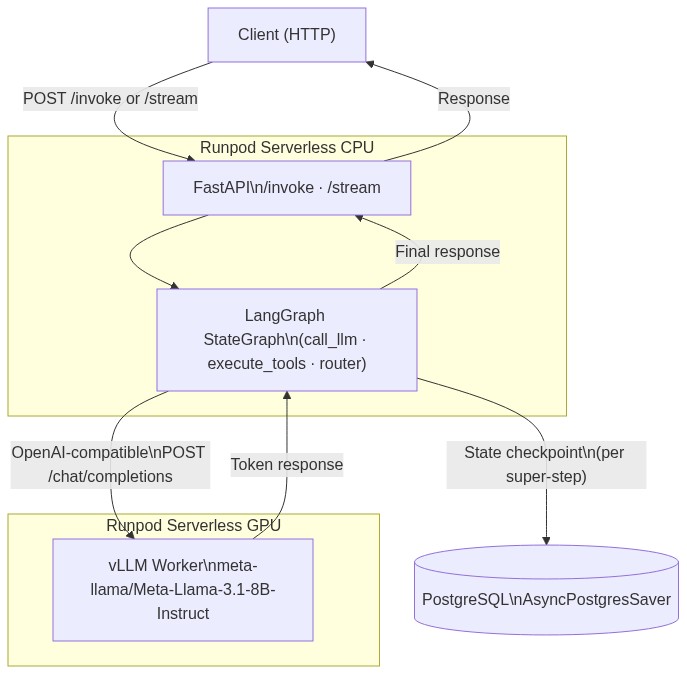
A client sends a POST /invoke with a thread_id and input message. FastAPI passes it to graph.ainvoke(). The StateGraph runs step by step: call_llm sends messages to the Runpod vLLM endpoint, execute_tools dispatches tool calls, and a router conditional edge decides whether to continue, loop, or end. PostgreSQL persists state at each super-step boundary (in a sequential graph, that means after each node completes).
Swapping the model means updating ENDPOINT_ID only. The graph topology, tools, and PostgreSQL schema stay fixed, which is the operational payoff of the decoupled architecture.
1. Standing Up the vLLM Inference Layer
Log into the Runpod console. Navigate to Serverless -> Quick Deploy -> select the Serverless vLLM card.
In the Model field, enter your Hugging Face model ID. For a solid production starting point, use meta-llama/Meta-Llama-3.1-8B-Instruct, which supports a 128K context window. For private models, supply your Hugging Face access token in the token field.
GPU selection matters for production workloads: for fp16 8B-class inference with adequate KV cache headroom, 24GB VRAM or more is a practical starting point. The L40S (48GB) is the cost-efficient default for 8B-class models, handling KV cache allocation comfortably with MAX_MODEL_LEN set to 32K. Use the A100 (80GB) or H100 (80GB) for throughput-sensitive workloads or 70B-class models. Configure active workers (always-warm instances) and max workers to match peak concurrency expectations.
Click Advanced to configure the key engine arguments:
| Variable | Purpose | Example Value |
|---|---|---|
MAX_MODEL_LEN |
Context window cap; directly controls KV cache VRAM allocation | 32768 |
GPU_MEMORY_UTILIZATION |
Fraction of VRAM vLLM reserves for the model executor (weights plus KV cache) | 0.90 |
DTYPE |
Model precision | bfloat16 |
Set MAX_MODEL_LEN explicitly. Leave it at the model’s default (128K for Llama 3.1) and vLLM will pre-allocate KV cache for the full context on initialization, hitting CUDA OOM on the L40S before the first request completes. Set it to the maximum context your agent workflows actually need. For many multi-turn agent sessions, 16K to 32K is a practical starting range.
If you encounter OOM errors after deployment, reduce GPU_MEMORY_UTILIZATION from 0.90 to 0.85. If you have VRAM headroom, raise it toward 0.95 to increase KV cache capacity and throughput.
If your agent uses tool calling, enable it on the vLLM endpoint too. Set ENABLE_AUTO_TOOL_CHOICE=true and TOOL_CALL_PARSER=llama3_json (the parser that matches Llama 3.1’s tool-call format) in the endpoint environment variables. Without these, the server never emits structured tool calls, so the agent’s router never branches to a tool. Match the parser to the model family: llama3_json for Llama 3.x, hermes for Qwen, mistral for Mistral.
After deployment, copy the Endpoint ID from the Serverless dashboard. Use the built-in request testing interface to verify the endpoint is live before wiring it to your agent:
2. Wiring LangGraph’s LLM Client to the Runpod Endpoint
Wiring LangGraph to the Runpod endpoint is one code change. Runpod’s vLLM worker exposes an OpenAI-compatible /chat/completions endpoint. You swap base_url and api_key, bind your tools, and nothing else in your agent changes.
The .bind_tools(tools) call is what makes tool calling work on the client side. Without it, the model never emits tool_calls, so the router below always routes straight to the end. The server side matters just as much: tool calling only works if the vLLM endpoint runs with auto tool choice and a matching parser (the ENABLE_AUTO_TOOL_CHOICE and TOOL_CALL_PARSER variables set in Section 1). Message formatting and token streaming need no such flags and work as-is.
To swap models (say, upgrading from Llama 3.1 8B to Llama 3.3 70B), deploy a new Runpod Serverless endpoint, update ENDPOINT_ID, and redeploy the orchestration container. The StateGraph, tools, and checkpointer configuration stay untouched. Match TOOL_CALL_PARSER to the new model family when you switch.
3. Building the StateGraph with Persistent Checkpointing
Start with an explicit state schema; vague schemas make state transitions harder to reason about and debug.
add_messages is a LangGraph reducer that appends to the message list rather than replacing it, which is essential for multi-turn conversations where earlier messa
ges need to stay in context.
Next come the three node functions. They reuse the tools and tool_registry defined in Section 2:
The router function’s use of Send enables parallel tool dispatch. When the LLM returns three tool calls simultaneously, router returns three Send objects. LangGraph fans them out as concurrent graph branches, collects their ToolMessage outputs (merged via the add_messages reducer), and sends the merged state back to call_llm for the next iteration. Sequential dispatch would require three round-trips before the LLM sees any results. The Send pattern collapses that to one.
One production detail makes or breaks that parallelism. A super-step is one complete round of node execution: when router fans out three parallel Send branches, all three run inside the same super-step. Within a parallel super-step, branches may only write state channels that have a reducer. messages has one (add_messages), so concurrent ToolMessage appends merge cleanly. tool_calls_pending does not, which is why execute_tools returns only messages and lets call_llm reset the pending list on the next super-step. Writing a reducer-less channel from multiple parallel branches in the same super-step raises InvalidUpdateError, and it surfaces exactly when more than one tool call fires at once, the case this design is built for.
Install the checkpoint dependencies, then wire the saver into the graph. You will need a PostgreSQL instance reachable from Runpod’s network; Section 4 covers provisioning options.
Those connection kwargs are not optional. setup() issues table-creation DDL that needs autocommit, the saver expects dict_row, and prepare_threshold=0 keeps checkpoint queries working behind the transaction poolers that managed Postgres providers (Supabase, PgBouncer) put in front of the database. For a simpler single-process setup without a shared pool, AsyncPostgresSaver.from_conn_string(db_url) applies the same settings internally.
Invoke the compiled graph with a per-session thread_id in the run config:
LangGraph stores each session’s checkpoints keyed by thread_id, so concurrent invocations with different thread_id values don’t interfere with each other. A session spanning 50 node executions over 30 minutes keeps its full state intact across all of them, regardless of which CPU container handles each request. With the graph wired and checkpointing confirmed, the next step is packaging the orchestration layer into a deployable container.
4. Containerizing and Deploying the Orchestration Layer
The minimal Dockerfile:
requirements.txt, pinned to tested ranges (LangGraph has shipped import-path and API changes across minor versions, so cap the upper bound):
The FastAPI service (main.py):
Build and push the image:
Use a version tag instead of latest. Runpod caches layers aggressively, and latest will serve stale images after updates.
Before deploying the orchestration layer, provision an external PostgreSQL instance reachable from Runpod’s network. A managed database (Neon, Supabase, Railway, or RDS) works and is reachable over the public internet; so does a self-hosted Postgres on a VPS or a Runpod Pod running PostgreSQL. Because the connection runs over the public internet, require TLS by appending ?sslmode=require to the connection string. Store the full string as DATABASE_URL. The checkpointer.setup() call in build_graph() creates the checkpoint tables on first startup, so you don’t run migrations manually.
To deploy to Runpod Serverless CPU:
- In the Runpod console, navigate to Serverless -> New Endpoint.
- Click Import from Docker Registry and enter your image URL.
- Under Worker Type, select CPU.
- Under Environment Variables, add:
RUNPOD_API_KEY(used to authenticate calls to the vLLM endpoint)ENDPOINT_ID(the vLLM endpoint ID from Section 1)DATABASE_URL(your PostgreSQL connection string, e.g.,postgresql://user:pass@host:5432/agents?sslmode=require)
- Configure container concurrency based on your expected concurrent agent sessions per worker.
- Click Deploy.
No Network Volume is required for this architecture. Because state is externalized to PostgreSQL, the container filesystem stays ephemeral by design. Runpod autoscales the orchestration layer horizontally using Flex workers. When incoming request concurrency saturates the active workers, new containers spin up automatically.
5. Monitoring, Debugging, and Replay
A spike in GPU queue depth and a spike in CPU error rate mean different things and need different fixes. Each Runpod Serverless endpoint surfaces its own metrics independently so you can keep track of them separately.On the CPU orchestration endpoint, watch request logs, worker state transitions, and error output. GPU-side, the vLLM endpoint surfaces execution-time metrics, cold-start tracking, and queue-based scaling signals. Watch them separately, because a spike in GPU queue depth signals that the inference layer needs more max workers, while a spike in CPU error rate points to a bug in the orchestration layer.
Because the checkpointer writes state at each super-step boundary, a mid-workflow failure loses at most the last super-step’s work; a failure mid-parallel-dispatch rolls back to the state before any of those tools ran. To inspect and resume:
Passing None as the input tells LangGraph to resume from the last checkpoint rather than starting a new run. The agent picks up from the last saved super-step. For long-running workflows that call many tools, checkpoint resumption is the difference between a recoverable failure and a full restart that wastes the tokens and minutes already spent.
The architecture and Runpod’s per-second pricing change the cost math. CPU containers bill per second of compute consumed;GPU workers bill per second of GPU compute consumed, which is only when inference is actually running. . Because the two layers scale independently, you’re not paying GPU rates for routing logic, tool dispatch, or state management. Both layers scale to zero when there’s no traffic. On equivalent workloads, teams moving from traditional cloud providers to Runpod Serverless typically save 80-90% on compute costs.
Coframe scaled from zero to hundreds of concurrent GPU workers in under 250 milliseconds via FlashBoot when traffic spiked on launch day - no infrastructure team, no pre-provisioning.
Frequently Asked Questions
What is a LangGraph checkpointer and why does it matter for production deployments?
It persists StateGraph state to an external store (here, PostgreSQL) at each super-step boundary, described in Section 3. A failed super-step loses at most that step’s work, not the entire workflow. Without a checkpointer, any mid-workflow failure restarts from the beginning, discarding the tokens and time already spent.
How does thread_id isolation work across multiple Runpod CPU containers?
To track state, LangGraph keys each session’s checkpoints by thread_id in PostgreSQL, enabling any CPU container to serve any session without collision, and ensuring concurrent sessions with different thread_id values never interfere with each other.
When should I use the L40S versus A100 or H100 for vLLM inference on Runpod?
Use the L40S (48GB) for 8B-class models like Llama 3.1 8B at MAX_MODEL_LEN of 32K or below. Step up to the A100 or H100 (80GB) for 70B-class models, very long context windows, or throughput-heavy batching where per-request cost matters less.
Why does MAX_MODEL_LEN need to be set explicitly instead of using the model default?
vLLM pre-allocates KV cache for the full MAX_MODEL_LEN at startup, so leaving Llama 3.1 at its 128K default exhausts an L40S’s VRAM and triggers CUDA OOM before the first request. Set it to the context your workflows actually use, typically 16K to 32K (see Section 1).
How does the Send API enable parallel tool execution in LangGraph?
The router returns one Send object per tool call, and LangGraph runs those branches concurrently within a single super-step, merging their ToolMessage outputs through the add_messages reducer (see Section 3). Without Send, the calls run one at a time, a full round-trip each.
What happens to in-flight agent sessions when the CPU orchestration container scales down?
Nothing is lost. Session state lives in PostgreSQL, not container memory, so when a new container picks up the next request for that thread_id, it reads the last checkpoint and resumes from the last saved super-step.
Does this architecture require Kubernetes or infrastructure orchestration tooling?
No. Runpod Serverless handles container scheduling, autoscaling, and worker lifecycle without Kubernetes, Helm, or YAML. The orchestration layer ships from a Docker registry, the inference layer via Quick Deploy, and the only infrastructure you manage is the PostgreSQL database.
Conclusion
Separate what scales differently, persist state externally, and keep inference and orchestration on their own cost axes. That’s the whole architecture.
The vLLM layer goes live in minutes via Quick Deploy. The orchestration layer ships straight from a Docker registry with no YAML to write. The result is a production stateful-agent stack with no Kubernetes, no Helm, and no minimum spend - billed only for the compute each layer actually uses. Start with the vLLM endpoint in Section 1, point your agent at it with RUNPOD_API_KEY and ENDPOINT_ID, and let PostgreSQL carry the state.


