
The six AI model families and what they're good for
Which kind of AI actually solves my problem?
All
 Skip to main content
Blog
Why does AI need this particular chip?


Part three of AI Infrastructure 101, a seven-part series. Part two mapped the six AI model families.
Every conversation about AI infrastructure eventually arrives at the same three letters.
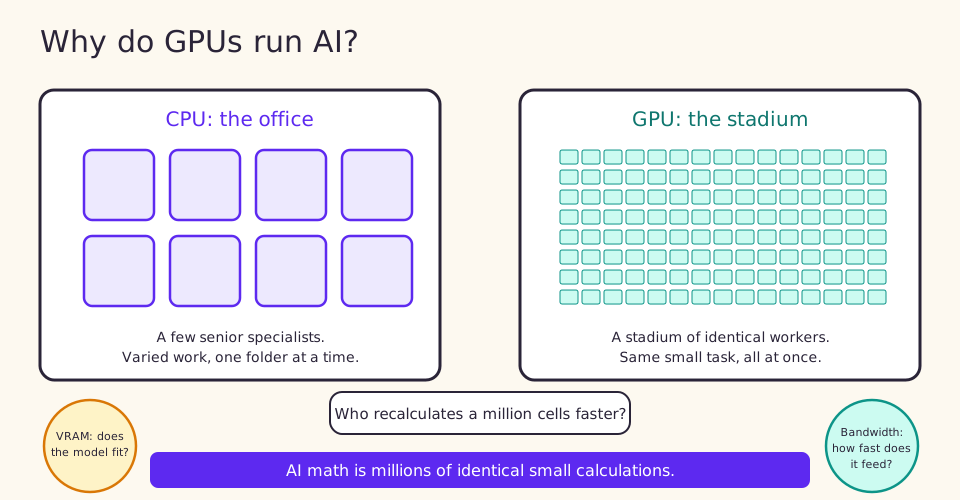
A CPU (central processing unit) is the general-purpose brain in every computer. It has a modest number of powerful cores, typically 4 to 64, each excellent at complex logic and at doing many different tasks in sequence. A GPU (graphics processing unit) inverts that design. It packs hundreds or thousands of smaller, simpler cores that all execute the same kind of operation at once. The design originated in video games, where millions of pixels need computing simultaneously, and it turned out to be a perfect match for AI.
Hold onto one intuition: a CPU is a small team of senior specialists handling varied work in order, while a GPU is a stadium full of workers all doing identical small tasks at the same moment. Training a neural network is stadium work. The math underneath, multiplying enormous grids of numbers called matrices, splits naturally into thousands of identical small calculations that can run in parallel.
Training a neural network means showing it data, measuring its errors and adjusting its parameters, millions of times over. Each pass relies on matrix multiplication, which GPUs accelerate dramatically. Modern training runs also consume millions of images or billions of text tokens, processed in parallel batches. Even with GPUs, training takes hours to weeks. On CPUs alone it would take orders of magnitude longer, which in practice means it would not happen. Faster training also compounds: teams that iterate quickly try more ideas and ship better models.
Inference is the production side, where a trained model answers real requests. Large models demand substantial compute for every single response, and production systems must handle many user requests concurrently while keeping responses fast. A GPU serves many inference requests in parallel. That parallelism is the difference between a chatbot that feels instant and one your customers give up on.
For AI work, the specs that matter most are VRAM, the onboard memory that determines how large a model the card can hold, and memory bandwidth, the speed at which data moves between that memory and the compute cores. The next part in this series turns VRAM into arithmetic you can use.
NVIDIA designs the GPUs that dominate AI, including the data center chips you will hear named in every vendor conversation. NVIDIA does not manufacture them; TSMC (Taiwan Semiconductor Manufacturing Company) fabricates the chips in its foundries. NVIDIA's dominance rests not only on hardware but on CUDA, its software ecosystem, which nearly all AI frameworks are built to exploit. AMD designs competing GPUs and Intel has entered the market, but NVIDIA remains the default for AI workloads, which is why GPU supply, pricing and availability so often trace back to the capacity of a single designer and a single manufacturer.
Picture recalculating a spreadsheet with a million formulas. A CPU works down the column, very fast, one formula at a time. A GPU hands one formula to each of a thousand workers and finishes the entire sheet in a few passes. Now note that a single response from a large language model involves billions of multiply-and-add operations. The difference between the two approaches is the difference between a chatbot that answers in one second and one that answers in several minutes.
GPU marketing emphasizes raw speed, but AI capacity planning starts with memory. When you evaluate any GPU offering, ask two questions in order. Does the VRAM fit my model? Does the throughput meet my request volume? Speed matters only after the model fits. This single habit prevents the most common first-time mistake, which is renting fast hardware that cannot hold the model at all.
Next in the series: Will Your Model Fit? The VRAM Napkin Math, the arithmetic that lets you sanity-check any vendor proposal in thirty seconds.
Runpod Serverless runs your container as an autoscaling endpoint that scales to zero and bills by the second.
Blog Posts
Which kind of AI actually solves my problem?
.jpeg)
Three storage layers, three lifetimes, and how to get your work onto the right one before you lose it instead of after.
Part one of AI Infrastructure 101, a seven-part series.
