Newly Features
We've cooked up a bunch of improvements designed to reduce friction and make the.
Create ->




Lorem ipsum dolor sit amet, consectetur adipiscing elit, sed do eiusmod tempor incididunt ut labore et dolore magna aliqua. Ut enim ad minim veniam, quis nostrud exercitation ullamco laboris nisi ut aliquip ex ea commodo consequat. Duis aute irure dolor in reprehenderit in voluptate velit esse cillum dolore eu fugiat nulla pariatur.
Block quote
Ordered list
Unordered list
Bold text
Emphasis
Superscript
Subscript
SwarmUI is a modular, open-source web interface for AI image and video generation. It supports Stable Diffusion, SDXL, Flux, Wan video models, and more, all powered by a ComfyUI backend under the hood.
What makes it appealing is that it bridges two worlds: beginners get a clean, intuitive Generate tab where they can type a prompt and click a button, while advanced users can drop into a full ComfyUI node graph for unrestricted workflow control.
The problem is getting it running on a remote GPU. SwarmUI has a non-trivial install process involving .NET, Python environments, model downloads, and CUDA version alignment. On a fresh cloud instance, that setup can take anywhere from 20 minutes to an hour of troubleshooting, all of it billable.
Nerdylive's template handles the entire setup (including ComfyUI) automatically, so you go from "Deploy" to generating images in a single click. Here's what you get out of the box:
SwarmUI on port 2254: The main event. A fully configured SwarmUI instance with a ComfyUI backend, ready to load checkpoints and start generating. The template ships with CUDA 12.6 support, and the SwarmUI version is configurable via an environment variable, so you can pin to a specific release or upgrade without rebuilding the pod.
JupyterLab on port 7888: A full notebook environment for anything SwarmUI doesn't cover: custom Python scripts, model inspection, dataset prep, or just poking around the filesystem. This is especially useful if you want to run training scripts or debug workflows alongside your generation setup.
Syncthing on port 8384: This is the underrated gem. Syncthing is a peer-to-peer file synchronization tool that lets you sync folders between your local machine and your pod in real time, with all traffic encrypted via TLS. No S3 buckets, no scp commands, no runpodctl gymnastics for moving models and outputs back and forth. Install Syncthing on your laptop, pair it with the pod, and your model directory stays in sync automatically. Drop a new checkpoint into a local folder and it appears on the pod. Generate a batch of images on the pod and they show up on your desktop.
Multiple ComfyUI instance ports (7821, 7822, 7823…): SwarmUI can orchestrate multiple ComfyUI backends simultaneously, which is how it earned the "Swarm" in its name. If you're running a multi-GPU pod or want to parallelize generation across backends, additional ports are already exposed and ready. This addresses an exrtremely commonly cited pain point with ComfyUI is that it's not able to effectively use multiple GPUs for parallel processing
SSH on port 22: For users who prefer a terminal. Full SSH access is available via TCP for direct command-line work.The template also comes pre-loaded with a set of practical utilities: runpodctl for pod management, rsync and rclone for file transfers, cron for scheduled tasks, and pre/post start scripts in /workspace/ for custom boot-time automation
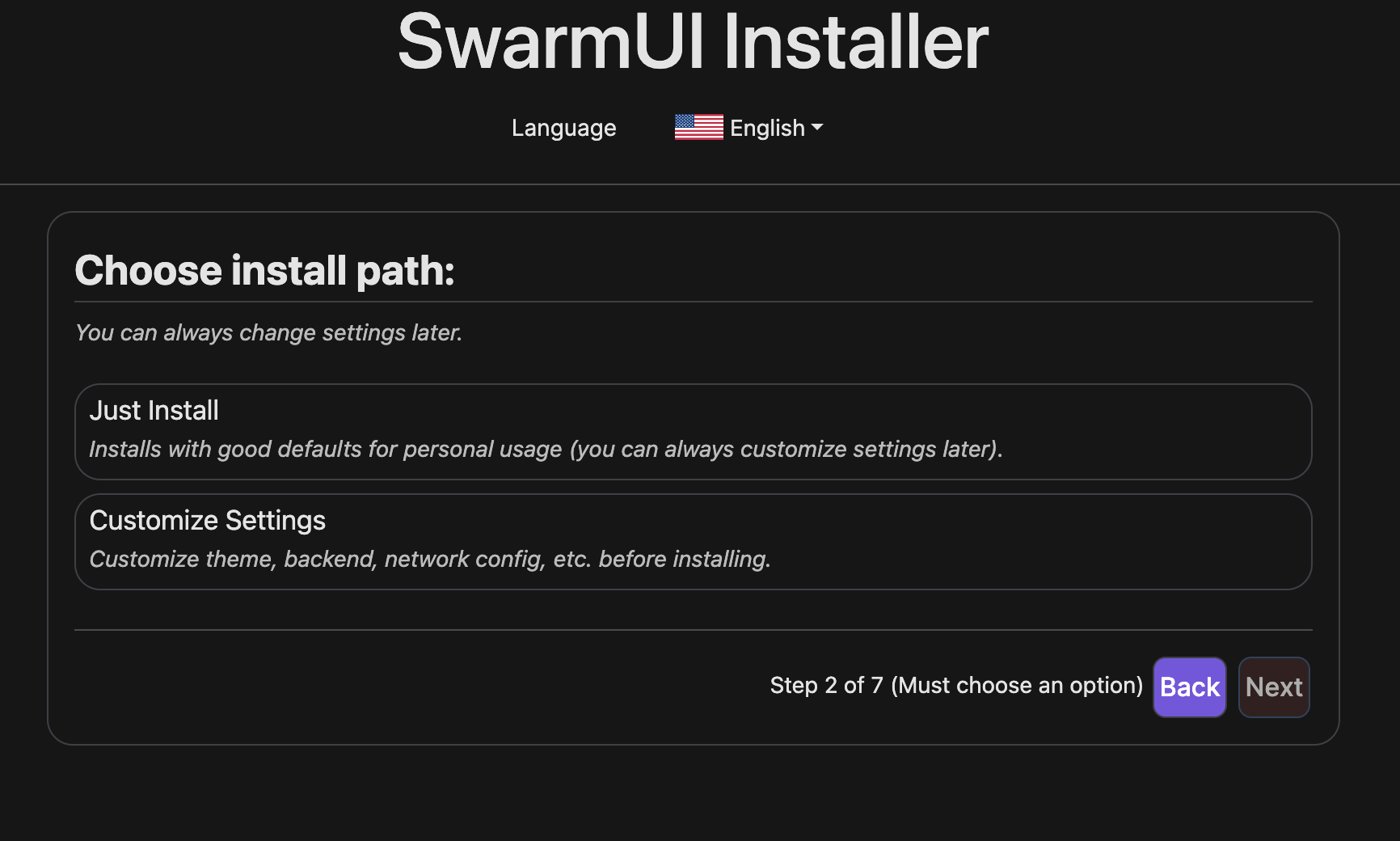
Installation is simple; once you start up the pod you just need to go through the configuration wizard on port 2254 and go through some initial setup tasks:
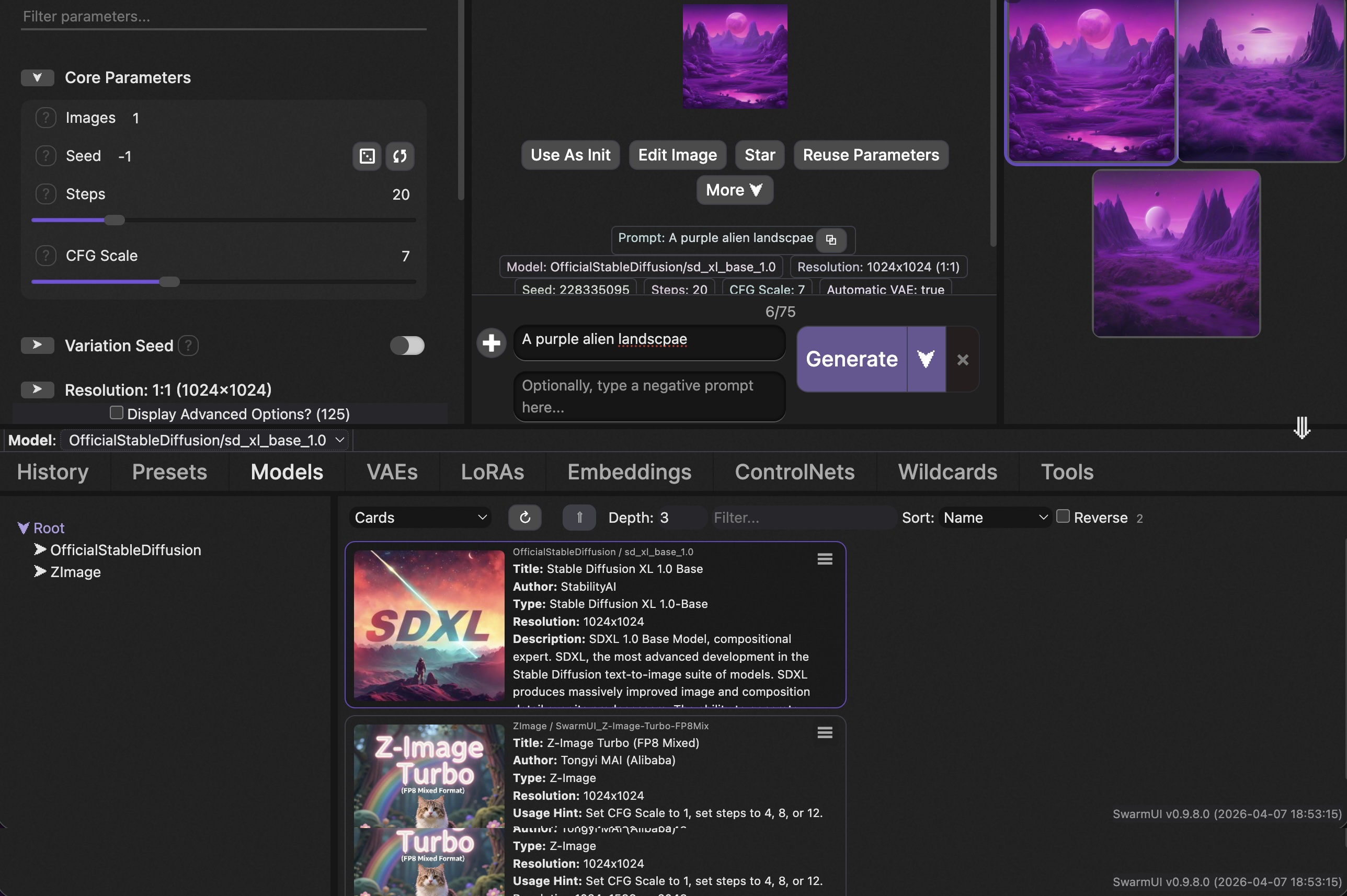
Once you go through the setup, you'll be presented with a UI where you can start your generations; simply enter your prompt and click Generate to get started.
If you generate AI images or videos and want a turnkey cloud setup, this template removes essentially all of the DevOps overhead. A few scenarios where it particularly shines:
Again, if this sounds compelling to you, check out the template here and you can be up and running with a pod in minutes.
This is exactly the kind of contribution that makes the Runpod ecosystem valuable: a community member identified real friction in a popular workflow, packaged a clean solution, and shared it so everyone benefits. Nerdylive actively supports the template and is responsive to questions on the Runpod Discord (tag: @nerdylive).
It's also a great example of Runpod's referral program in action: if you see a workflow gap that the community has, you can build and publish your own template, and for every dollar users spend on it, you earn a cut as credits with the potential for cash earnings. See the referral terms and conditions for details.
Questions about the template? Drop into the Runpod Discord and ask us directly.


Runpod community helper nerdylive built a template that packages SwarmUI, JupyterLab, and Syncthing into a single deployable pod, eliminating the typical setup overhead of running AI image and video generation on cloud GPUs.

SwarmUI is a modular, open-source web interface for AI image and video generation. It supports Stable Diffusion, SDXL, Flux, Wan video models, and more, all powered by a ComfyUI backend under the hood.
What makes it appealing is that it bridges two worlds: beginners get a clean, intuitive Generate tab where they can type a prompt and click a button, while advanced users can drop into a full ComfyUI node graph for unrestricted workflow control.
The problem is getting it running on a remote GPU. SwarmUI has a non-trivial install process involving .NET, Python environments, model downloads, and CUDA version alignment. On a fresh cloud instance, that setup can take anywhere from 20 minutes to an hour of troubleshooting, all of it billable.
Nerdylive's template handles the entire setup (including ComfyUI) automatically, so you go from "Deploy" to generating images in a single click. Here's what you get out of the box:
SwarmUI on port 2254: The main event. A fully configured SwarmUI instance with a ComfyUI backend, ready to load checkpoints and start generating. The template ships with CUDA 12.6 support, and the SwarmUI version is configurable via an environment variable, so you can pin to a specific release or upgrade without rebuilding the pod.
JupyterLab on port 7888: A full notebook environment for anything SwarmUI doesn't cover: custom Python scripts, model inspection, dataset prep, or just poking around the filesystem. This is especially useful if you want to run training scripts or debug workflows alongside your generation setup.
Syncthing on port 8384: This is the underrated gem. Syncthing is a peer-to-peer file synchronization tool that lets you sync folders between your local machine and your pod in real time, with all traffic encrypted via TLS. No S3 buckets, no scp commands, no runpodctl gymnastics for moving models and outputs back and forth. Install Syncthing on your laptop, pair it with the pod, and your model directory stays in sync automatically. Drop a new checkpoint into a local folder and it appears on the pod. Generate a batch of images on the pod and they show up on your desktop.
Multiple ComfyUI instance ports (7821, 7822, 7823…): SwarmUI can orchestrate multiple ComfyUI backends simultaneously, which is how it earned the "Swarm" in its name. If you're running a multi-GPU pod or want to parallelize generation across backends, additional ports are already exposed and ready. This addresses an exrtremely commonly cited pain point with ComfyUI is that it's not able to effectively use multiple GPUs for parallel processing
SSH on port 22: For users who prefer a terminal. Full SSH access is available via TCP for direct command-line work.The template also comes pre-loaded with a set of practical utilities: runpodctl for pod management, rsync and rclone for file transfers, cron for scheduled tasks, and pre/post start scripts in /workspace/ for custom boot-time automation
Installation is simple; once you start up the pod you just need to go through the configuration wizard on port 2254 and go through some initial setup tasks:
Once you go through the setup, you'll be presented with a UI where you can start your generations; simply enter your prompt and click Generate to get started.
If you generate AI images or videos and want a turnkey cloud setup, this template removes essentially all of the DevOps overhead. A few scenarios where it particularly shines:
Again, if this sounds compelling to you, check out the template here and you can be up and running with a pod in minutes.
This is exactly the kind of contribution that makes the Runpod ecosystem valuable: a community member identified real friction in a popular workflow, packaged a clean solution, and shared it so everyone benefits. Nerdylive actively supports the template and is responsive to questions on the Runpod Discord (tag: @nerdylive).
It's also a great example of Runpod's referral program in action: if you see a workflow gap that the community has, you can build and publish your own template, and for every dollar users spend on it, you earn a cut as credits with the potential for cash earnings. See the referral terms and conditions for details.
Questions about the template? Drop into the Runpod Discord and ask us directly.
The most cost-effective platform for building, training, and scaling machine learning models—ready when you are.




.webp)