Inkling 2 Mini: Thinking Machines' Open-Weights Agent Model, and How to Run It on Runpod
Run Inkling 2 Mini on Runpod with vLLM, SGLang, or llama.cpp. GPU needs from 24GB to 96GB, measured tokens per second, cost per token, and a working API call.
You can run Inkling 2 Mini, Thinking Machines' open-weights agent model, on one rented GPU for $0.72 to $2.69 an hour. We deployed all four of our Runpod templates for it and measured speed, cost per token, and context length. The fastest setup costs more than twice as much per token as the cheapest, and the cheapest template is set to a 120k-token context.
TL;DR (prices are Secure Cloud list rates as of November 24, 2026)
Cheapest per token: the vLLM 32GB template on an RTX PRO 4500 ($0.72/hr) generated a median of 106.8 tokens per second, about $1.87 per million tokens, with a 120k context.
Fast and affordable: the same template on an RTX 5090 ($1.39/hr) reached 169.3 tokens per second, about $2.28 per million tokens.
Fastest, with the longest context: the SGLang 96GB template on an RTX PRO 6000 ($2.69/hr) generated a median of 180 tokens per second, and 268 on code. The vLLM 96GB template on the same card took a 1,025,877-token prompt and found a code word buried in the middle.
Minimum GPU: a 24GB RTX 4090 ($0.89/hr) runs a 4-bit GGUF at about 70 tokens per second. The model card recommends 32GB or more for the original checkpoint.
Before you build: the model card warns that the model can overwrite or delete files without asking, and may not report its results accurately. Run agents in a sandbox, and require confirmation before destructive actions.
What is Inkling 2 Mini?
Thinking Machines Lab released Inkling 2 Mini on November 20 under Apache 2.0, with a separate Model Acceptable Use Policy. It's a sparse mixture-of-experts model with 26.4B parameters, 3.4B active per token, that takes text and images and returns text. Thinking Machines designed it for developers building agentic and tool-use applications.
It's also a looped transformer: the middle 12 of its 24 layers run three times per token with shared weights, which gives 5.4B effective active parameters per token without storing more weights. The checkpoint is about 20GB in mixed NVFP4 and MXFP8 precision, so it fits on one card. The announcement post has the details.
On the model card, Thinking Machines reports 79.2% on SWE-bench Verified (bash only), 79.0% on BrowseComp (with compaction), and 82.7% on MCP Atlas (Public). Qwen3.8-27B, which we covered earlier, scores 77.8% on SWE-bench Verified in the same table. These are the lab's numbers for the original weights, so run your own evals before you rely on the 4-bit GGUF.
The card also lists limits: weaker factual recall, lower quality outside English, less reliable instruction following, and occasional reasoning loops, especially when debugging code. It adds that support for looped models in local runtimes is new, so speed varies by runtime and hardware.
How to run Inkling 2 Mini on Runpod: pick a template
All four templates serve an OpenAI-compatible API, so the same client code works against each one.
Pick vLLM 32GB when cost matters, vLLM 96GB when you need the full window, and SGLang when you need speed. The SGLang template turns on speculative decoding and serves up to four requests at once. The llama.cpp template downloads a 17.6GB IQ4_NL GGUF plus the vision projector on first start and serves one request at a time, which suits a personal coding assistant or a demo.
Inkling 2 Mini GPU requirements and speed by card
We measured output speed with one request at a time. Prices are Secure Cloud list rates per hour as of November 24, 2026.
GPU
VRAM
Price
Template
Median tokens/s
Cost per 1M tokens
Measured
RTX PRO 6000
96GB
$2.69/hr
SGLang, native weights
180 (268 on code)
$4.15
Nov 21
RTX PRO 6000
96GB
$2.69/hr
vLLM, native weights
149.5
$5.00
Nov 24
RTX 5090
32GB
$1.39/hr
vLLM, native weights
169.3
$2.28
Nov 24
RTX PRO 4500
32GB
$0.72/hr
vLLM, native weights
106.8
$1.87
Nov 24
RTX PRO 4500
32GB
$0.72/hr
llama.cpp, 4-bit GGUF
72.5
$2.76
Nov 21
RTX 4090
24GB
$0.89/hr
llama.cpp, 4-bit GGUF
69.5
$3.56
Nov 21
Engine matters as much as the card. On the same RTX PRO 6000, SGLang's speculative decoding ran about 1.2 times as fast as vLLM on prose and 1.8 times as fast on code. On the same RTX PRO 4500, native weights on vLLM ran about 1.5 times as fast as the 4-bit GGUF on llama.cpp. The cost ranking holds on code alone: SGLang's 268 tokens per second works out to about $2.79 per million tokens, still above the RTX PRO 4500's $1.87.
Speed is tokens per second after the first token, streamed, counting reasoning tokens. Each figure is the median of 15 requests (5 prompts, 3 runs each), and 268 is the median of the code requests only. The November 24 tests used different prompts than November 21, with each template's published image and launch command. Re-running SGLang and the RTX 4090 gave 177.6 and 69.5, within 2% of the November 21 results.
Cost per million tokens is the hourly price divided by tokens generated per hour at the median speed. It assumes one request at a time and a Pod that's busy all hour, which a single user rarely is. SGLang accepts four requests at once, so test with your own traffic. Prices change, so check the pricing page and rerun the math.
Deploy Inkling 2 Mini on a Runpod Pod
Each template deploys a Pod, a GPU machine you rent by the hour. You need a Runpod account.
Open the template link from the table, choose a GPU it lists, and deploy. The RTX PRO 6000 price above is for the Server Edition.
Wait for the server to load. The first start pulls the container image, downloads the weights, and starts the engine. In our November 24 tests the vLLM and llama.cpp templates answered within about 13 minutes and SGLang took 21, mostly pulling its image. To check readiness, call GET https://<POD_ID>-<port>.proxy.runpod.net/v1/models. It returns 404 or 502 until the server is up, then 200.
Set an API key if anyone else can reach the Pod. The vLLM templates don't set one, so anyone with your Pod URL can use the server. The SGLang and llama.cpp templates read an optional API_KEY environment variable. Set it to a long random string before you deploy. On llama.cpp we confirmed that a request without the key returns 401 and a request with it returns 200.
Terminate the Pod when you're done. These templates keep the model on the container disk, which is erased when a Pod stops, so a stopped Pod downloads the weights again on restart. A volume disk, if you add one, keeps billing while the Pod is stopped.
Call the Inkling 2 Mini API
Each Pod gets a proxy URL. Replace <POD_ID> with your Pod's ID from the console. The port is 8000 for vLLM, 30000 for SGLang, and 8080 for llama.cpp.
curl https://<POD_ID>-8000.proxy.runpod.net/v1/chat/completions \
  -H "Content-Type: application/json" \
  -d '{
    "model": "thinkingmachines/Inkling-2-Mini",
    "messages": [
      {"role": "user", "content": "Write a Python function that merges two sorted lists."}
    ],
    "max_tokens": 2048
  }'
If you set an API key, add -H "Authorization: Bearer $API_KEY" to the request.
The response separates the model's reasoning from its answer, in a different field on each engine: message.reasoning on vLLM, and message.reasoning_content on SGLang and llama.cpp. Reasoning tokens count against max_tokens. In our vLLM test requests, roughly half the completion tokens were reasoning (280 of 545 in one, 449 of 997 in another), so leave room. If a request fails with a model error, GET /v1/models shows the name your server expects.
Requests through the Pod proxy time out after 100 seconds and fail with a 524 error. If a long agent turn hits that limit, add "stream": true to the request body so tokens start arriving before the timeout, and read the response as a stream. If you script the API with Python's built-in urllib, the proxy can reject its default User-Agent with error 1010. Use the OpenAI SDK, or set your own User-Agent header.
Because the model is multimodal, you can also send images. This example uses the OpenAI Python SDK:
import os
from openai import OpenAI

client = OpenAI(
    base_url="https://<POD_ID>-8000.proxy.runpod.net/v1",
    api_key=os.environ.get("API_KEY", "not-needed"),
)

response = client.chat.completions.create(
    model="thinkingmachines/Inkling-2-Mini",
    messages=[
        {
            "role": "user",
            "content": [
                {"type": "text", "text": "Describe this image in one sentence."},
                {"type": "image_url", "image_url": {"url": "https://example.com/photo.jpg"}},
            ],
        }
    ],
    max_tokens=1024,
)

print(response.choices[0].message.content)
Swap in your own image URL. The server downloads the image itself, so the URL has to be publicly reachable from the Pod, and some hosts block server-side requests.
Image input and tool calling both worked on all four templates in our tests. Tool calling used one get_weather function, and it also worked in our OpenCode runs on the SGLang template.
Tips for agentic use
Set limits on output tokens and agent turns, as the model card recommends. In two of our eight OpenCode runs, the comic and the Blender scene, one response spent its entire 32,768-token limit on reasoning and returned no answer. The agent recovered on the next turn both times.
The card also says to run agent workloads in a sandbox and require confirmation before destructive actions, because the model may delete or overwrite files without asking and may not report its results accurately. Our OpenCode runs executed on a laptop, with the Pod serving only the model, so that advice applies to wherever you run the agent harness.
What we built with it
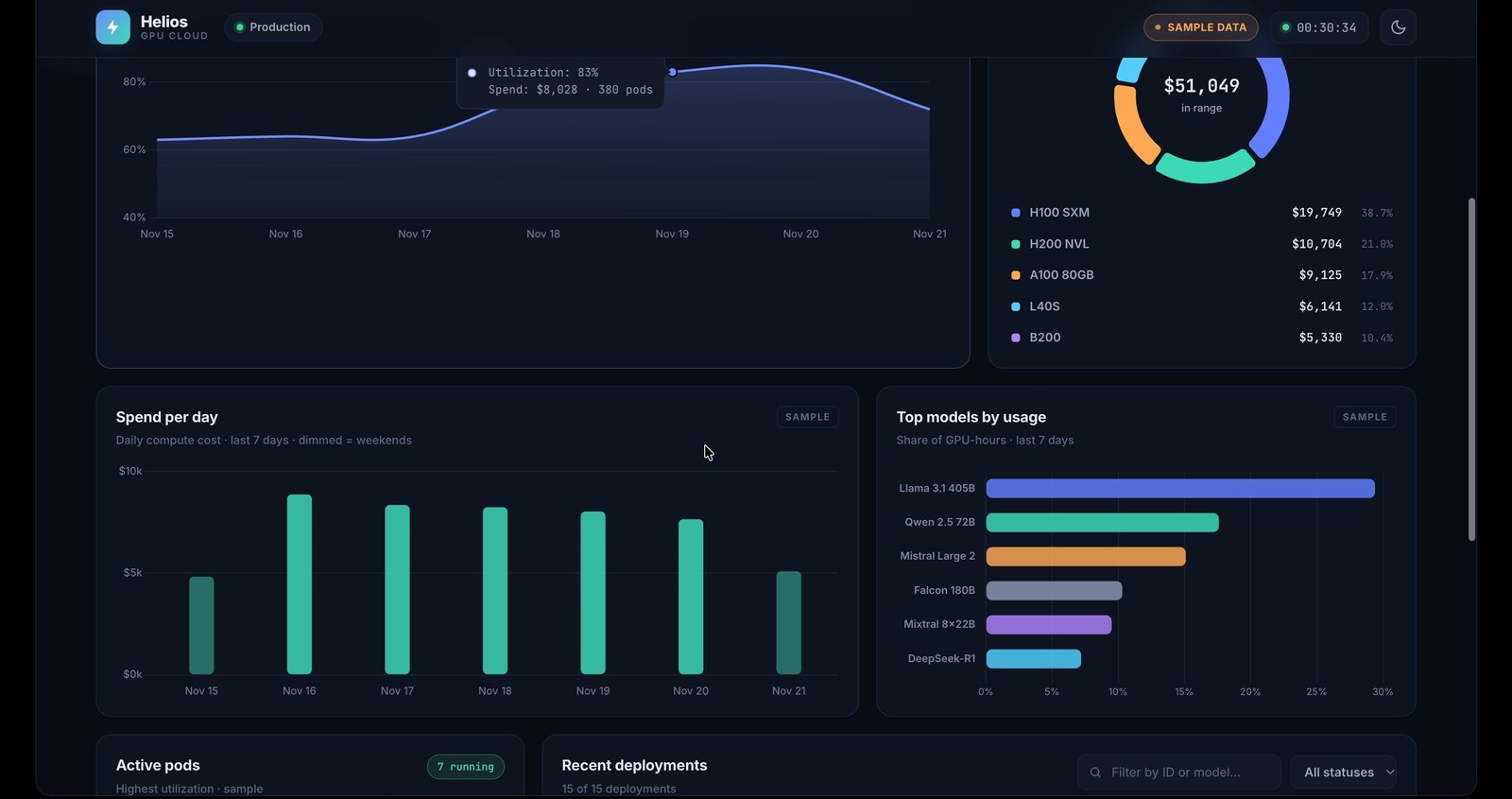
To see how Inkling 2 Mini handles real work, we gave it eight tasks through OpenCode, running against the SGLang template on one RTX PRO 6000. Each started from one prompt that described the result, told the model not to ask questions, and set a finish line. Here is the dashboard prompt in full:
Build a polished operations dashboard for a fictional GPU cloud platform, with active pods, GPU utilization, spend per day, top models by usage, a cost breakdown by GPU type, and a recent deployments table. Generate realistic mock data in the browser and label it as sample data. Make the charts interactive with tooltips, add date-range filtering, and support light and dark mode. Use plain HTML, CSS, and JS with a charting library from a CDN, and no backend. Do not ask me questions. Only stop when the dashboard is finished and open in my default browser.
Task
What it built
Minutes to finish
Dashboard
Helios GPU Cloud, a fictional fleet dashboard with charts, date filters, and light and dark mode
4.0
GPU picker
The Runpod GPU picker rebuilt from a screenshot, with search and a vRAM sort
4.5
Arcade game
Neon Drift, a canvas dodge game with a saved high score and synthesized sound
5.1
Landing page
Ember & Oak, a fictional coffee subscription site with a pricing toggle and an FAQ
6.0
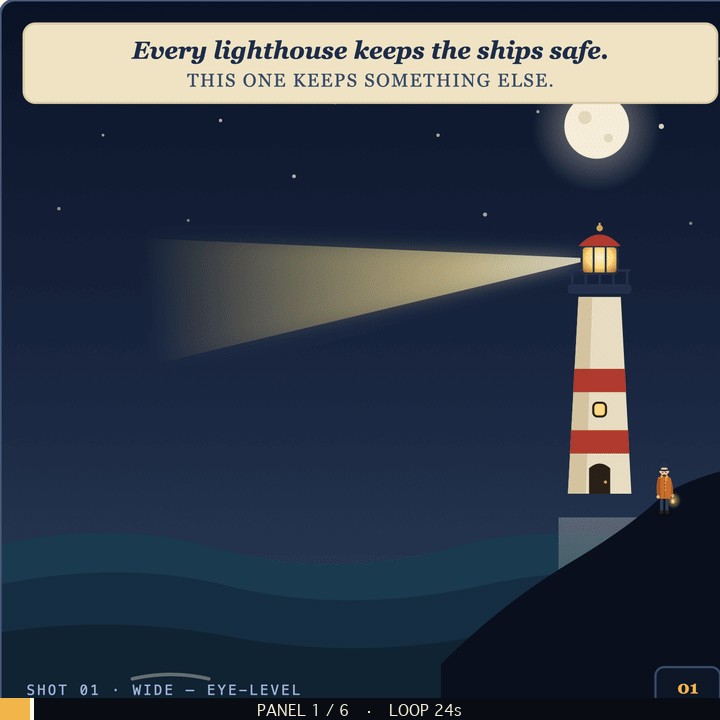
SVG comic
A six-panel lighthouse storyboard in one SVG, then a 24-second looping GIF
6.0 (12.6 with follow-ups)
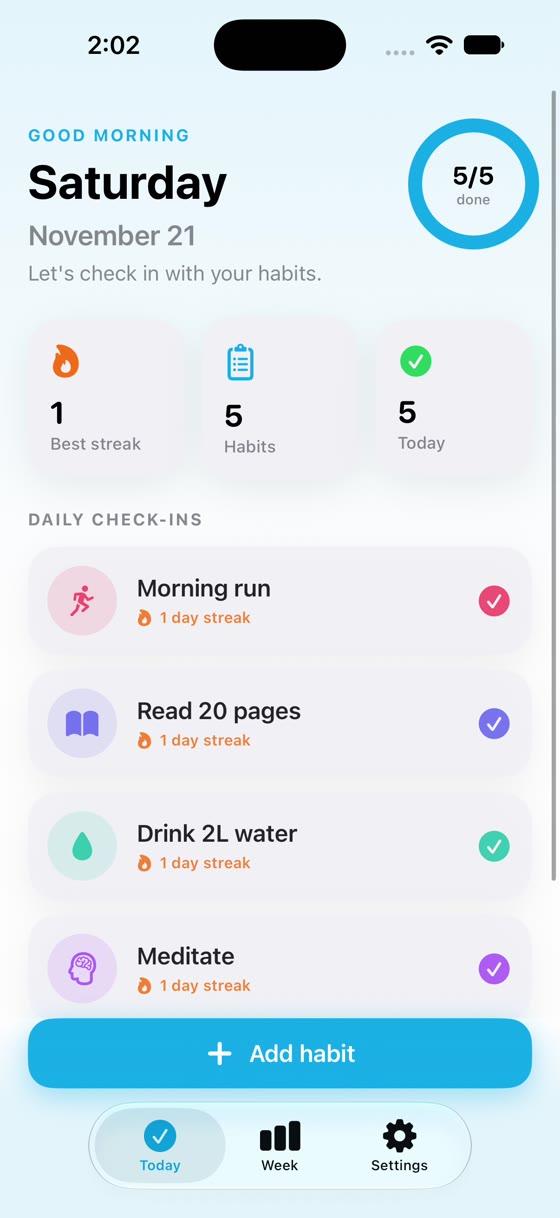
iOS app
A SwiftUI habit tracker, built with xcodebuild and launched in the Simulator
7.9
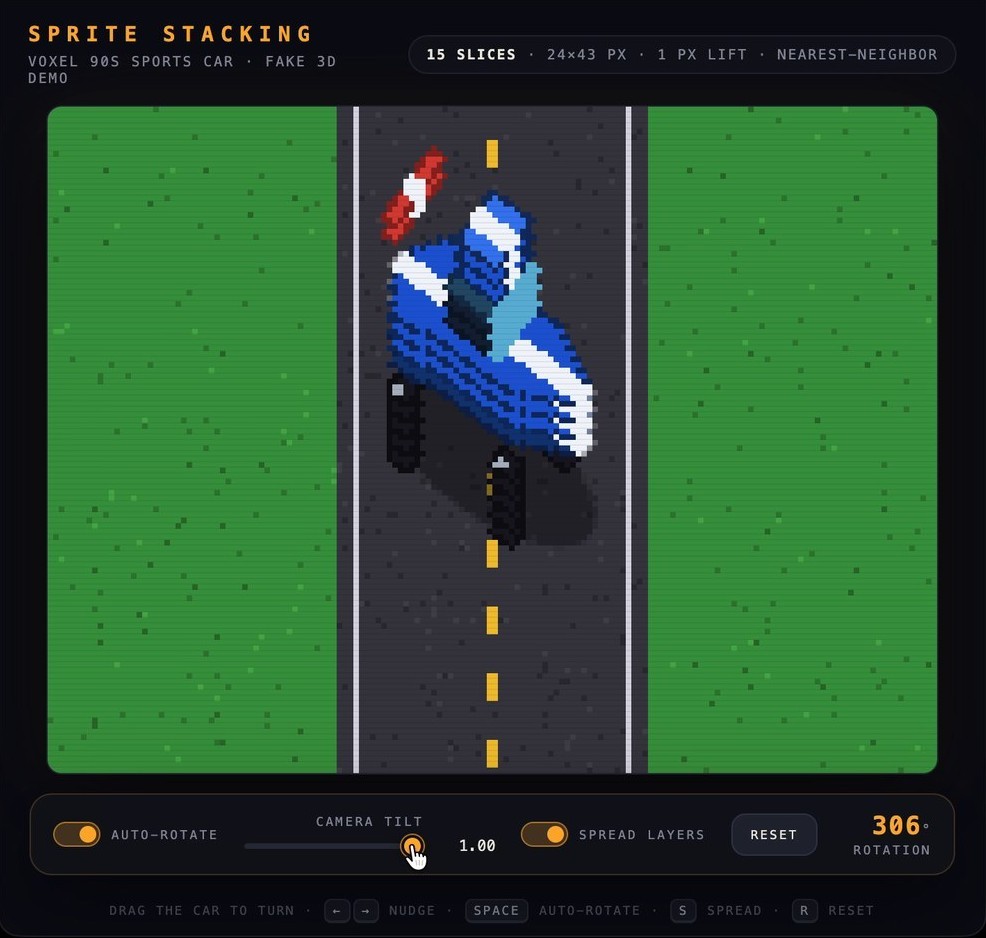
Sprite stacking
A pixel art car built from stacked slices that rotates as you drag
9.6
Blender previs
A 10-second preview of a courier chasing a drone, from primitive shapes
13.1
Seven of the eight finished in under ten minutes, measured from the prompt to the agent's finish. The agent's working time across all eight tasks was about an hour.
The dashboard has 7, 30, and 90-day ranges and labels all its data as sample data.
The iOS app has Today, Week, and Settings tabs, streaks, and a daily completion ring.
Sprite stacking fakes 3D by layering flat slices. The prompt specified a 24 by 43 pixel car about 15 layers tall and linked an article on the technique, which the model fetched before it wrote any code. It was a single shot with no follow-ups, and the toggle shown here spreads the layers apart.
The comic is one hand-written SVG with no raster images. In the GIF, the progress bar overlaps the bottom edge of the artwork slightly.
The weakest result was the screenshot recreation. In one try, judged by eye, it matched the layout and missed finer details.
Start building
Inkling 2 Mini suits self-contained builds like a page, an app, a script, or a scene, and it runs on hardware you can rent by the hour. Pick a larger model for work that leans on factual recall or non-English output.
To run it, pick a template from the table, check current rates on the pricing page, and deploy from the Runpod console. Tell us what you build in the #built-on-runpod channel in the Runpod Discord.