
Global Volumes are now in beta for Serverless endpoints
Attach a Global Volume to a Runpod Serverless endpoint and your workers start in any data center with your GPU types. Store model weights once, read anywhere.
All
 Skip to main content
Blog
Runpod Serverless now scores fallback GPU types so workers can land on compatible capacity when your first choice is contended.


If your Serverless workers stop starting whenever your first-choice GPU is contended, the fix is one setting. Configure your endpoint with multiple compatible GPU types in priority order, and the scheduler can place workers across all of them instead of queuing behind a saturated first choice.
We recently changed how Serverless picks a machine for your worker, and the change makes that setting work harder than it used to. The scheduler used to walk your GPU type list in order, exhausting every machine with your first choice before falling through to the second. Now it scores every type you listed in one pass. Placements evaluate roughly 47 machines instead of 38, and the share landing on a second- or third-choice type is up more than 6 percentage points.
During most demand spikes, availability is a scheduling problem, not a supply problem. When every H100 is contended, capable GPUs of other types are often idle a few racks away; what fails is the match between your worker and a GPU it can hold. If you picked the H100 because it is the best card rather than because your model needs 80 GB, your endpoint is over-specified. An endpoint that states what it will accept, rather than only what it would prefer, gives the scheduler what it needs to keep your workers running through a GPU shortage.
Serverless endpoints let you select up to 3 GPU types in priority order. If your first choice is unavailable, your workers fall back to the next type on your list. It is a preference statement: I prefer H100s, but I would also accept 4090s.
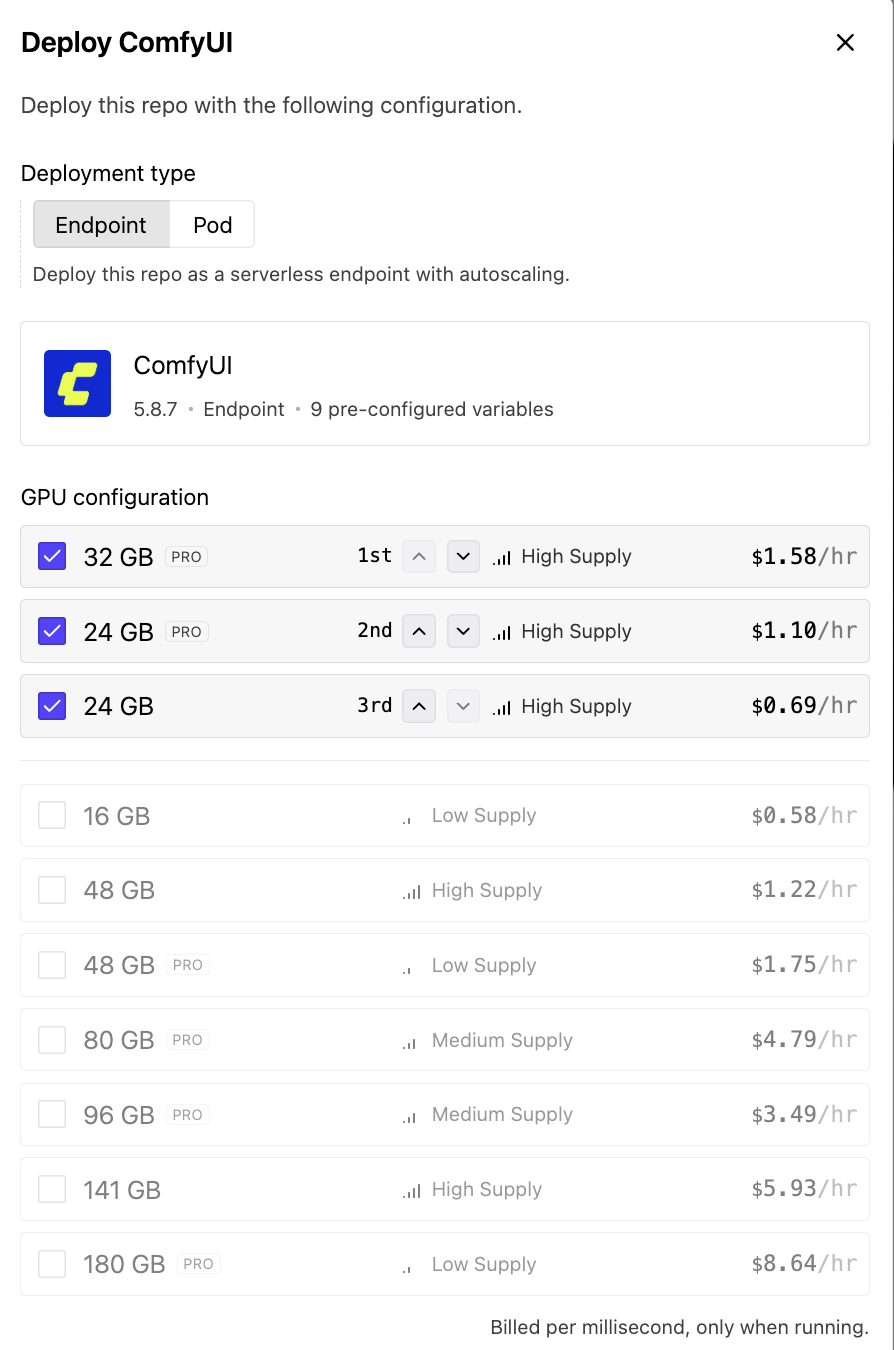
A GPU type on Runpod is a group of GPUs in the same video memory (VRAM) tier that the scheduler treats as interchangeable for placement. The 24 GB tier, for example, includes the A5000, the L4 and the RTX 3090. Interchangeable means your model fits and runs on any of them. Throughput still varies within a tier. When you select a type, you are telling the scheduler that any GPU in that group is acceptable, which is what gives it room to work during a supply crunch. Each additional type on your list widens the set of machines your workers can land on.
Those controls have existed for a while. What changed recently is how the scheduler uses them.
Reserving a GPU and starting a worker are two separate steps. Under contention there is almost always one free H100 somewhere in the fleet at any given moment. The old scheduler would find it and assign your worker to it. By the time the worker tried to start, someone else had already reserved that GPU, so the worker failed, the scheduler found the next free H100, and the same thing happened again. A strict "always pick my first choice" sort produces workers that chase individual free GPUs and keep losing.
Warm caches start workers fastest, so over time an endpoint's active machines gravitate toward the same small set of nodes. That concentration shrinks the effective pool the endpoint draws from, which makes the race for the remaining first-choice GPUs even tighter.
The fix came in two steps.
First, the scheduler widened the candidate pool. It now considers all of your acceptable GPU types together in a single evaluation instead of querying one type at a time and falling through on failure. This is where the jump in machines considered per placement comes from.
Second, GPU rank stopped being a hard sort key and became one input to a machine's overall quality score. Under the old behavior, every machine with your first-choice GPU beat every machine with your second choice, no matter how contended or otherwise poor the first-choice machine was. Under the new behavior, a great machine with your second-choice GPU beats a bad machine with your first choice. The scheduler weighs how likely the placement is to succeed and hold, in addition to how high the GPU sits on your list. The old scheduler asked whether any seat was left on your first-choice flight; the new one asks which flight gets you there on time.
We're leaving the scoring inputs, weights and thresholds out. The concept is what's important, and the tuning is specific to our fleet.
The metrics below measure the scheduler's behavior. Your endpoint's outcomes, queue time and worker starvation during contention respond more slowly, and we report where they stand below.
The table compares a 14-day window before the change (July 22 – August 5) with a 6-day window after the second phase rolled out (August 13 – August 20).
The rise in rank-2 and rank-3 placements is the point of the change. Each of those placements is a worker that would previously have been stuck racing for a contended first-choice GPU and is instead running on a compatible one. With enough data now collected, the positive effect on placement behavior is statistically significant.
Three caveats apply. This is a before-and-after comparison, not a controlled experiment, so the results are associative rather than causal. The two windows differ in length, which is why the table reports shares and per-placement averages rather than raw totals. Most importantly, the change shows up in placement behavior and not yet in worker starvation, which typically takes longer to respond than placement metrics do.
List every GPU type your workload can run on, in priority order. The scheduler can only widen the field you give it, and an endpoint configured with a single type gets none of this benefit. If you picked your GPU type by choosing the best card rather than by sizing your model, this is where you fix it.
In the console, select multiple GPU types when you create or edit the endpoint, ordered by preference. Advanced settings let you exclude specific GPU types if you need to.
In the Python SDK, gpu_ids is a comma-separated string, and its order is your fallback order. The GPU types reference in the Runpod docs maps each VRAM tier to its exact GPU type IDs, so you don't have to guess the strings:
import runpod

runpod.api_key = "YOUR_API_KEY"

endpoint = runpod.create_endpoint(
    name="my-inference-endpoint",
    template_id="your_template_id",
    gpu_ids="AMPERE_80,ADA_48_PRO,AMPERE_48",  # priority order = fallback order
    workers_max=5,
)
Your priority list drives two distinct behaviors, and knowing which one you are seeing makes your endpoint easier to reason about:
This example sets max workers to 5 on purpose, because that is the count where distribution activates. Endpoints with fewer than 5 workers still get fallback; their workers simply all run on the highest-priority type available at the time, with no deliberate spread.
Size your model to the VRAM floor of the list, not the ceiling. In the example above, the lowest tier on the list guarantees 48 GB, so the model and its working set must fit in 48 GB. Anything above that floor is headroom you can't plan on. If your model needs the full 80 GB, do not list 48 GB types as fallbacks, because a worker that lands there will fail for a different reason.
Your endpoint's billing history breaks usage out by GPU type, so it shows where your workers actually land. If your fallback types never show up there, your primary choice is keeping pace with your traffic and the priority list is costing you nothing.
The configuration advice above works best alongside a few related settings, all documented in the Serverless docs:
A single high-end GPU outperforms several lower-tier cards on most inference workloads, so a fallback request runs slower than one on your first choice. You're trading some performance predictability for the ability to keep serving when your first choice is saturated. Your worker count decides that price: below 5 workers, fallback types come into play only when supply forces the issue, while at 5 or more workers the distribution behavior deliberately keeps a minority of workers on secondary types as insurance. If steady-state throughput on your primary type matters more to you than spike resilience, let that distinction drive how many workers you run.
Each GPU type bills at its own per-second rate, so a worker that lands on a fallback type bills at that type's rate rather than your first choice's rate. The billing history view described above is where you verify what you actually paid. Rates change, so check the current numbers on the pricing page rather than planning around a figure you saw in a blog post.
Failover is one project among several in how Serverless allocates work. The next problem in line is quota-aware failover: an endpoint at quota on one GPU type could redeploy on another rather than waiting. We aren't promising timing.
Open your endpoint configuration and list every GPU type your model fits on, in priority order.
Runpod Serverless runs your container as an autoscaling endpoint that scales to zero and bills by the second.
Blog Posts

.jpeg)