This post shows how to deploy a full Stable Diffusion UI using a community-created template on Runpod. With just a few clicks, you can generate.
We've been hearing that a lot of people have been having trouble getting stable diffusion to work on cloud compute platforms. We now have a simple template that will let you get started with minimal fuss!
If you need to know the basics of how to start a pod, you can check out this guide for starting a Disco Diffusion pod. All you need to change is to run the Stable Diffusion template rather than the Disco Diffusion one. The official Runpod updated template is the one that has the Runpod logo on it!
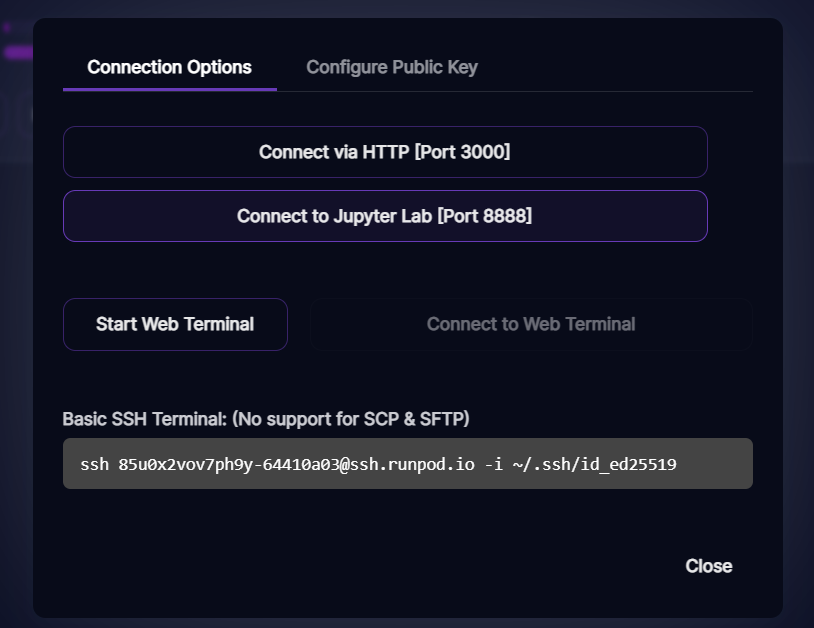
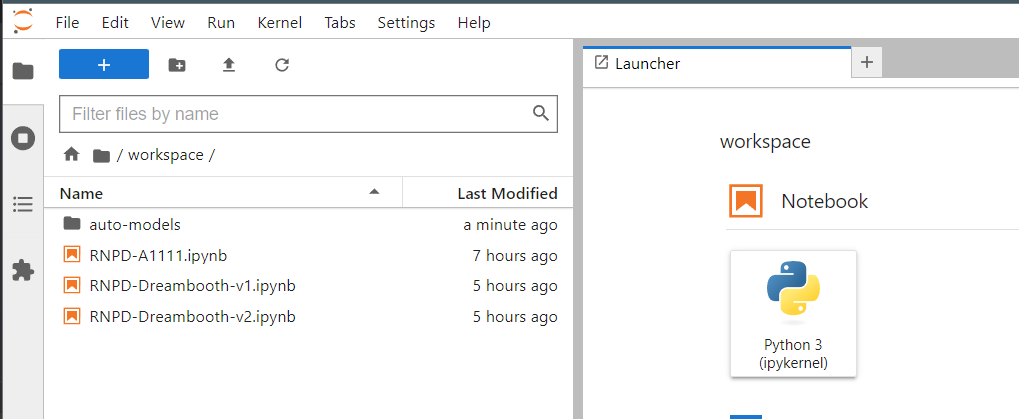
This template was created for us by the awesome TheLastBen. In order to get started with it, you must connect to Jupyter Lab and then choose the corresponding notebook for what you want to do.
Choose RNPD-A1111 if you just want to run the A1111 UI. Choose one of the DreamBooth notebooks if you'd like to train your own model!
Ben has added tons of goodies for us such as an easy ControlNet installer, offset_noise for DreamBooth, tight integrations with HuggingFace, and much more!
Give it a shot today and let us know what you think.
Check out some of the wonderful guides our users have created for us:
Note: These videos may show a different template in use!
What's new in Runpod Serverless: Faster cold starts, batch inference, and no-Docker deploys
Whether you're already running production endpoints on Runpod or you're sizing us up for the first time, here's a plain-language tour of what Runpod Serverless does today, why it's faster and cheaper than it was six months ago, and how to deploy your first endpoint in minutes.
Beyond the Notebook: The Engineering Realities of Production AI Agents
Shift from stateless inference to stateful architectures to resolve infrastructure bottlenecks like memory management, concurrency limits, and runaway jobs in production AI agents.



.jpeg)