
You finish training your model on an A100, evals pass, checkpoint saved. The natural next step is to serve it on the same A100, because that’s the hardware you know and it just worked. But AI inference and training are structurally different workloads with structurally different cost profiles, and treating them the same quietly drains your infrastructure budget.
Three weeks into production, that A100 idles at 3% utilization between requests while still missing p99 latency targets, because cold starts eat your response budget. The Stanford HAI 2025 AI Index puts the broader trend in perspective: inference costs for GPT-3.5-level systems dropped approximately 280x between November 2022 and October 2024, driven by hardware and software optimization specific to inference workloads. Teams that serve on training-tier hardware capture none of that gain, and pay continuously for capacity they don’t use.
This guide breaks down how to size GPUs for each workload, when burst billing beats always-on capacity, and which optimizations actually move the needle in production.
Training vs. Inference: Two Different Hardware Contracts
Training and inference impose different requirements because they work in opposite directions. Training runs repeated forward and backward passes over a full dataset, sometimes for days. The GPU must sustain peak FLOP throughput across the entire run, and VRAM must simultaneously hold model parameters, gradients, Adam optimizer states, and intermediate activations. You measure success by training loss over time and FLOP utilization.
Inference runs a single forward pass per request. The GPU must minimize time-to-first-token and sustain tokens-per-second across concurrent requests. VRAM holds model weights and active KV cache entries. You measure success by p50/p99 latency, tokens/sec per GPU, and cost per token (often expressed as cost per thousand or per million tokens in API contexts).
These optimization targets diverge sharply at scale. A training run wants the GPU saturated continuously. A production inference endpoint deals with bursty traffic, variable request lengths, and idle periods between user sessions. High-VRAM cards optimized for maximum batch throughput often generate significant idle-time spend when serving real traffic on reserved or dedicated instances, because the billing runs whether requests arrive or not.
VRAM Math: Sizing GPUs Before You Rent Anything
The VRAM delta between training and inference is larger than most teams expect, and it’s where incorrect GPU selection creates real financial consequences.
For training in bf16/fp16 with Adam, you need approximately 2 bytes per parameter for weights, 2 bytes for gradients, and 8 bytes for optimizer states (Adam maintains first and second moment estimates at fp32, so 4 bytes each). That totals 12 bytes per parameter minimum. Llama 3.1 8B Instruct requires roughly 96 GB just for weights, gradients, and optimizer states. Activation memory then adds tens of gigabytes on top. As a rough guide, at batch size 4 and sequence length 2048, an 8B model accumulates around 35 GB of activations; doubling either the batch size or sequence length roughly doubles that figure, before gradient checkpointing enters the picture. Without gradient checkpointing, an 8B model in training exceeds the capacity of any single current GPU, including the A100 80GB. Gradient checkpointing reduces activation memory by discarding intermediate activations during the forward pass and recomputing them on demand during the backward pass, trading roughly 20-30% of throughput for a proportional memory reduction that makes smaller models fit on a single card.
For inference, Runpod’s documented sizing rule is approximately 2 GB of VRAM per billion parameters at fp16. That covers weights only. The remaining VRAM budget must account for the KV cache explicitly, because that cache grows with context length and concurrent request volume.
Scaling that accounting from 8B to 70B is where the training-versus-inference gap becomes a tier change. Working through Llama 3 70B Instruct concretely:
- Training at bf16 with Adam: 70B parameters x 12 bytes = 840 GB minimum for weights, gradients, and optimizer states, with activation memory on top. This requires a multi-node setup with tensor parallelism even at 80GB per card.
- Inference at fp16: 70B x 2 GB = 140 GB, requiring two A100 80GBs or an equivalent multi-GPU configuration.
- Inference at 4-bit quantization: The theoretical floor is 70B x 0.5 GB = 35 GB. In practice, quantization metadata, buffers, and KV cache overhead push actual consumption to 40-45 GB. A single L40S at 48GB covers this configuration with limited headroom for KV cache.
The roughly 95-100 GB delta between training and quantized inference VRAM requirements on the same model maps directly to a GPU tier change and the corresponding cost-per-hour difference.
GPU Selection: Matching Hardware to Workload
Training workloads on Runpod map to the A100 and H100. The A100 (80GB) delivers 312 TFLOPs of bf16/fp16 performance via sparse tensor cores and connects to other cards via NVLink for multi-GPU synchronization. For Llama 3.1 70B, Llama 3.3 70B, Mixtral 8x22B, and Falcon 180B at full precision, multi-GPU A100 Pod configurations are the standard baseline. The H100 (80GB) adds FP8 training support and faster attention kernels for transformer-heavy workloads. If your training framework exposes FP8, the H100 tier warrants evaluation.
Translated into picks: a single A100 80GB runs LoRA fine-tunes of Llama 3.1 8B (QLoRA reaches 13B-class), a 4xA100 80GB NVLink Pod handles full-parameter Llama 3.1 70B at bf16, and an 8xH100 SXM cluster with FP8 sits at the Llama 3.1 405B class.
Inference workloads use a different GPU set, optimized for memory bandwidth rather than peak FLOPs. During inference, the GPU repeatedly loads model weights from VRAM into compute units on each forward pass, so transfer speed determines actual throughput more than tensor core multiply rates. The L40S (48GB) is a cost-efficient inference option on Runpod for both language and vision workloads, fitting a 4-bit quantized 70B model with limited KV cache margin. At roughly 864 GB/s of memory bandwidth versus the A100 80GB’s roughly 2 TB/s, the L40S still often beats the A100 on cost-per-token at moderate batch sizes thanks to FP8 compute and a lower per-hour rate. The RTX 4090 at 24GB covers smaller LLMs and prototyping but as a consumer-grade card lacks ECC memory error correction, which matters for long-running production where silent memory errors can degrade inference output.
Mapped to specific models: an RTX 4090 serves Llama 3.1 8B at fp16 or 13B-class at INT4, an L40S serves Llama 3 70B or Llama 3.3 70B at INT4 (around 42 GB) with tight KV cache margin, two A100 80GB give Llama 3 70B at fp16 comfortable headroom, and an H100 80GB fits DeepSeek-R1 reasoning or 70B-class FP8 serving with faster attention.
Cost Profiles: Burst Spend vs. Continuous Spend
Training cost is burst-oriented. You need uninterrupted GPU access for the job duration (fine-tuning can take hours to days depending on model size and dataset, pretraining typically runs for weeks), then the compute terminates. Runpod Pods bill per second with no minimum commitment. You spin up a 4xA100 Pod, run the job, and terminate.
Inference cost compounds with traffic volume and persists indefinitely. Every production endpoint carries a continuous compute cost that scales with request rate and concurrency. Getting the worker configuration wrong (over-provisioning always-on capacity or under-provisioning and hitting cold-start latency penalties) becomes expensive at scale.
Runpod Serverless offers two worker modes to match these patterns. Flex workers scale to zero when idle and bill only during active processing. They’re the right choice when traffic is bursty or unpredictable and some cold-start latency is acceptable. Active workers stay on continuously and run approximately 20-30% cheaper per compute-hour than Flex workers, because the scheduler packs them more efficiently. That per-hour saving only reduces total cost when utilization is consistently high; at low or bursty utilization, Flex workers cost less overall because idle time generates no charge. Active workers eliminate cold starts and make sense when traffic is steady and latency SLAs are tight.
FlashBoot changes the Flex worker economics. FlashBoot caches container images and pre-initializes GPU contexts to reduce cold starts significantly (Runpod’s announcement cites a lowest measured cold start of 563ms, with 95% of cold starts under 2.3 seconds). Model weight loading time is separate: weights fetched from a container registry on first init add seconds to minutes depending on model size, while weights pre-loaded to a Network Volume are available immediately after container boot. Runpod reports this cuts cold-start-related costs by over 70% for affected endpoints. With reduced cold starts via FlashBoot, Flex workers become viable for a broader range of latency-sensitive endpoints that previously required always-on capacity, shifting idle-time compute cost back to true pay-per-use billing.
Egress fees also factor into total cost comparisons. Pipelines that move large embedding batches or model outputs back to application layers can generate substantial data transfer fees on providers that charge for outbound traffic. Runpod charges no egress fees, which compounds positively at the continuous inference spend volumes described above.
Reducing the per-request compute cost, independent of billing model, requires optimization at the model and serving layer.
Inference Optimization: Techniques That Move the Needle in Production
Quantization is an inference-time decision applied to a checkpoint after training completes. You quantize the saved weights before deployment; the training run itself stays at full precision. Applying FP8 on H100 hardware delivers approximately 2x throughput and memory efficiency over fp16 on the same GPU; comparing H100 FP8 against A100 FP16 can show up to 4x gains, though this reflects a cross-generation comparison. The gain is not quality-neutral: accuracy degradation varies by model and task, and quantization should be validated against your evaluation benchmarks before production deployment. As shown in the Llama 3 70B example, 4-bit quantization compresses VRAM requirements from 140 GB to roughly 40-45 GB in practice, dropping the required hardware tier from a two-A100 configuration to a single L40S. Smaller weights free up VRAM headroom, but turning that headroom into throughput depends on how requests are batched.
Continuous batching with vLLM is the standard answer to variable-length LLM outputs. Static batching allocates a fixed slot per request and holds the entire batch until every request completes before processing the next one. Long requests block short ones, and GPU compute units sit idle waiting for stragglers. Kwon et al. (2023) demonstrated throughput improvements of up to 23x over naive HuggingFace Transformers serving using PagedAttention and continuous batching, with 2-4x improvements over optimized baselines like FasterTransformer. The actual multiplier varies considerably with baseline and workload characteristics. In production, continuous batching fills completed slots immediately with new requests, keeping GPU utilization high across variable-length outputs. That handles utilization across requests; KV caching addresses the redundant work within them.
KV caching reuses attention key-value states when prompts repeat across turns. When system prompts, few-shot examples, or conversation history recur (which is most production traffic), a static serving setup recomputes attention for those tokens on every request. KV caching stores the key-value pairs from prior turns and retrieves them on subsequent requests, avoiding that recomputation. The throughput benefit scales directly with the repetition rate across your request stream. One constraint to plan for: KV cache size grows with context length, and you must account for that growth alongside model weights in your VRAM budget. A model that fits within your VRAM budget at minimal context can exceed that budget under concurrent long-context requests as the KV cache expands. Quantization, batching, and caching all assume one user request equals one forward pass. Reasoning workloads break that assumption.
Test-time compute is the term for that break. If your workload uses chain-of-thought prompting, best-of-N sampling, or multi-step reasoning (DeepSeek R1, o3-style architectures), the compute budget per request can approach training-job scale. Best-of-N sampling generates N independent completions for each user request, then scores them with a reward model or verifier and returns the highest-ranked response. Generating 16 candidates multiplies GPU time by 16x per user request, and the reward model adds another inference pass on top. GPU sizing and billing model selection for that workload class requires sustained occupancy planning that more closely resembles batch job scheduling than standard real-time inference capacity planning, with response time expectations added as a constraint.
Putting these techniques into practice requires a deployment architecture that surfaces each one.
Deployment Patterns: Training and Inference Workflows on Runpod
The training path on Runpod is direct. You select a Pod GPU (A100 or H100), choose a pre-built container with PyTorch and CUDA already installed, configure multi-GPU via NVLink for models that exceed single-card VRAM limits, and the Pod bills per second from launch through termination.
The inference path requires a few more steps:
Write a handler function using the runpod SDK that processes the event input object and returns a structured response. The minimal structure is:
- The
job["input"] dictcontains whatever payload you POST to the endpoint. The return value must be JSON-serializable; wrap errors in{"error": message}rather than raising exceptions. - Containerize the handler with your model weights via a Dockerfile and push the image to Docker Hub.
- Create the endpoint from the Runpod console: navigate to the Serverless section and click “New Endpoint.” Enter your Docker image URL and set the endpoint name.
- Select your GPU type. L40S is a strong default for mid-size LLM inference; larger models may require A100 or H100.
- Configure scaling. Choose worker type (Flex or Active), enable FlashBoot, and set idle timeout.
- Deploy and validate. Click “Deploy Endpoint,” then use the Runpod console’s built-in testing interface to validate endpoint latency before you commit to Active worker capacity.
The Runpod Python SDK (pip install runpod) also lets you define a Python handler function and deploy it directly as an auto-scaling endpoint, skipping explicit container builds. The SDK handles containerization and scaling configuration, making handler iteration faster during early-stage endpoint development. Runpod Flash extends this with a decorator pattern for even faster prototyping.
Cold start mitigation at scale uses Runpod Network Volumes. A Network Volume, priced at $0.07/GB/month per Runpod’s current pricing at runpod.io/pricing, mounts simultaneously across worker replicas. The model weights download once to the volume on first initialization and remain available to all subsequent workers without re-fetching from the container registry. For a 70B model at 4-bit quantization (roughly 40-45 GB depending on quantization format), that weight caching eliminates the download latency on every worker initialization after the first.
Matching a checkpoint to the right GPU tier follows VRAM budget as the primary branching variable, with worker mode and latency validation as the final steps before capacity commitment.
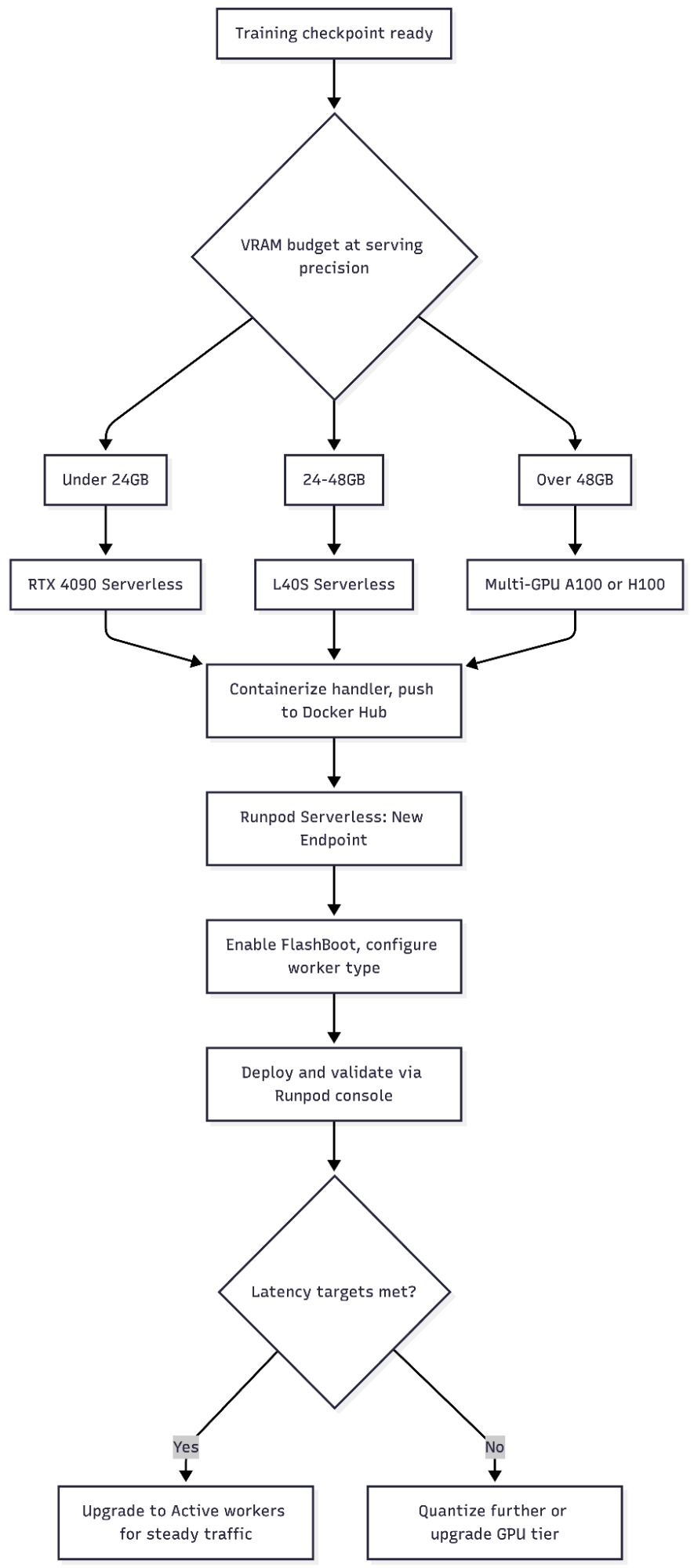
Configuration Selection: A Decision Framework for GPU and Billing Mode
The right configuration depends on workload type, model size, traffic pattern, and latency requirement. The matrix below maps these to concrete hardware and billing choices.
| Workload | Recommended GPU | Deployment Mode | Billing Model | Primary Optimization |
|---|---|---|---|---|
| Initial training (7B–14B) | A100 40GB | Pod (single) | Per-second (Runpod) | Gradient checkpointing |
| Initial training (22B–70B+) | A100 80GB x4+ NVLink | Pod (multi-GPU) | Per-second | Tensor parallelism |
| Fine-tuning (7B–14B) | A100 40GB or RTX 4090 | Pod | Per-second | LoRA / QLoRA (reduce trainable parameters and VRAM by 60–80%, making RTX 4090 viable for 7B–14B fine-tunes that would otherwise require an A100) |
| Real-time inference (7B–14B) | RTX 4090 or L40S | Serverless Flex + FlashBoot (Runpod) | Per-active-second | vLLM continuous batching |
| Real-time inference (70B+) | L40S (quantized) or A100 80GB | Serverless Active (Runpod) | Always-on | AWQ-INT4 + paged KV cache |
| Batch inference | A100 or L40S | Pod (Runpod) | Per-second | High batch size |
| Reasoning models (CoT / best-of-N) | A100 80GB or H100 | Serverless Active (Runpod) | Always-on | Per-request compute budget cap (a maximum output token limit per request that prevents unbounded chain-of-thought generation from consuming disproportionate GPU time) |
The fast calculation for any new model: take the parameter count in billions, multiply by 2 GB for fp16 serving or by 0.5 GB for 4-bit quantized serving, then add 20% headroom for KV cache. For Llama 3.1 8B at fp16, that’s 8 x 2 = 16 GB plus 3.2 GB headroom, totaling 19.2 GB, which fits on an RTX 4090 with margin. For Llama 3 70B at 4-bit, that’s 70 x 0.5 = 35 GB plus headroom, fitting on a single L40S as covered earlier.
Default to Flex workers with FlashBoot for new endpoints; the cold-start window FlashBoot delivers is acceptable for most p99 budgets. Promote to Active workers only after measured traffic confirms the per-hour discount will outweigh idle billing.
FAQ: GPU Selection and Billing for Training and Inference
What is the difference between AI inference and training GPU requirements?
Training GPUs must sustain continuous peak FLOP throughput and hold weights, gradients, and optimizer states in VRAM simultaneously (roughly 12 bytes per parameter at bf16/fp16 with Adam). Inference GPUs must minimize latency per forward pass and maximize tokens/sec, with VRAM holding only weights and the active KV cache (roughly 2 GB per billion parameters at fp16, or 0.5 GB at 4-bit quantization).
Which GPU is best for LLM inference on Runpod?
As covered in the GPU Selection section, the L40S (48GB) fits most production LLM inference scenarios. It handles a 4-bit quantized 70B model with limited KV cache margin, handles multimodal workloads, and can deliver competitive cost-per-token at moderate batch sizes compared to A100s. For smaller models (7B-14B) or prototyping, the RTX 4090 at 24GB is often more cost-efficient, though pricing varies across cloud providers.
When should I use Flex workers vs. Active workers on Runpod Serverless?
For bursty or unpredictable traffic where FlashBoot’s cold-start range is acceptable, start with Flex workers. Switch to Active workers (20-30% cheaper per compute-hour) once steady traffic justifies always-on capacity. See the Cost Profiles section for the full tradeoff analysis.
With the decision framework and FAQ in hand, the loop closes back to the scenario the article opened with.
Return to the A100 idling at 3% utilization between requests. The fix was never about the GPU itself; that A100 was right for training and wrong only because nothing in the path from checkpoint to endpoint forced a re-evaluation when the workload changed. Training infrastructure becomes a stable, solved configuration once you’ve matched VRAM budget to model size and selected the right multi-GPU setup. You run the job and terminate. Inference is where the ongoing engineering work accumulates: quantization decisions, batching strategy, KV cache sizing, worker mode selection, and cold start management all compound over time and at every traffic scale transition. Getting the architecture right before you commit to GPU type and billing model significantly affects whether your production system stays cost-predictable or generates surprises at billing time.
Deploy your first inference endpoint, no reserved capacity required. Start on Runpod


