
Most LLM serving infrastructure treats each request as independent. Your application sends a prompt, the server computes every token from scratch, returns a response, and forgets. That works for single-turn chat. It falls apart when your pipeline chains multiple LLM calls that share context, because the server recomputes the same key-value activations for the same shared prefix on every call, discarding GPU work that could have been reused.
SGLang is an open-source serving framework built around a different assumption: that LLM workloads have exploitable structure. Its runtime caches KV activations across requests using a radix tree (RadixAttention), enforces output schemas at the token level during generation (XGrammar), and exposes a Python API for writing multi-step workflows with branching and parallelism. This article walks through each of these capabilities with working code, covers deployment from a single GPU to multi-node tensor parallelism, and ends with a benchmark you can run in under an hour to measure the throughput difference on your own workload.
The problem with chaining LLM calls over HTTP
A standard multi-step LLM pipeline fires three sequential POST requests to /v1/completions, each one carrying the same 2,000-token system prompt and few-shot examples in the request body.
Each call triggers a full prefill pass over every token before the first generated token. On an H100, that costs roughly 30-50ms per request for an 8B model under low load, and climbs above 200ms at 70B. Multiply by two pipeline steps and 100 concurrent users, and you’re burning tens of thousands of GPU-seconds per hour on compute that produces zero new tokens.
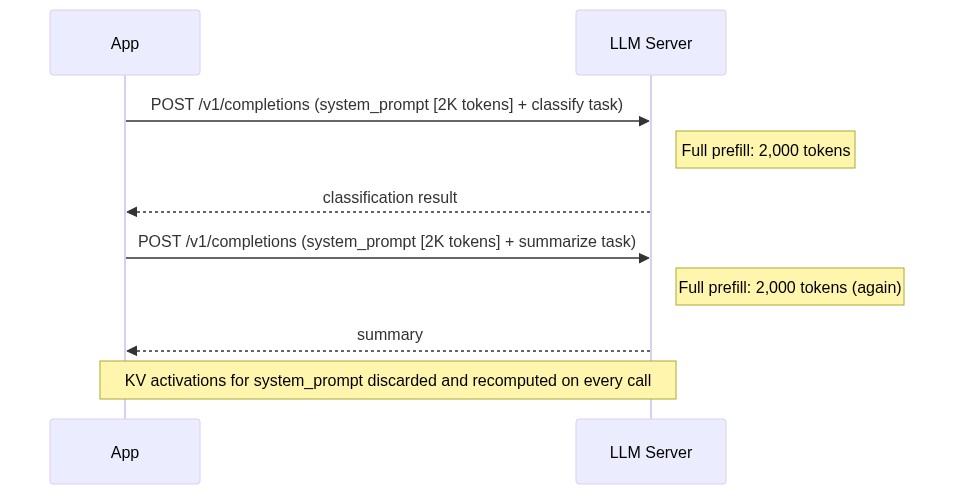
At high concurrency this compounds fast. If you’re running 50 concurrent document pipelines with two HTTP calls each, you’re paying for 100 full prefill passes over the same 2,000-token context per batch. The throughput ceiling you’re hitting has nothing to do with generation speed.
SGLang eliminates this redundancy by treating your multi-step workflow as a first-class program.
SGLang’s programming model: @sgl.function, gen(), fork(), and select()
SGLang’s core abstraction is the @sgl.function decorator combined with the state object s. When you decorate a Python function with @sgl.function, SGLang compiles the decorated function into an intermediate representation (IR), a computational graph the runtime executes. The s object accumulates tokens across generation calls within a single workflow execution, and SGLang tracks the token sequence to determine which KV cache entries are shareable across concurrent requests.
The document triage agent from the naive example above, rewritten as an @sgl.function:
Because both the “report” and “contract” branches share the same system prompt prefix, SGLang’s RadixAttention layer caches that prefix’s KV entries once and reuses them across all requests following the same prefix path. The Python if statement controls execution flow, but the runtime controls KV memory allocation. You get branching logic and cache reuse without writing any cache management code.
fork() extends the model to parallel generation. When you need both a summary and entity extraction for every document, fork the state after the shared prefix, execute both branches concurrently, and join:
Both branches run in parallel and share the KV cache for the system prompt and document prefix. The wall-clock time for parallel_analysis is approximately equal to whichever branch takes longer, not the sum of both. After s.join(fork_states), named generation variables from each fork remain accessible on the returned state object. state["summary"] and state["entities"] resolve to the outputs of their respective branches.
select() handles constrained discrete choices where you want the model to pick from a fixed option set. The runtime scores each candidate string and returns the highest-probability one, which is faster and more reliable than generating free text and then parsing it:
SGLang also exposes a standard OpenAI-compatible server endpoint at /v1/chat/completions. The @sgl.function programming model is worth adopting when your workflow has branching, parallelism, or multi-step logic where shared state and cache reuse matter. Single-turn inference requests work fine against the REST endpoint without any workflow wrapping.
The architectural differentiator is that SGLang exposes your workflow’s structure to the runtime. When the runtime knows which token sequences are shared across requests, it can make scheduling and memory decisions that no amount of client-side optimization can replicate.
RadixAttention: how to design workflows that maximize KV cache reuse
RadixAttention stores KV cache entries in a radix tree where each node represents a sequence of tokens. When a new request arrives, the runtime walks the tree from the root, matching the request’s prompt tokens against existing nodes. Every matched node means the KV activations for that token sequence already live in GPU memory and require zero additional prefill compute. Only the unmatched suffix triggers new computation.
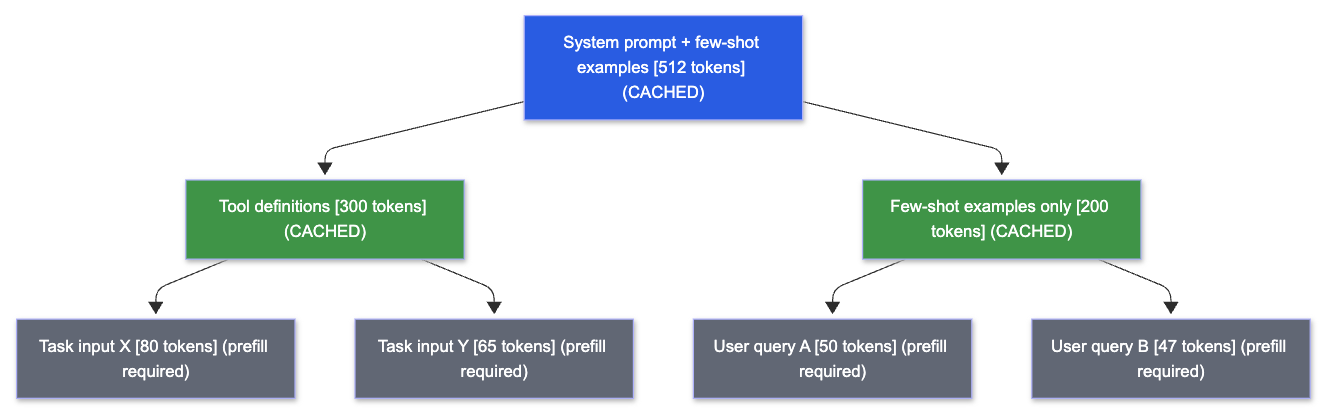
Blue and green nodes are shared KV cache entries that live in GPU memory across requests. Gray nodes require prefill compute. Requests D and E both match the full blue-plus-green path through the tool definitions branch, so only their unique task suffix tokens trigger new computation. The SGLang paper reports up to 6.4x higher throughput across various workloads when RadixAttention can exploit shared prefixes. That 6.4x gain degrades sharply when prefix ordering is inconsistent, because the radix tree match fails and every request falls back to full prefill.
Consistent prefix ordering is the primary production lever, and it’s entirely within your control as the engineer designing the prompt templates. Three patterns drive the most cache reuse in production workloads.
Place your system prompt and few-shot examples at the start of every request and keep their content byte-identical across requests. Even a single character change produces different tokenizer output IDs, breaking the exact prefix match and invalidating cache hits for every downstream node in the radix tree. If you parameterize your system prompt with per-user customization, move the fixed instructions to the front and append variable content after the few-shot examples. The fixed portion gets cached because RadixAttention caches only token sequences that are identical across requests; the variable suffix does not. Keeping your fixed prefix at the top alone captures the bulk of available cache reuse for most chat and classification workloads.
For tool-using agents, put the tool definitions block before the dynamic task input. A Llama 3.1 70B deployment with 15 tool definitions carries 3,000-4,000 tokens of fixed tool schema. If that schema appears after the user query (as some prompt templates default to), every request starts with a unique prefix and RadixAttention has nothing to match, and no caching benefit accrues. Repositioning the tool block to the top means all requests share that prefix. RadixAttention caches it once, and the entire schema block stops requiring prefill compute on subsequent requests.
In RAG pipelines, the same principle applies with an additional constraint: structure prompts as [system prompt] + [retrieved documents] + [user query] rather than interleaving query context with retrieved passages. When you retrieve the same documents across multiple query variants (common in multi-turn conversations over a fixed document set), the retrieved-document token block is already cached, as long as the documents appear at the same position in the prompt and are byte-identical across requests. Only the user query tokens at the end trigger new prefill work. The rest of the prompt is served from cache.
The deployment section below covers how to route requests to warm-cache replicas when running multiple SGLang instances.
Structured generation: constrained decoding with XGrammar
Asking a model to “output valid JSON” fails at scale in a specific, reproducible way: the model generates a mostly-valid structure, then drops a closing brace or produces a malformed nested object, and your json.loads() call raises a JSONDecodeError. Post-hoc validation loops (generate, validate, retry on error) add 1-3 full generation passes for every failed output. At high concurrency, parse error rates stabilize above zero and the retry overhead becomes a predictable fixed cost on your latency budget.
SGLang’s constrained decoder solves this by restricting the token sampling space at each decoding step using XGrammar, the default grammar backend. The sampler only considers tokens that produce a valid continuation of the target grammar at every step. The grammar state machine tracks which tokens are legal given the tokens already generated, so the sampler only ever draws from structurally valid continuations.
The integration with Pydantic is direct. Define your output schema as a Pydantic model, serialize it to JSON Schema, and pass it to gen() via the json_schema parameter:
model_validate_json() succeeds on every call because every output token satisfied the schema constraints during sampling. The parse error retry loop is gone because the grammar backend makes parse errors structurally impossible.
The --grammar-backend flag at server startup controls which backend loads. XGrammar is the default and covers JSON schema, regex patterns, and EBNF grammars. You can swap to Outlines via --grammar-backend outlines for broader regex dialect support, or to Llguidance via --grammar-backend llguidance for Microsoft Guidance format or multi-turn incremental grammar constraints. For the gen() call itself, the three constraint parameters map to distinct use cases:
json_schema:typed structured objects, the right choice for the majority of production extraction and classification tasksregex:fixed-format strings like\\d{4}-\\d{2}-\\d{2}for dates, IPv4 addresses, or product codesebnf:domain-specific grammars, code fragments, or structured formats that JSON Schema can’t express
The SGLang arXiv paper (2312.07104) documented earlier work on compressed finite state machines that achieved a 1.6x throughput increase in JSON decoding benchmarks. XGrammar replaces the earlier constrained decoding backend with broader grammar support and tighter integration with the token sampling loop.
Deployment patterns: single GPU to multi-node
Installation is pip install "sglang>=0.3" from PyPI. For faster resolution in CI environments, uv pip install "sglang>=0.3" cuts install time significantly. Both install paths require CUDA 11.8 or later and a compatible NVIDIA driver (520+) to already be present on the host. If starting from a bare cloud VM, the official Docker image lmsysorg/sglang:latest packages the CUDA runtime and eliminates driver compatibility issues. Use it for production nodes where CUDA version mismatches are a risk.
Llama 3.1 is a gated model. Accept the license at huggingface.co/meta-llama/Llama-3.1-8B-Instruct and set export HUGGING_FACE_HUB_TOKEN=<your_token> before launching the server.
The minimal command to serve Llama 3.1 8B Instruct on a single GPU:
Three flags matter most for production tuning:
-mem-fraction-static 0.85:controls what fraction of GPU VRAM the server pre-allocates for the KV cache. Higher values give more cache capacity but leave less headroom for weight storage and activations. Start at 0.85 and lower it if you see OOM errors on long-context requests.-max-running-requests 128:caps concurrency to prevent OOM from too many simultaneous sequences occupying KV cache slots. On a single A100 80GB with-mem-fraction-static 0.85, 128concurrent 8B-class requests stays stable under typical workload distributions.-chunked-prefill-size:breaks long prefills into chunks processed across multiple scheduler iterations. The default in recent SGLang versions is 8192; tune this value down if you observe TTFT spikes from long-context requests blocking the batch scheduler.
For 70B-class models, add --tp 4 to distribute weights across 4 GPUs with tensor parallelism:
With TP=4 on H100 80GB nodes, KV cache capacity scales roughly linearly with the number of GPUs, so --max-running-requests 256 is a reasonable starting ceiling for 70B-class models. Adjust downward if you see OOM on long-context sequences.
Tensor parallelism splits each transformer layer’s weight matrices across GPUs and uses torch.distributed all-reduce operations between the attention and MLP sub-layers. The communication overhead is acceptable on NVLink-connected H100 SXM nodes. NVLink’s 900 GB/s bidirectional bandwidth keeps all-reduce costs low relative to GPU compute time. That overhead becomes a throughput bottleneck on PCIe-connected nodes, where PCIe bandwidth limits practical tensor-parallel groups to at most 2 GPUs. For TP degrees of 4 or 8, NVLink hardware is strongly recommended because PCIe bandwidth is insufficient to sustain the all-reduce communication overhead at these TP sizes.
SGLang’s scheduler runs as a dedicated process and dispatches batches to the GPU, overlapping batch preparation with GPU execution to keep the GPU continuously engaged. Frameworks that share a scheduler thread with request handling introduce CPU-side overhead that grows with request rate. The SGLang v0.4 release notes document this as the “zero-overhead scheduler,” and the speedup is most significant on small models and large tensor-parallelism configurations.
Provisioning a 4xH100 SXM pod on Runpod takes a few minutes through the console with no sales call and no minimum spend. Per-second billing matters here because iterating on --mem-fraction-static values (testing 0.80, 0.85, 0.88, comparing TTFT and OOM behavior at each) means you spin up a pod, run a 5-minute benchmark, terminate it, adjust the flag, and repeat. At Runpod’s on-demand H100 rates ($2.69-$3.49/hr), a morning of config iteration across several short test runs costs under $20 with no idle-time charges between runs. On a reserved-capacity model from CoreWeave or similar, you pay for idle time between test runs regardless of whether the GPU is doing work.
When running multiple SGLang replicas behind an API gateway, SGLang ships a cache-aware load balancer that routes incoming requests to the replica most likely to have a warm cache for the request’s prefix. A round-robin load balancer routes to a cold-cache instance just as readily as a warm one, wasting the prefix match. Enable the cache-aware router when you’re running more than one SGLang replica.
If you want to wrap the SGLang server in a FastAPI application to add auth, logging, or request transformation, the OpenAI-compatible endpoint means your FastAPI layer is a thin proxy:
Your existing client code hits the FastAPI layer at your external endpoint, and the proxy forwards requests to SGLang unchanged.
Your next step: run a head-to-head benchmark in under an hour
The fastest way to quantify RadixAttention’s impact on your workload is a direct comparison. Provision a GPU, launch an SGLang server using the command from the previous section, and point your existing client code at http://localhost:30000/v1.
Then run the built-in benchmark against a prompt dataset that reflects your actual production traffic, including realistic prefix lengths:
The dataset file is a JSONL file where each line contains a {"prompt": "..."} object.
The benchmark outputs TTFT (time to first token) and throughput (tokens/sec) directly. Record both, then run the same benchmark against your current vLLM or TGI deployment using the same prompt dataset. If your workload includes any shared prefixes (system prompts, few-shot examples, tool descriptions), the throughput delta will be visible in a single benchmark run. The cache warms up within the first few requests and the advantage compounds across the remainder of the run. A synthetic dataset of random prompts with no shared prefix produces minimal difference because cache hit rates approach zero when every prompt is unique.
Plan for roughly 30-60 minutes of GPU time for the full exercise.
If the benchmark shows throughput gains, the SGLang structured output documentation and the original arXiv paper (2312.07104) are the two most useful follow-on reads. The paper’s evaluation section covers the benchmark methodology and workload definitions used to produce the 6.4x throughput figure, which gives you a calibration point for what to expect from your specific prefix distribution.
Deploy your first SGLang server on an H100 in minutes, no waitlists, no minimum spend. Start building on Runpod


