BF16 is the default for mixed precision training on any Ampere or newer GPU, because it shares FP32's exponent range and needs no loss scaling. FP16 needs a GradScaler, because its narrow range underflows small gradients. FP8 adds 4-25% end-to-end throughput on large transformers, once a BF16 baseline exists.
The short answer
In this guide, precision refers to the number format a GPU uses to store and compute each number, and formats are usually named by bit count. FP32 uses 32 bits per number and is the default for training, BF16 and FP16 use 16 bits and FP8 uses 8. Fewer bits make the math faster and the data smaller, at the cost of range (how large or small a value the format can hold), detail (how finely it separates nearby values) or both.
Mixed precision training runs matrix multiplications in a 16-bit or 8-bit floating-point format while keeping the weight updates, reductions and loss in 32-bit. It speeds up training because Tensor Cores execute low-precision math at many times the FP32 rate and because 16-bit activations take half the memory traffic.
You need mixed precision for nearly every training run on a modern GPU. Every GPU on Runpod Secure Cloud has matrix units built for low-precision math (Tensor Cores on NVIDIA, Matrix Cores on AMD), the change takes a few lines of code and in our H100 benchmark BF16 ran 2.3x faster than TF32 and 9.0x faster than plain FP32 with TF32 disabled. Plain FP32 still makes sense when you are isolating a numerical bug or running on hardware without those units, such as a CPU.
Which part of this guide applies to you depends on the workload:
- Pre-training or long fine-tunes of transformers with several billion parameters: use BF16, then test FP8 with the FP8 and benchmark sections.
- LoRA, QLoRA or full fine-tunes on a single GPU: use BF16 with the settings in the fine-tuning section. FP8 does not apply.
- Vision, speech or other models under about 1B parameters: turn on BF16 autocast and TF32 and stop there, because the measured FP8 gains come from large transformers.
- Inference: serve in the precision the model was trained in, which is BF16 for most current models.
Use this table to pick a format:
| Your GPU | Train in | Loss scaling* | What to expect |
|---|---|---|---|
| Ampere or newer (A100, A40, L40S, H100, H200, B200, B300, RTX PRO 6000) | BF16 autocast, FP32 master weights | Not needed | The default. Matches FP32 accuracy when the master weights stay in FP32, with the exceptions listed below. |
| Pre-Ampere GPUs you run yourself (V100, T4) | FP16 autocast with GradScaler | Required | The only fast option, because these GPUs have no BF16 Tensor Cores. Every GPU on Runpod Secure Cloud supports BF16. |
| Ada, Hopper or Blackwell, such as the H200, training a large transformer | FP8 via Transformer Engine or torchao, BF16 elsewhere | Per-tensor or per-block scaling, handled by the library | 4-25% more end-to-end throughput at 8B scale in published torchtitan runs, depending on GPU and scaling recipe. |
| Any GPU, inference only | BF16 or FP16 weights, FP8 if the serving engine supports it | Not applicable | FP16 and BF16 give near-identical outputs for most trained models. |
* Whether you need loss scaling depends only on the format. FP16 needs it, because its narrow range lets small gradients round to zero unless the loss is scaled up first. BF16 and TF32 never need it, because they share FP32's range, and FP8 libraries such as Transformer Engine and torchao apply their own per-tensor or per-block scaling automatically.
BF16 mixed precision needs care in four situations: running a BF16-trained checkpoint in FP16, training BF16 weights without an FP32 master copy, hand-written softmax, exponential or variance code that autocast cannot see, and losses or output heads with a very large dynamic range, which should stay in FP32.
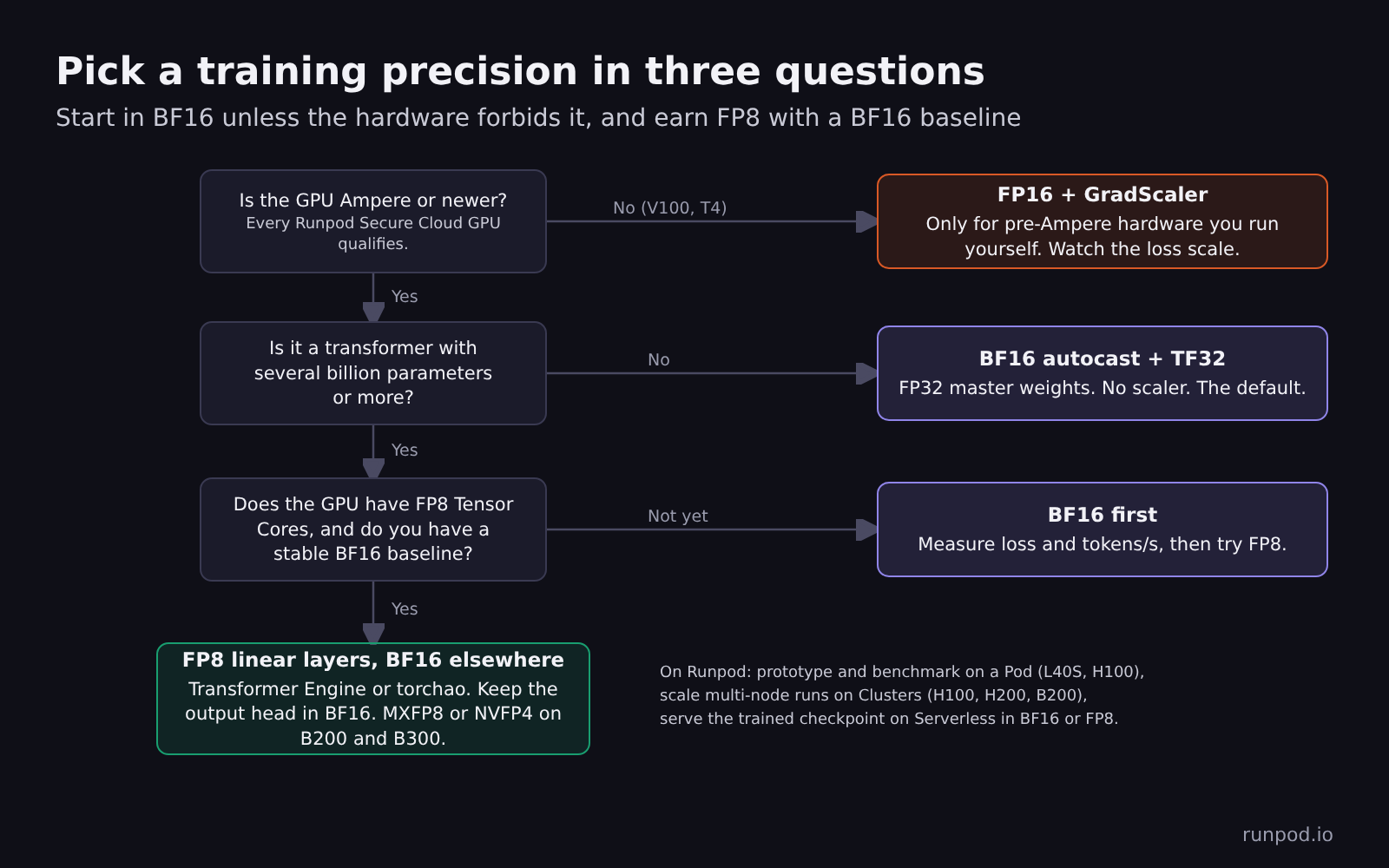
Start in BF16 unless the hardware rules it out, and move to FP8 only after a BF16 baseline exists.
Half the memory and double the speed are both wrong
Mixed precision explainers usually promise half the memory and double the speed. Neither holds up, and both errors affect which GPU you rent.
Mixed precision does not halve the memory of a training run. With the AdamW optimizer, standard mixed precision still stores 16 bytes per parameter, exactly what pure FP32 training stores, because it keeps an FP32 master copy of the weights and FP32 optimizer state. The savings come from activations, which is why mixed precision lets you raise batch size or sequence length but does not let a 7B full fine-tune fit on a GPU it did not fit on before.
FP8 does not double end-to-end training speed. FP8 doubles peak Tensor Core throughput over BF16 on Hopper and Blackwell, but attention, normalization, the optimizer step, data loading and communication do not get faster. The torchao team measured Llama 3 8B training on eight GPUs with torchtitan and reported FP8 gains of about 25% on H100 and B200 and about 15% on MI300X with the fastest (tensorwise) scaling recipe, and 4-10% with the more outlier-tolerant rowwise recipe.
How the bits are split decides everything
Every floating-point format spends its bits on three fields. The sign bit sets positive or negative. The exponent bits set the range, meaning how large and how small a number can get. The mantissa bits set the precision, meaning how many distinct values exist between two powers of two.
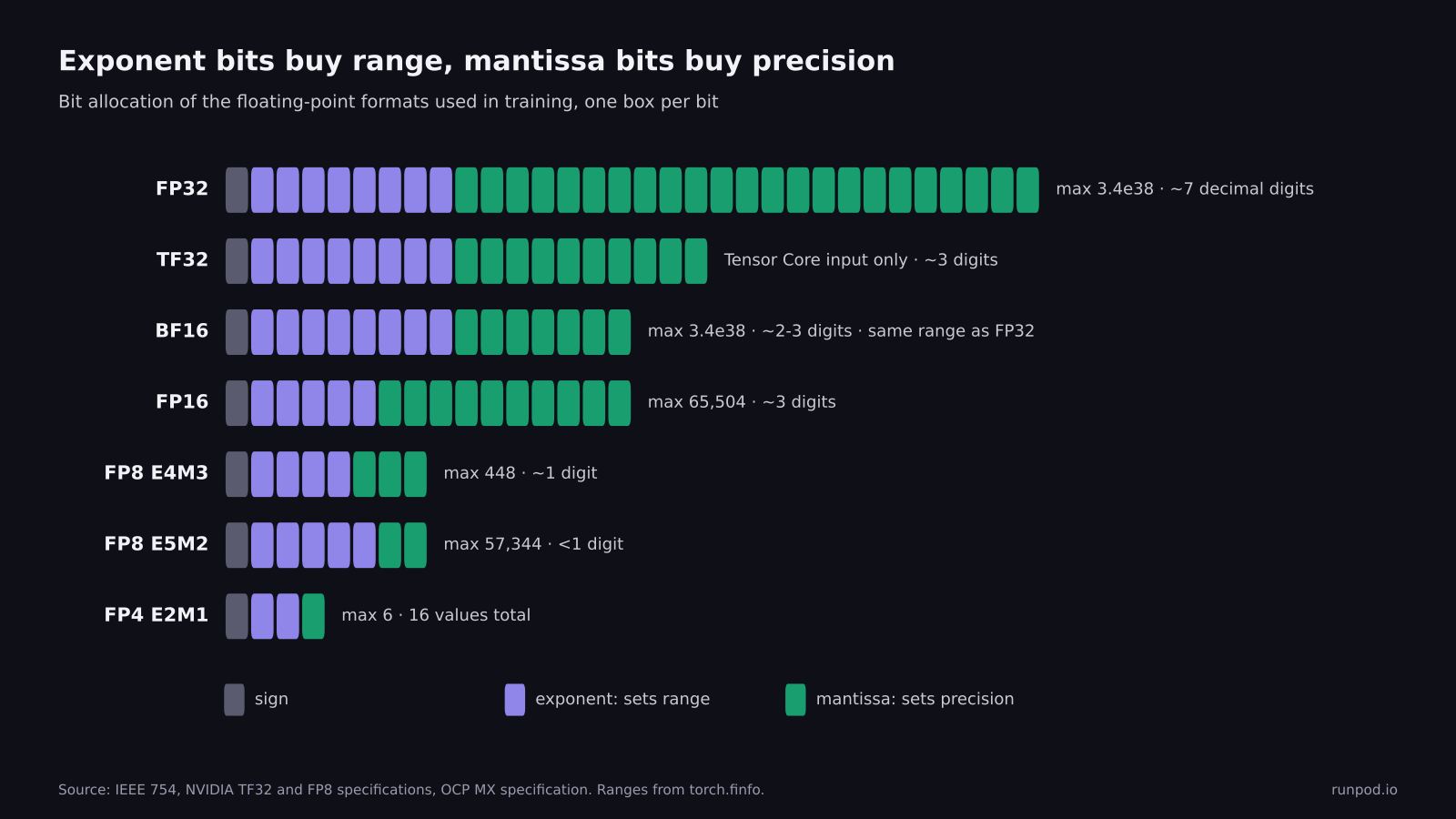
BF16 keeps FP32's eight exponent bits and gives up mantissa. FP16 does the opposite. That one design choice explains why FP16 needs loss scaling and BF16 does not.
| Format | Sign / exponent / mantissa bits | Largest value | Smallest normal value | Relative step (machine epsilon) |
|---|---|---|---|---|
| FP32 | 1 / 8 / 23 | 3.4 × 10^38 | 1.2 × 10^-38 | 1.2 × 10^-7 |
| TF32 (Tensor Core input only) | 1 / 8 / 10 | 3.4 × 10^38 | 1.2 × 10^-38 | 9.8 × 10^-4 |
| BF16 | 1 / 8 / 7 | 3.4 × 10^38 | 1.2 × 10^-38 | 7.8 × 10^-3 |
| FP16 | 1 / 5 / 10 | 65,504 | 6.1 × 10^-5 | 9.8 × 10^-4 |
| FP8 E4M3 | 1 / 4 / 3 | 448 | 1.6 × 10^-2 | 0.125 |
| FP8 E5M2 | 1 / 5 / 2 | 57,344 | 6.1 × 10^-5 | 0.25 |
Note: Values for FP32, BF16, FP16, E4M3 and E5M2 come from torch.finfo in PyTorch 2.x. E4M3 here is the OCP float8_e4m3fn variant used by NVIDIA GPUs.
FP16 tops out at 65,504, so a single large activation or an unscaled loss can overflow to infinity. BF16's epsilon of 0.0078 means that adding 0.001 to a BF16 value of 1.0 does nothing at all, which is the reason the master weights stay in FP32.
FP16 needs loss scaling because its range is narrow
FP16 represents normal numbers down to 6.1 × 10^-5. Below that it falls back to subnormal numbers, which lose precision bit by bit, and anything smaller than about 3 × 10^-8 rounds to zero. Gradients can land in that band, and deeper networks widen the spread of gradient magnitudes.
To show where real gradients land, we trained a small four-layer transformer (3.3 million parameters) on CPU in FP32, captured every gradient value at two points in training and cast them into each format.
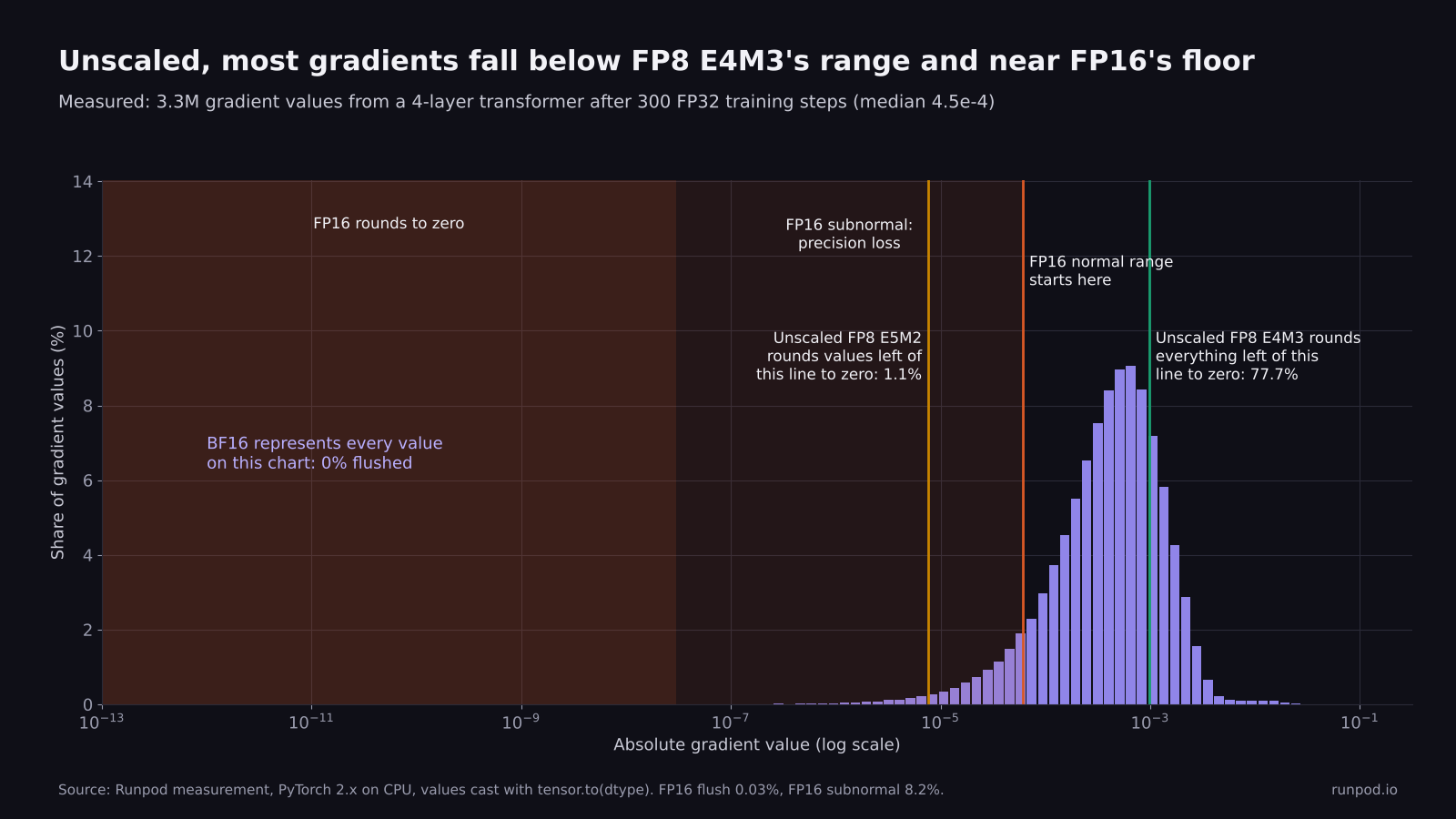
Measured gradients from a 3.3M-parameter transformer after 300 steps. The median gradient is 4.5 × 10^-4, and 8.2% of gradients fall into FP16's subnormal band.
In this small model, casting gradients straight to FP16 sent 0.03% of them to zero and pushed another 8.2% into the subnormal range, where they keep only a few significant bits. Multiplying the loss by 65,536 before the backward pass, which is PyTorch's default starting scale, moved almost all of those values back into FP16's normal range and caused no overflows. A 3.3M-parameter model shows the mechanism but says nothing quantitative about a production model; GradScaler's scale history, described below, tells you how close your own model runs to the edge.
That multiply is loss scaling, introduced together with FP32 master weights by Micikevicius et al. in Mixed Precision Training (arXiv 1710.03740). PyTorch's GradScaler implements the dynamic version. It starts at a scale of 65,536, multiplies the loss before backward(), divides the gradients by the same factor before the optimizer step and checks them for infinities. If it finds any, it skips that step and halves the scale. After 2,000 clean steps in a row it doubles the scale again. Skipped steps at the start of a run are normal; a scale that keeps falling for hundreds of steps points to a real overflow in the model.
Diagram: one FP16 mixed precision training step. FP32 master weights are cast to FP16 for the forward pass on Tensor Cores, the FP32 loss is multiplied by a scale factor, the backward pass produces FP16 gradients, and the gradients are unscaled and checked for overflow. Clean gradients update the FP32 master weights; an overflow skips the step and halves the scale.
Dynamic loss scaling in one loop. BF16 training skips this machinery entirely because its range matches FP32.
BF16 vs FP16: BF16 keeps FP32's range and gives up precision
BF16 (bfloat16, short for brain floating point) uses the same eight exponent bits as FP32, so it covers FP32's entire normal range and gradients do not underflow in practice. In the measurement above, not a single gradient flushed to zero in BF16 at either checkpoint. That is why BF16 training needs no GradScaler.
The price is precision. BF16 has 7 mantissa bits, roughly two to three significant decimal digits, against FP16's three to four. That is enough for the matrix multiplications in the forward and backward pass, because Tensor Cores accumulate the products in FP32 and the rounding noise is small next to stochastic gradient noise. It is not enough for weight updates.
Why the FP32 master copy still exists
A weight update is usually tiny relative to the weight. A learning rate of 3 × 10^-4 multiplied by a normalized gradient produces updates around 10^-3 or smaller, applied to weights around 0.01 to 1.0. When the update is smaller than half the spacing between representable values near the weight, the addition rounds back to the original number and the update disappears.
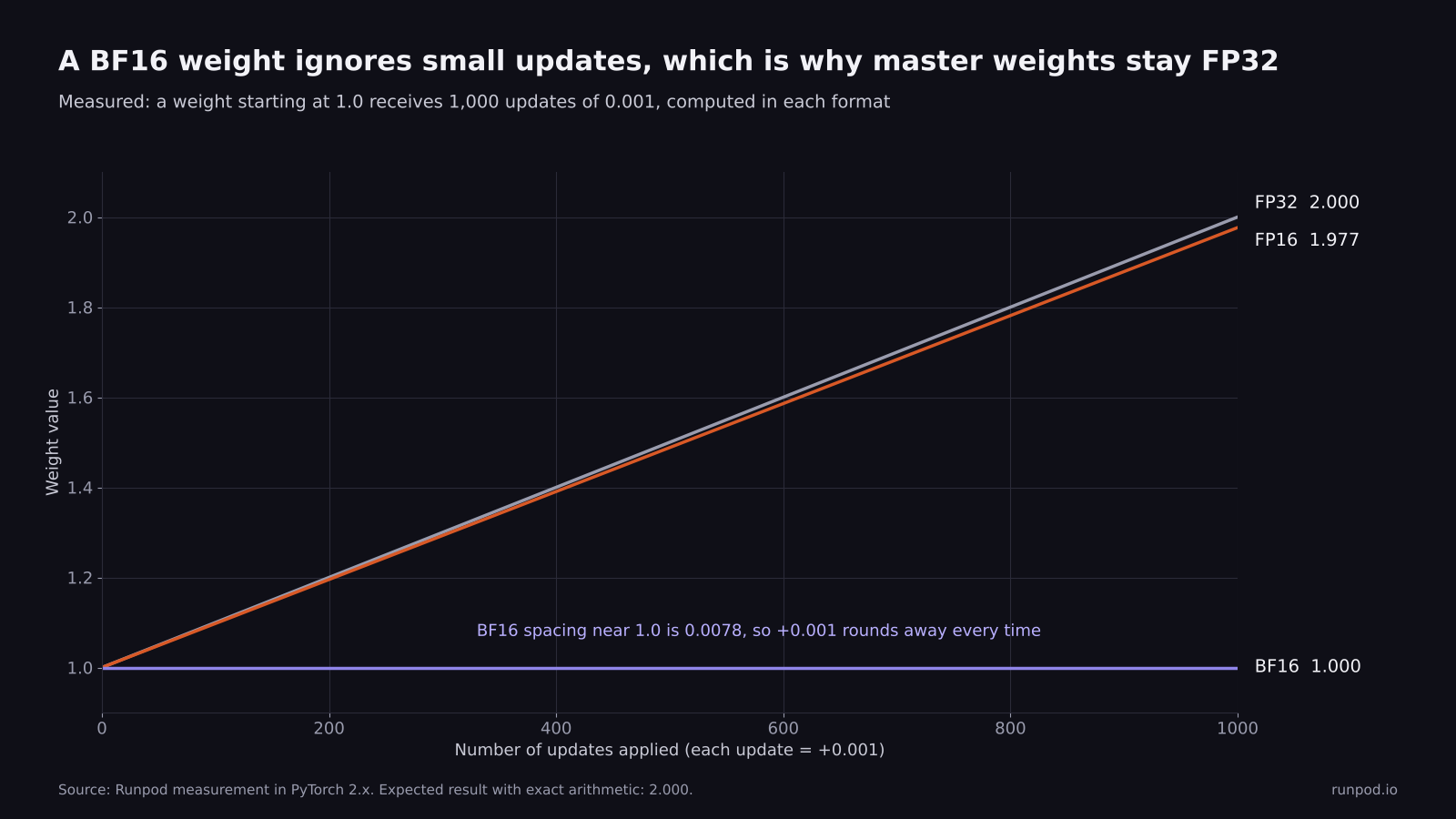
Measured in PyTorch. A BF16 weight of 1.0 ignores all 1,000 updates of 0.001, because 0.001 is less than half of BF16's spacing at 1.0 (0.0078). The FP32 weight reaches 2.0 as expected.
This is why autocast leaves the model's parameters in FP32 and only casts inputs to low-precision kernels. Your optimizer reads FP32 weights, applies FP32 updates and writes FP32 weights. Autocast also keeps operations that are sensitive to rounding or range in FP32: softmax, log-softmax, layer norm, most losses, exponentials and large reductions.
Pure BF16 training, with BF16 weights and no master copy, does exist and saves memory. It works when paired with stochastic rounding or a compensated optimizer. Without one, the loss can plateau early with no error message, for the reason the weight-update figure shows, so treat it as an advanced option.
FP8 depends on per-tensor or per-block scaling
FP8 has so little range and precision that no training recipe casts tensors to it directly. NVIDIA's Ada, Hopper and Blackwell GPUs support two FP8 variants. E4M3 has more precision and a maximum of 448. E5M2 has more range, up to 57,344, and only two mantissa bits. The common Hopper recipe, called HYBRID in Transformer Engine, uses E4M3 for weights and activations in the forward pass and E5M2 for gradients in the backward pass.
Every FP8 recipe pairs the cast with a scale factor. The scale maps each tensor's largest absolute value (its amax) onto the top of the format's range, so the tensor uses the representable values that exist instead of underflowing.
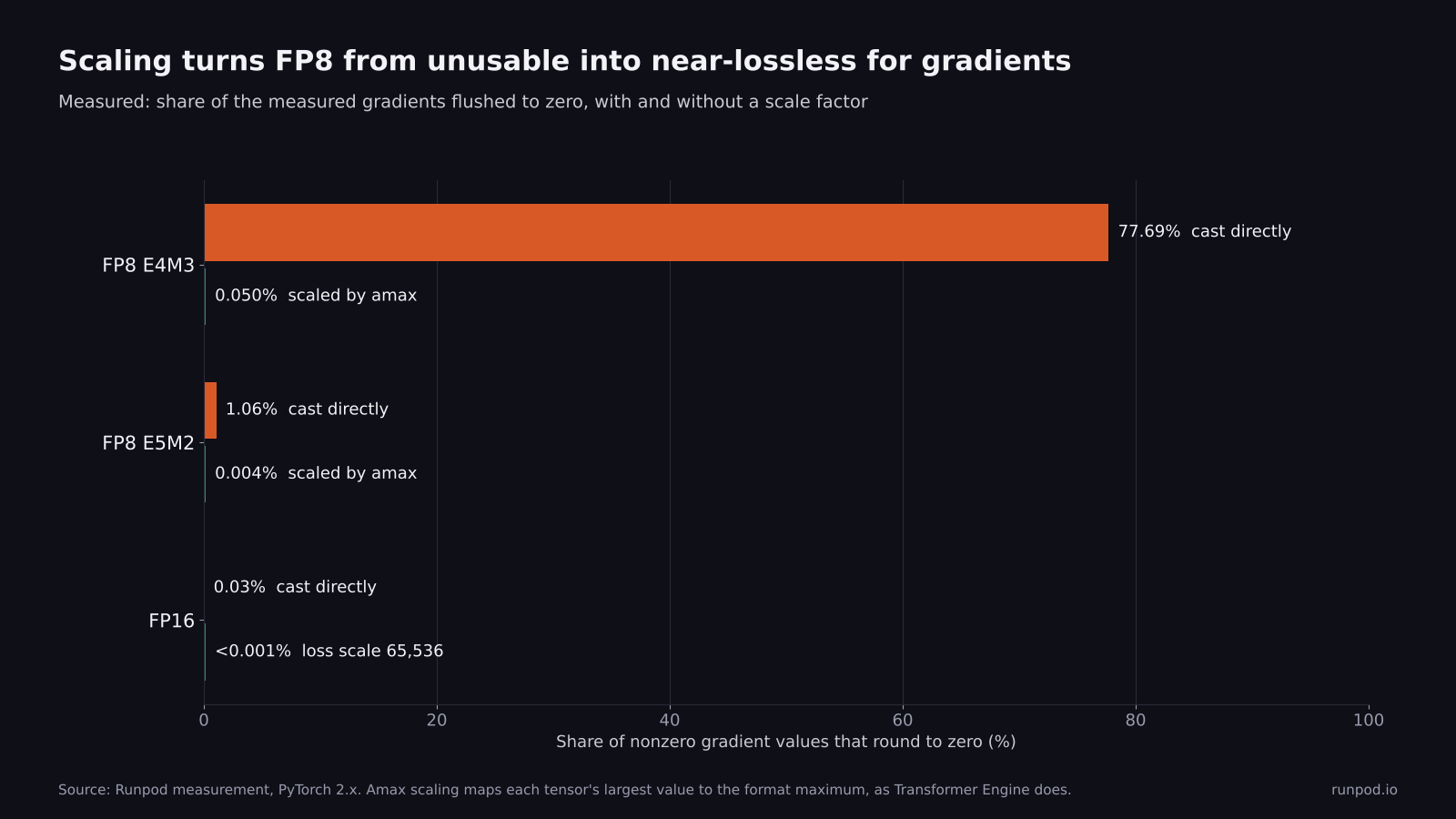
Measured on the same gradients as the histogram above. Without a scale factor, FP8 E4M3 destroys most of the gradient. With per-tensor amax scaling, the loss falls to 0.05%.
The scaling recipes differ in granularity, and finer granularity costs more bookkeeping but handles outliers better:
- Delayed and current per-tensor scaling use one scale per tensor. Delayed scaling picks the scale from a history of recent amax values, and current scaling computes it from the tensor itself. Both run on Ada, Hopper and Blackwell.
- Block scaling assigns a scale to each tile and needs Hopper or Blackwell. DeepSeek-V3, a 671B-parameter mixture-of-experts model, was trained this way, using 1 × 128 tiles for activations and 128 × 128 blocks for weights. In validation runs at roughly 16B and 230B parameters, DeepSeek reported a relative loss error below 0.25% against BF16.
- MXFP8 assigns a power-of-two scale to every block of 32 values and Transformer Engine supports the full recipe only on Blackwell data center GPUs (B200 and B300). The fine blocks let it use E4M3 for every tensor, including gradients.
- NVFP4 goes to 4-bit E2M1 values with 16-element blocks, and its full training recipe also runs only on B200 and B300 today. NVIDIA's recipe adds stochastic rounding, 2D weight scaling and Hadamard transforms. It also recommends keeping the last few layers in higher precision.
FP8 training still keeps master weights and optimizer state in higher precision. DeepSeek-V3's report lists the embedding, output head, mixture-of-experts gating, normalization and attention as components it kept in BF16 or FP32. The FP8 work targets the large linear layers, which is where most of the FLOPs live in a transformer.
Where the speed comes from
The speedup comes from Tensor Core throughput, and each step down in precision roughly doubles it on recent data center GPUs.
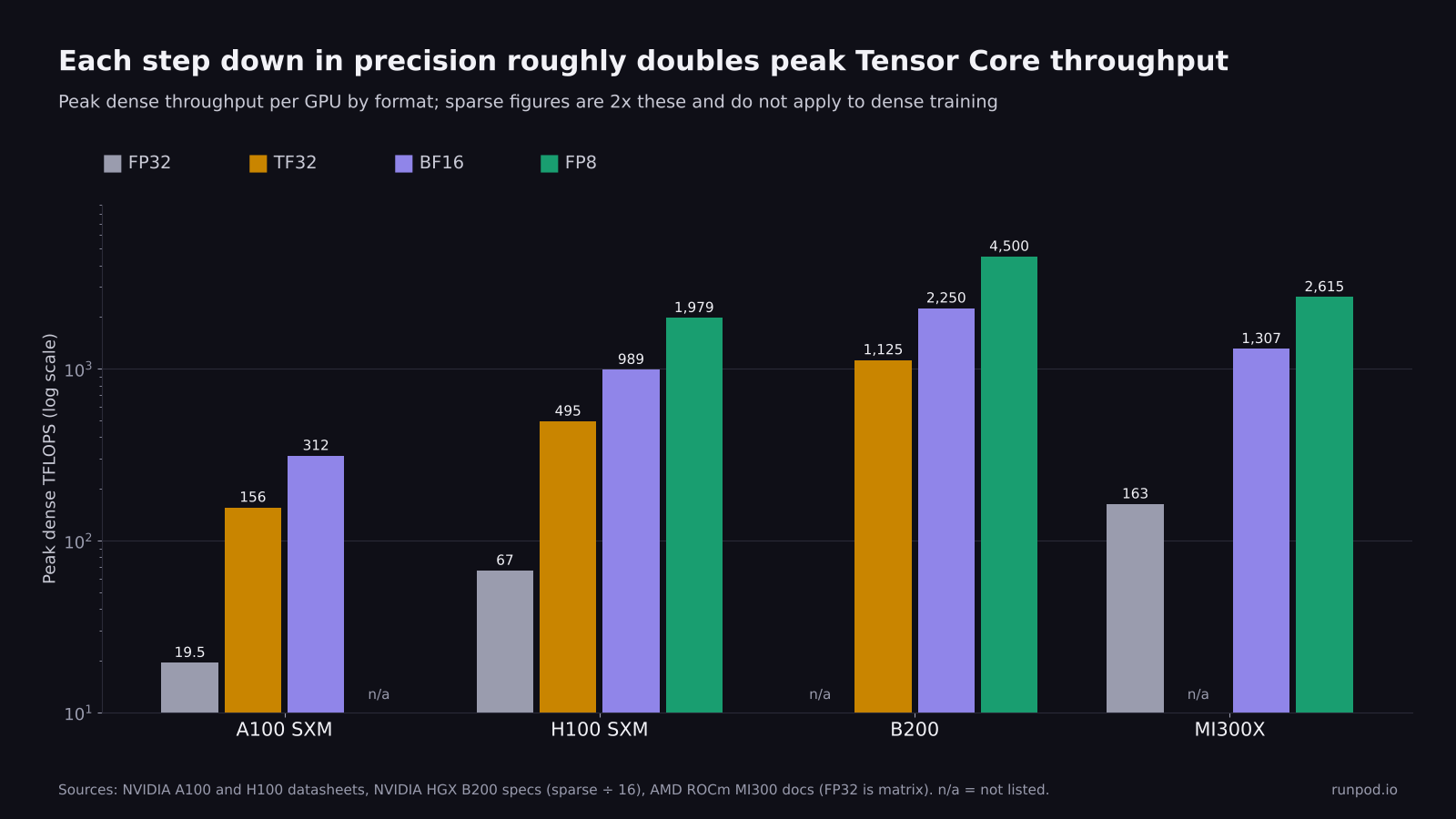
Peak dense throughput from vendor datasheets. A100 has no FP8 Tensor Cores. Sparse figures, which vendors often headline, are double these and do not apply to ordinary dense training.
| GPU | FP32 | TF32 | BF16 / FP16 | FP8 |
|---|---|---|---|---|
| A100 SXM | 19.5 | 156 | 312 | Not supported |
| H100 SXM | 67 | 495 | 989 | 1,979 |
| B200 | Not listed | 1,125 | 2,250 | 4,500 |
| MI300X | 163 | 654 | 1,307 | 2,615 |
Note: A100 and H100 figures from NVIDIA datasheets; B200 derived by dividing NVIDIA's HGX B200 eight-GPU sparse figures by 16 (eight GPUs, and dense is half of sparse); MI300X from AMD's ROCm architecture documentation, where the FP32 and TF32 figures are matrix throughput. NVIDIA FP32 figures are non-Tensor Core.
On Ampere and newer GPUs, PyTorch does not use TF32 for matrix multiplications by default. A "plain FP32" baseline therefore runs at 19.5 TFLOPS on an A100, while BF16 autocast runs at 312, a 16x gap. Turning on TF32 with one line raises the FP32 ceiling to 156 TFLOPS, so BF16's remaining advantage is 2x. A speedup claim means little until you know which of those baselines it was measured against.
End-to-end gains fall short of the peak ratio whenever part of the step is bound by memory bandwidth, communication or the host CPU. The clearest public data comes from the torchao and torchtitan benchmarks for FP8 against BF16 on Llama 3 8B, eight GPUs per run.
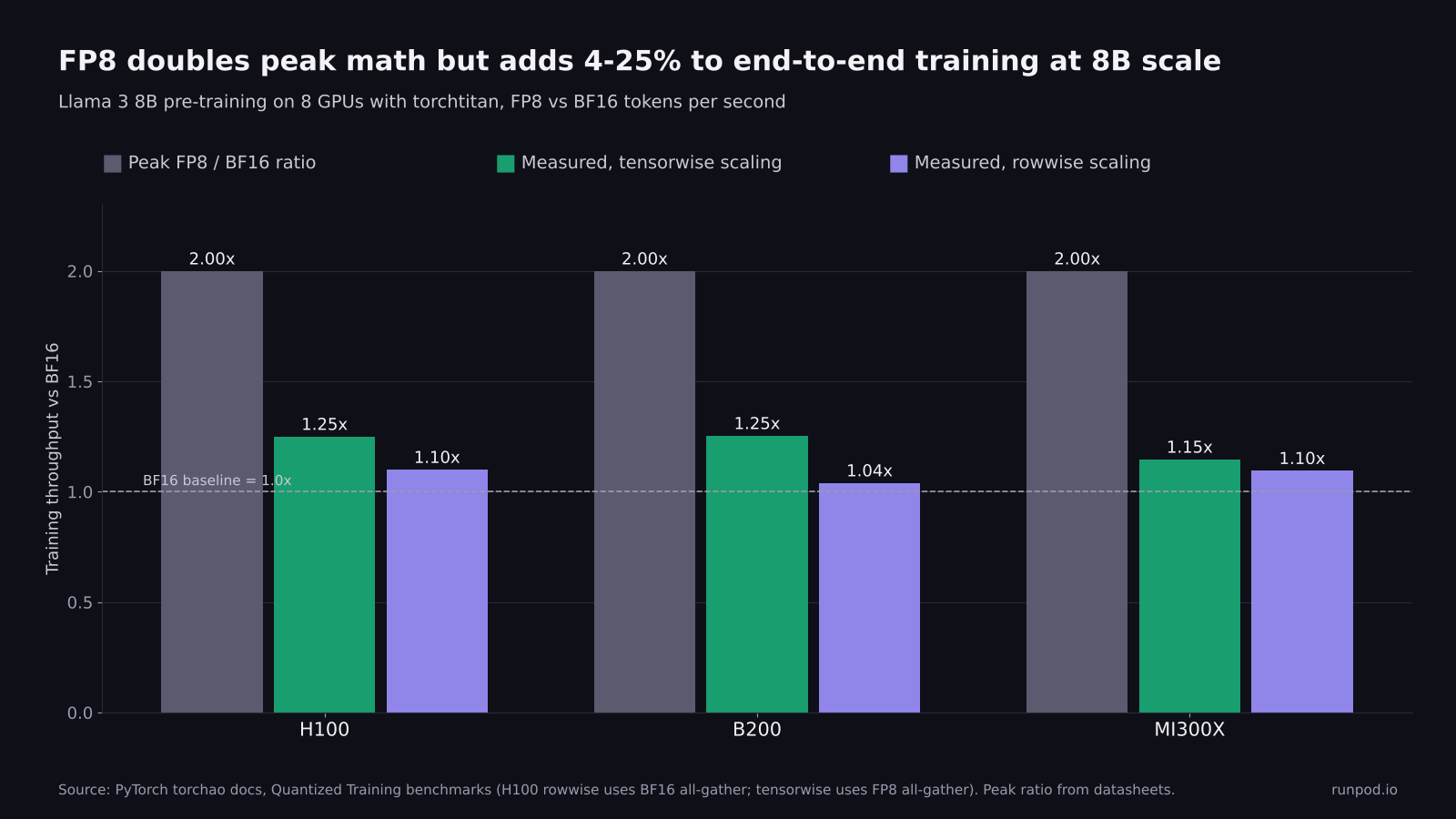
Peak FP8 throughput doubles BF16 on these GPUs. Measured end-to-end training throughput rises 15-25% at 8B scale with tensorwise scaling. Rowwise scaling, which handles outliers better, measured 10% on H100 and 4% on B200.
The torchao team also reports up to 1.5x at 405B parameters on 512 GPUs, which fits the pattern that larger models spend a larger share of each step in the linear layers FP8 accelerates. FP8 is worth its integration cost for large transformer pre-training and long fine-tunes, and rarely for a 1B model or a convolutional network.
Runpod bills Pods per second, so a run that finishes 25% faster uses 1 / 1.25 = 0.8 of the GPU-hours, which is a 20% lower bill at the same hourly rate. That holds only if the faster run reaches the same validation loss in the same number of steps, so compare time to a fixed validation loss before you count the savings.
Mixed precision does not halve your training memory
Mixed precision lowers the precision of the math and the stored activations, but it leaves the weights and optimizer state in FP32. Training memory has two parts: state that scales with parameter count, and activations that scale with batch size, sequence length and model width. Mixed precision changes the second part far more than the first.
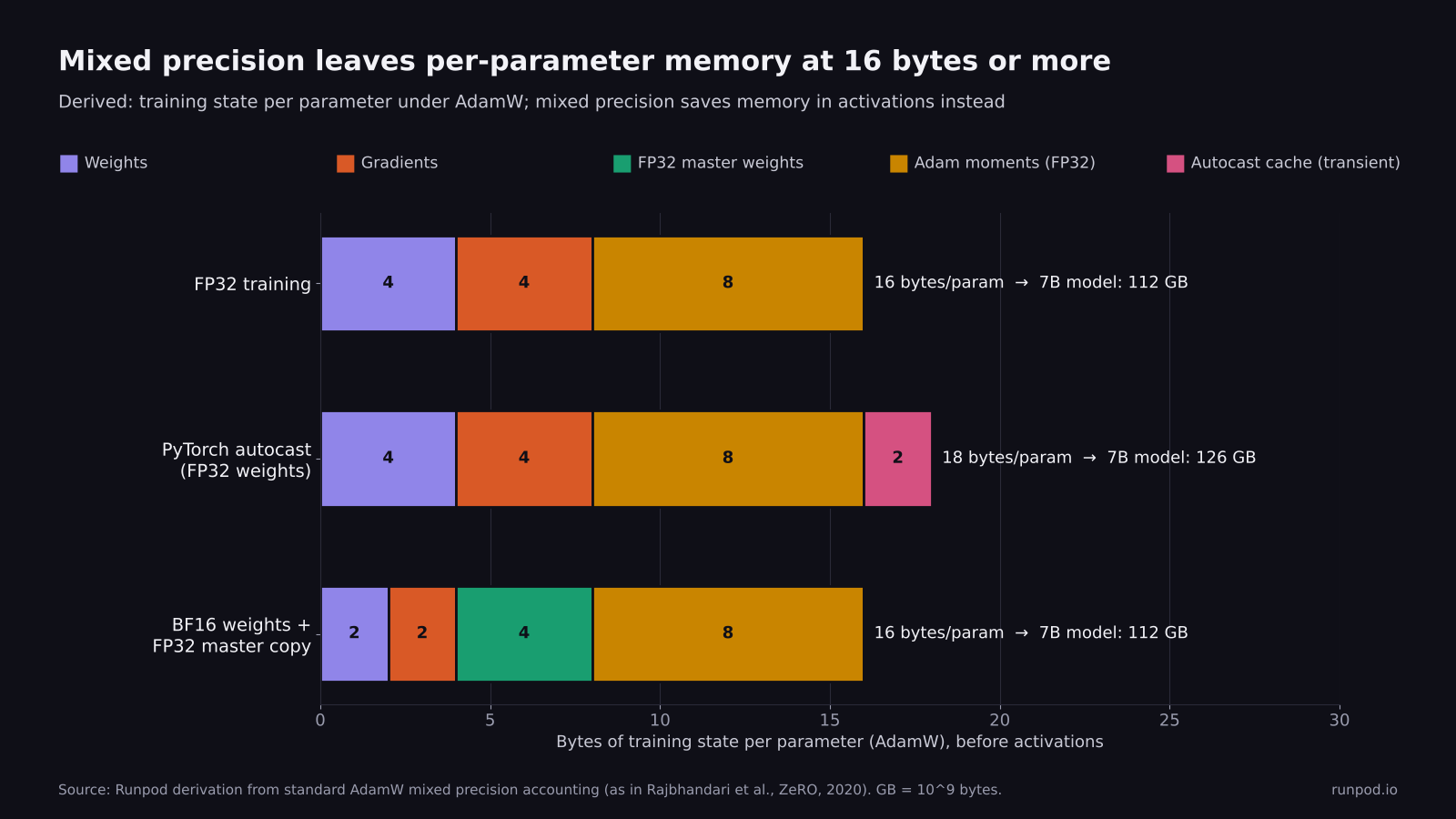
Derived from standard AdamW accounting. Every common mixed precision setup stores 16-18 bytes per parameter. The 2-byte saving per value applies to activations, not to optimizer state.
The arithmetic for AdamW is short enough to do by hand:
FP32 training:          4 (weights) + 4 (grads) + 8 (two Adam moments)             = 16 bytes/param
PyTorch autocast:       4 (FP32 weights) + 4 (FP32 grads) + 8 (Adam)               = 16 bytes/param
BF16 weights + master:  2 (BF16 weights) + 2 (BF16 grads) + 4 (FP32 master) + 8    = 16 bytes/param
Optional BF16 weight cache inside autocast: about +2 bytes/param while it is alive
For a 7B model, 16 bytes per parameter is 112 GB of state before a single activation is stored. That does not fit on an 80 GB H100 or A100 under any precision setting. It fits on a 141 GB H200, a 180 GB B200 or a 288 GB B300 with room left for activations, or it can be sharded across several GPUs with FSDP or DeepSpeed ZeRO on a Cluster. An 8-bit optimizer, LoRA or QLoRA changes the math, as the fine-tuning section shows.
Inference needs far less. The weights alone take 2 bytes per parameter in BF16 or FP16, so a 7B model needs about 14 GB before the KV cache and activations, and FP8 weights at 1 byte per parameter halve that (derived).
Activations are where mixed precision helps. Autocast stores the outputs of its low-precision operations in BF16 or FP16, roughly halving the memory those activations need. In practice that buys a larger batch, a longer sequence or less activation checkpointing, and each of those converts back into throughput.
Enable mixed precision in PyTorch, Hugging Face, Lightning and Keras
The code changes are small. In PyTorch, the current API is torch.autocast(device_type="cuda") and torch.amp.GradScaler("cuda"). The older torch.cuda.amp.autocast and torch.cuda.amp.GradScaler still run but are deprecated.
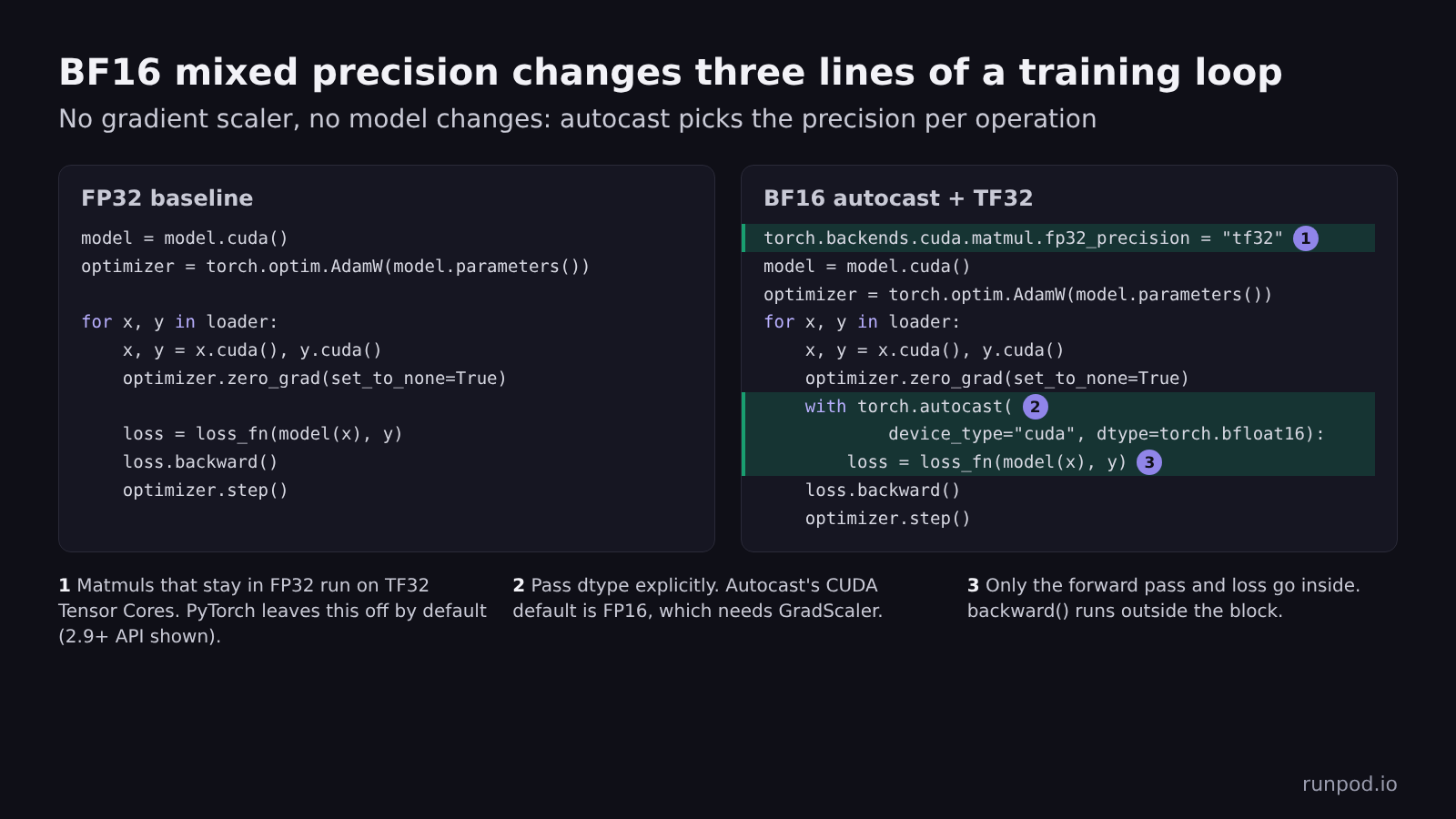
BF16 mixed precision changes three lines of a standard PyTorch loop and needs no gradient scaler.
BF16 with PyTorch autocast, for Ampere and newer GPUs:
import torch

# model, loader and loss_fn come from your existing training script.
# Let any matmul that stays in FP32 use TF32 Tensor Cores (PyTorch 2.9+ API).
# On older releases: torch.backends.cuda.matmul.allow_tf32 = True
torch.backends.cuda.matmul.fp32_precision = "tf32"
torch.backends.cudnn.conv.fp32_precision = "tf32"

model = model.cuda()
optimizer = torch.optim.AdamW(model.parameters(), lr=3e-4, fused=True)

for x, y in loader:
    x, y = x.cuda(non_blocking=True), y.cuda(non_blocking=True)
    optimizer.zero_grad(set_to_none=True)
    with torch.autocast(device_type="cuda", dtype=torch.bfloat16):
        loss = loss_fn(model(x), y)
    loss.backward()
    optimizer.step()
Autocast's default CUDA data type is FP16, not BF16, so pass dtype=torch.bfloat16 explicitly. Call backward() outside the autocast block; the backward pass runs in the same precision the forward pass chose for each operation.
FP16 with dynamic loss scaling, for pre-Ampere GPUs, which Runpod Secure Cloud does not offer, or when a deployment target requires FP16:
# model, optimizer, loader and loss_fn come from your existing training script.
scaler = torch.amp.GradScaler("cuda")

for x, y in loader:
    x, y = x.cuda(non_blocking=True), y.cuda(non_blocking=True)
    optimizer.zero_grad(set_to_none=True)
    with torch.autocast(device_type="cuda", dtype=torch.float16):
        loss = loss_fn(model(x), y)
    scaler.scale(loss).backward()
    scaler.unscale_(optimizer)                # required before gradient clipping
    torch.nn.utils.clip_grad_norm_(model.parameters(), 1.0)
    scaler.step(optimizer)                    # skips the step if any gradient is inf or NaN
    scaler.update()
Hugging Face Transformers sets the same behavior with flags on TrainingArguments:
from transformers import TrainingArguments

args = TrainingArguments(
    output_dir="out",
    bf16=True,     # use fp16=True on pre-Ampere GPUs
    tf32=True,
)
PyTorch Lightning uses a precision string. The "bf16-mixed" value is BF16 autocast with FP32 weights, and "bf16-true" is the pure BF16 mode described above:
import lightning as L

trainer = L.Trainer(precision="bf16-mixed")   # "16-mixed" for FP16 with loss scaling
Keras 3 and TensorFlow use a global policy. Keep the final layer's output in FP32 so the loss is computed at full precision:
import keras

keras.mixed_precision.set_global_policy("mixed_bfloat16")
num_classes = 10
inputs = keras.Input(shape=(784,))
x = keras.layers.Dense(256, activation="relu")(inputs)
outputs = keras.layers.Dense(num_classes, dtype="float32")(x)   # keep the output layer in FP32
model = keras.Model(inputs, outputs)
FP8 with NVIDIA Transformer Engine replaces nn.Linear and related layers with Transformer Engine modules and wraps the forward pass in an FP8 context. Transformer Engine 2.9 and later name the context te.autocast with a recipe argument; earlier releases use te.fp8_autocast(enabled=True, fp8_recipe=recipe):
import torch
import transformer_engine.pytorch as te
from transformer_engine.common.recipe import DelayedScaling, Format

recipe = DelayedScaling(fp8_format=Format.HYBRID, amax_history_len=16, amax_compute_algo="max")
layer = te.Linear(4096, 4096, bias=True).cuda()
inp = torch.randn(32, 4096, device="cuda")   # both dimensions divisible by 16

with te.autocast(enabled=True, recipe=recipe):
    out = layer(inp)
loss = out.float().pow(2).mean()
loss.backward()    # outside the FP8 context
FP8 with torchao converts the existing nn.Linear layers of a standard PyTorch model in place and relies on torch.compile for speed:
import torch
from torchao.float8 import Float8LinearConfig, convert_to_float8_training

# model is your existing nn.Module, for example a Hugging Face causal LM.
model = model.cuda()   # keep FP32 master weights; run forward under BF16 autocast
config = Float8LinearConfig.from_recipe_name("rowwise")   # or "tensorwise", "rowwise_with_gw_hp"
convert_to_float8_training(model, config=config,
                           module_filter_fn=lambda mod, fqn: fqn != "lm_head")
model = torch.compile(model)
Run the forward pass under torch.autocast(device_type="cuda", dtype=torch.bfloat16) as in the BF16 example, so the non-FP8 layers run in BF16 while the optimizer keeps FP32 weights. The filter keeps the output head out of FP8, which matches what production FP8 recipes do. Transformer Engine's FP8 linear layers also require both dimensions of each weight to be divisible by 16.
Mixed precision for LoRA, QLoRA and full fine-tuning
Fine-tuning adds one question to everything above: are the weights you train stored in FP32? The answer depends on how you load the model. Runpod's fine-tuning page covers the GPU options and pre-configured environments for these jobs.
| Method | Load the base model as | Weights you train | Training flags | Setting to check | Training state, 8B model (derived) |
|---|---|---|---|---|---|
| Full fine-tune | FP32, the default | All weights, with FP32 master copies | bf16=True, tf32=True | Loading with dtype=torch.bfloat16 removes the FP32 master copy. | 128 GB |
| LoRA | BF16 | Adapters, upcast to FP32 by PEFT | bf16=True, tf32=True | Keep PEFT's default autocast_adapter_dtype=True. | 17 GB |
| QLoRA | 4-bit NF4 through BitsAndBytesConfig | Adapters in FP32 | bf16=True, tf32=True | Set bnb_4bit_compute_dtype=torch.bfloat16, because it defaults to FP32. | 6.4 GB |
For a full fine-tune, load the model in FP32, which is the default, and train with bf16=True. That is autocast with FP32 master weights, at 16 bytes per parameter. Loading with dtype=torch.bfloat16 (torch_dtype in older Transformers releases) and then training with bf16=True updates BF16 weights directly, with no master copy. It saves memory and runs into the stagnation problem the weight-update figure shows.
For LoRA, the base model is frozen, so its precision affects memory and forward-pass accuracy but never receives updates. Load the base in BF16. PEFT upcasts BF16 or FP16 adapter weights to FP32 by default (autocast_adapter_dtype=True), so the parameters you train keep FP32 updates without any extra setup.
For QLoRA, the base is quantized to 4-bit NF4 and dequantized on the fly for each matrix multiplication. The dtype of that computation is bnb_4bit_compute_dtype, which defaults to FP32; set it to BF16 for speed. At 4 bits, a 14B model's weights take roughly 7 GB (derived: 14 billion parameters at half a byte each, before quantization constants), which is why a single 48 GB L40S handles QLoRA on 7B-14B models at moderate sequence lengths with gradient checkpointing on. Long contexts or large batches can still exceed 48 GB, because activation memory grows with both.
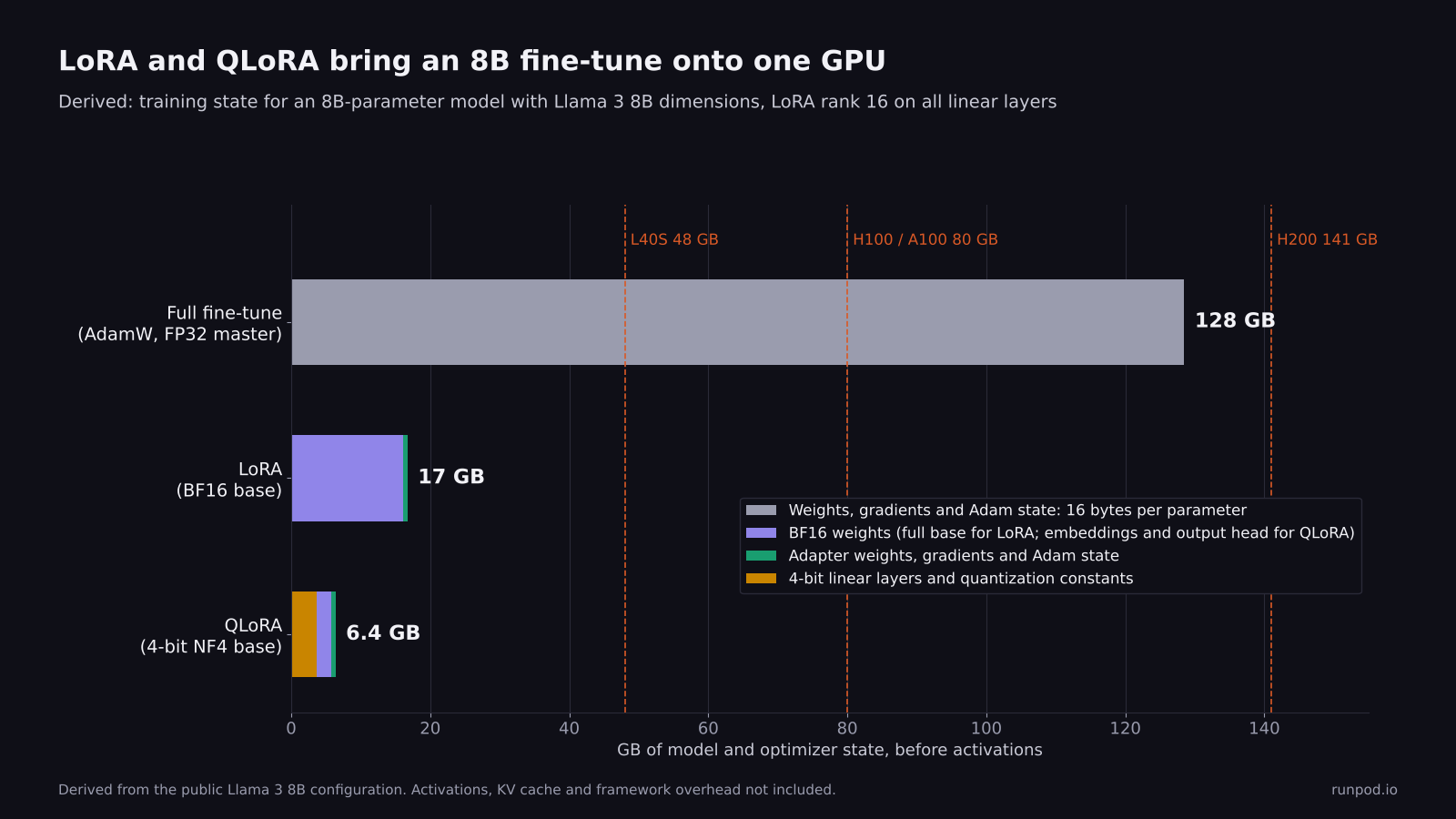
Derived from the Llama 3 8B configuration with LoRA rank 16 on all linear layers. A full fine-tune needs more memory than an 80 GB GPU holds, while LoRA and QLoRA fit on a single 48 GB L40S with room left for activations.
import torch
from transformers import AutoModelForCausalLM, BitsAndBytesConfig
from peft import LoraConfig, get_peft_model
from trl import SFTConfig

model_id = "Qwen/Qwen3-8B"   # any BF16-pretrained causal LM

bnb = BitsAndBytesConfig(
    load_in_4bit=True,
    bnb_4bit_quant_type="nf4",
    bnb_4bit_compute_dtype=torch.bfloat16,   # default is float32
    bnb_4bit_use_double_quant=True,
)
# On Transformers releases older than v5, pass torch_dtype= instead of dtype=.
model = AutoModelForCausalLM.from_pretrained(model_id, quantization_config=bnb, dtype=torch.bfloat16)
model = get_peft_model(model, LoraConfig(r=16, lora_alpha=32, target_modules="all-linear",
                                         task_type="CAUSAL_LM"))
# PEFT keeps the LoRA weights in FP32 (autocast_adapter_dtype=True by default).

args = SFTConfig(output_dir="out", bf16=True, tf32=True)
TRL's SFTConfig inherits the bf16 and tf32 flags from TrainingArguments, so the same settings apply. The FP8 results in this guide all come from full pre-training runs, and none of them measure LoRA or QLoRA, so BF16 is the defensible default for single-GPU fine-tuning.
Benchmark your own model before you commit a long run
Published benchmarks use someone else's model, batch size and data pipeline. An hour on a single Pod tells you what your own run will get before you commit a week of GPU time to one mode.
The benchmark script below trains the same small GPT-style model in each precision mode on synthetic data and prints step time, tokens per second, peak memory and final loss:
"""Compare training throughput and loss across precision modes on one GPU.

Usage on a Runpod Pod:
    python bench_precision.py --modes fp32 tf32 bf16 fp16 fp8:tensorwise fp8:rowwise --steps 200 --compile

fp8 modes need torchao and an FP8-capable GPU (Ada, Hopper or Blackwell) and are always
compiled; pass --compile to compile the other modes too for a like-for-like ratio.
Use fp8: to pick the torchao recipe per mode, or plain fp8 for --fp8-recipe.
"""
import argparse, time, torch, torch.nn as nn, torch.nn.functional as F

p = argparse.ArgumentParser()
p.add_argument("--modes", nargs="+", default=["fp32", "tf32", "bf16", "fp16"])
p.add_argument("--steps", type=int, default=200)
p.add_argument("--warmup", type=int, default=20)
p.add_argument("--dim", type=int, default=2048)
p.add_argument("--layers", type=int, default=8)
p.add_argument("--seq", type=int, default=1024)
p.add_argument("--batch", type=int, default=8)
p.add_argument("--vocab", type=int, default=32000)
p.add_argument("--device", default="cuda")
p.add_argument("--compile", action="store_true", help="torch.compile every mode (always on for fp8)")
p.add_argument("--fp8-recipe", default="rowwise", choices=["tensorwise", "rowwise", "rowwise_with_gw_hp"])
args = p.parse_args()
dev = args.device


class Block(nn.Module):
    def __init__(self, d):
        super().__init__()
        self.n1, self.n2 = nn.LayerNorm(d), nn.LayerNorm(d)
        self.qkv, self.proj = nn.Linear(d, 3 * d), nn.Linear(d, d)
        self.up, self.down = nn.Linear(d, 4 * d), nn.Linear(4 * d, d)
        self.h = d // 128

    def forward(self, x):
        B, T, D = x.shape
        q, k, v = self.qkv(self.n1(x)).view(B, T, 3, self.h, D // self.h).unbind(2)
        a = F.scaled_dot_product_attention(q.transpose(1, 2), k.transpose(1, 2),
                                           v.transpose(1, 2), is_causal=True)
        x = x + self.proj(a.transpose(1, 2).reshape(B, T, D))
        return x + self.down(F.gelu(self.up(self.n2(x))))


class GPT(nn.Module):
    def __init__(self):
        super().__init__()
        self.emb = nn.Embedding(args.vocab, args.dim)
        self.blocks = nn.Sequential(*[Block(args.dim) for _ in range(args.layers)])
        self.norm, self.head = nn.LayerNorm(args.dim), nn.Linear(args.dim, args.vocab)

    def forward(self, idx):
        return self.head(self.norm(self.blocks(self.emb(idx))))


def sync():
    if dev == "cuda":
        torch.cuda.synchronize()


def run(label):
    mode, _, recipe = label.partition(":")
    recipe = recipe or args.fp8_recipe
    torch.manual_seed(0)
    prec = "tf32" if mode == "tf32" else "ieee"
    torch.backends.cuda.matmul.fp32_precision = prec   # PyTorch 2.9+ TF32 API
    torch.backends.cudnn.conv.fp32_precision = prec
    model = GPT().to(dev)
    if mode == "fp8":
        from torchao.float8 import Float8LinearConfig, convert_to_float8_training
        # Skip the output head, as production FP8 recipes usually do.
        convert_to_float8_training(model, config=Float8LinearConfig.from_recipe_name(recipe),
                                   module_filter_fn=lambda m, fqn: fqn != "head")
    if mode == "fp8" or args.compile:
        model = torch.compile(model)
    opt = torch.optim.AdamW(model.parameters(), lr=3e-4, fused=(dev == "cuda"))
    amp_dtype = {"bf16": torch.bfloat16, "fp16": torch.float16, "fp8": torch.bfloat16}.get(mode)
    scaler = torch.amp.GradScaler(dev, enabled=(mode == "fp16"))
    # A fresh random batch every step (same seed in every mode), so the model cannot
    # memorize one batch and the final losses stay comparable across modes.
    gen = torch.Generator(device=dev).manual_seed(1)
    if dev == "cuda":
        torch.cuda.reset_peak_memory_stats()
    for step in range(args.warmup + args.steps):
        if step == args.warmup:
            sync(); t0 = time.perf_counter()
        data = torch.randint(0, args.vocab, (args.batch, args.seq + 1), device=dev, generator=gen)
        x, y = data[:, :-1], data[:, 1:]
        opt.zero_grad(set_to_none=True)
        with torch.autocast(device_type=dev, dtype=amp_dtype or torch.float32,
                            enabled=amp_dtype is not None):
            loss = F.cross_entropy(model(x).float().view(-1, args.vocab), y.reshape(-1))
        scaler.scale(loss).backward()
        scaler.step(opt)
        scaler.update()
    sync()
    dt = (time.perf_counter() - t0) / args.steps
    mem = torch.cuda.max_memory_allocated() / 2**30 if dev == "cuda" else float("nan")
    tok_s = args.batch * args.seq / dt
    print(f"{label:15s}  step {dt*1000:8.1f} ms  {tok_s:10.0f} tok/s  "
          f"peak mem {mem:6.1f} GiB  final loss {loss.item():.4f}")
    return tok_s


if dev == "cuda":
    import importlib.metadata as md
    try:
        ao = md.version("torchao")
    except md.PackageNotFoundError:
        ao = "not installed"
    print(f"GPU {torch.cuda.get_device_name()} | PyTorch {torch.__version__} | CUDA {torch.version.cuda} | torchao {ao}")
print(f"batch {args.batch}, seq {args.seq}, dim {args.dim}, layers {args.layers}, {args.steps} timed steps, compile={args.compile}")
results = {m: run(m) for m in args.modes}
for base_mode in ("fp32", "tf32"):
    if base_mode in results:
        for m, t in results.items():
            print(f"{m:15s}  {t / results[base_mode]:5.2f}x vs {base_mode}")
pip install torchao # only needed for the fp8 modes
python bench_precision.py --modes fp32 tf32 bf16 fp16 fp8:tensorwise fp8:rowwise --steps 200 --compileThe tokens-per-second ratio between tf32 and bf16 is your honest mixed precision speedup. The final loss should be close across modes; a large gap signals a numerical problem rather than noise. FP16 may skip a few early steps while the loss scale settles, so expect it to trail slightly. Then run your real training script for a few hundred steps in BF16 and in the candidate mode, and compare the loss curves, because a synthetic benchmark cannot catch a model-specific instability.
The script measures throughput on synthetic data, not convergence. For an FP8 decision, also run your real job to a fixed validation loss in both modes and compare wall-clock hours, because a throughput gain that needs more steps to converge is smaller than it looks. For a vision model, swap in your network and report images per second; the timing logic is the same.
We ran the script on a Runpod H100 SXM Pod on October 29, 2026, with the default settings: a 534M-parameter GPT-style model (derived from the script's dimensions), batch size 8, sequence length 1,024 and 200 timed steps under torch.compile. The software was PyTorch 2.13 with CUDA 12.9 and torchao 0.18, and all six modes ran in one pass.
| Mode | Step time | Tokens/sec | vs TF32 | Peak memory |
|---|---|---|---|---|
| FP32 | 495.0 ms | 16,550 | 0.25x | 17.1 GiB |
| TF32 | 126.1 ms | 64,982 | 1.00x | 17.1 GiB |
| BF16 | 54.9 ms | 149,142 | 2.30x | 14.4 GiB |
| FP16 | 58.8 ms | 139,414 | 2.15x | 14.4 GiB |
| FP8, tensorwise | 51.4 ms | 159,416 | 2.45x | 12.1 GiB |
| FP8, rowwise | 58.6 ms | 139,824 | 2.15x | 12.1 GiB |
Source: Runpod, measured in a single run on one H100 SXM Pod on October 29, 2026, with the runpod/pytorch:1.5.0-cu1281-torch2130-ubuntu2404 image, PyTorch 2.13 (CUDA 12.9), torchao 0.18, batch size 8, sequence length 1,024 and 200 timed steps under torch.compile.
BF16 ran 2.3x faster than TF32 and 9.0x faster than plain FP32 in the same run. Tensorwise FP8 added 7% on top of BF16 and used 16% less peak memory, while rowwise FP8 ran 6% slower than BF16, so at about half a billion parameters the FP8 gain is small and depends on the recipe. Final losses agreed within 0.002 across all six modes. The full six-mode run took 5 minutes 18 seconds.
Pick the GPU by the format you need
Precision support follows GPU architecture, so the format you plan to train in narrows the GPU list before price does.
| Architecture | Runpod GPUs | Low-precision formats | Secure Cloud price | Recommended for |
|---|---|---|---|---|
| Blackwell data center | B300, B200 | FP8, MXFP8 and NVFP4 | B300 $8.99/hr, B200 $7.99/hr | B200: full fine-tunes of 7B models on one GPU, and multi-node pre-training on Clusters, including MXFP8 and NVFP4 |
| Blackwell workstation | RTX PRO 6000 | FP8; NVFP4 partial in Transformer Engine; no MXFP8 yet | RTX PRO 6000 $2.69/hr | BF16 or FP8 work that needs up to 96 GB on one GPU |
| Hopper | H200, H100 SXM, H100 PCIe, H100 NVL | FP8, including block scaling | H200 $5.29/hr, H100 SXM $4.39/hr | H200: full fine-tunes of 7B models on one GPU. H100 SXM: FP8 experiments and FP8 vs BF16 benchmarks. Both also run multi-node on Clusters. |
| Ada Lovelace | L40S, L40, RTX 6000 Ada, L4 | FP8, per-tensor scaling only | L40S $1.09/hr, RTX 6000 Ada $1.09/hr | L40S: LoRA and QLoRA fine-tuning of 7B-14B models |
| Ampere | A100 SXM, A100 PCIe, A40, RTX A6000, RTX A5000 | No FP8 | A100 SXM $2.19/hr, RTX A6000 $0.69/hr | A100 SXM: BF16 training that needs 80 GB but not FP8, on a Pod or on Clusters |
| AMD CDNA 3 | MI300X | FP8, FNUZ encoding | $2.39/hr per the Runpod MI300X GPU page (updated August 27, 2026); Pods only | Full fine-tunes of 7B models on one Pod, using its 192 GB of memory |
Note: Every architecture listed has FP16 and BF16 Tensor Cores (Matrix Cores on AMD). FP8 and block-scaling support from the Transformer Engine support matrix. Prices are on-demand Secure Cloud rates and are billed per second. Availability varies by region; check the console for current stock. Current rates are on the Runpod pricing page, and the Choose a Pod guide covers matching VRAM to a workload.
Every GPU on Runpod Secure Cloud supports BF16, so the BF16 default applies on any Secure Cloud Pod. If you need BF16 and 80 GB of memory, the A100 is the lowest-cost option, and the H100 adds FP8 and roughly three times the BF16 throughput. If you want to train with MXFP8 or NVFP4, only the B200 and B300 support the full recipes today. For single-GPU fine-tuning, the 48 GB L40S supports BF16 and FP8 at a fraction of the hourly rate. QLoRA of a 7B-14B model fits on it at moderate sequence lengths, while a full fine-tune at 16 bytes per parameter tops out around 2B parameters.
AMD's MI300X supports FP16, BF16 and FP8, but its FP8 uses the FNUZ encodings (float8_e4m3fnuz and float8_e5m2fnuz in PyTorch) rather than the OCP encodings NVIDIA uses. Libraries such as torchao handle the difference, and the torchao benchmarks above include MI300X. Its 192 GB of memory also fits the 112 GB of training state for a 7B full fine-tune on a single GPU. On Runpod, the MI300X is available as a Pod, not on Clusters or Serverless.
Run mixed precision training on Runpod
Each stage of the work maps to a Runpod product:
- Runpod Pods give you an on-demand GPU billed per second, which keeps the benchmark above cheap: the full six-mode run took under six minutes on an H100 SXM. Start one from a PyTorch template on the GPU you plan to train on, because Tensor Core support differs by architecture. The Runpod PyTorch template we used for this run shipped PyTorch 2.13, so the 2.9+ TF32 API works as written. Template images change, so check torch.__version__ before you run the script.
- Clusters give you multi-node GPU clusters deployed in minutes, with 16 to 64 GPUs on B200, H200, H100 or A100 self-serve. Precision matters more at this scale, because communication grows with GPU count. Reducing gradients in BF16, through FSDP's MixedPrecision(reduce_dtype=torch.bfloat16) or a DDP BF16 communication hook, halves all-reduce traffic compared with FP32, and torchao's FP8 all-gather cuts FSDP weight traffic further. Reducing in BF16 across many ranks adds rounding error to the summed gradients, so compare loss curves against an FP32 reduce before you adopt it for a long run.
- Serverless runs the trained model as an inference endpoint. Export the checkpoint in the precision it was trained in, usually BF16, or quantize it to FP8 for an inference engine that supports FP8 weights, which halves weight memory again.
If you need reserved capacity or a cluster larger than 64 GPUs, talk to sales.
Troubleshoot NaNs, skipped steps and missing speedups
These are the failures that come up most often:
- The loss turns to NaN shortly after you start fine-tuning with fp16=True. Check how the checkpoint was trained: many recent open models ship BF16 weights (look for torch_dtype or dtype in config.json), and their activations can exceed FP16's 65,504 limit. Switch to bf16=True.
- The loss turns to NaN in the first few steps of FP16 training. Check that GradScaler wraps backward() and step(), and look for a hand-written softmax, exponential or variance computation in your model that autocast does not cover. Switching to BF16 resolves most of these cases outright.
- The scaler keeps skipping steps. Print scaler.get_scale() every few hundred steps. A scale that falls steadily toward 1 means some activation genuinely exceeds 65,504, and the fix belongs in the model, through a normalization layer or a smaller initialization.
- The BF16 loss plateaus earlier than the FP32 loss. Confirm that the optimizer is updating FP32 weights. A model converted with model.bfloat16() and trained without a master copy will stall for the reason the weight-update figure shows.
- AMP runs no faster than FP32. Matrix dimensions that are not multiples of 8 (for FP16 and BF16) or 16 (for FP8) can fall off the fastest Tensor Core paths. A GPU waiting on the data loader or the host CPU will not speed up either. A PyTorch Profiler or Nsight Systems trace shows the gaps between kernels; nvidia-smi utilization is too coarse to tell you.
- FP8 runs slower than BF16. Small matrices spend more time computing scale factors and casting than they save in math. Exclude small layers and the output head, and enable torch.compile.
- An FP8 run diverges overnight. Log loss and gradient norm every step and compare them with the BF16 run, because a widening gap or repeated loss spikes come before a divergence. Keep regular checkpoints so you can resume in BF16 from the last good one.
Frequently asked questions
What is mixed precision training and when do you need it?
Mixed precision training runs the matrix multiplications of the forward and backward pass in a 16-bit or 8-bit format, such as BF16, FP16 or FP8, while keeping the master weights, optimizer state and loss in FP32. Use it for nearly every training run on an NVIDIA Ampere or newer GPU or an AMD MI300X, because it runs several times faster than plain FP32 and matches FP32 accuracy when configured correctly.
What is BF16?
BF16, also called bfloat16 or brain floating point, is a 16-bit floating-point format with 1 sign bit, 8 exponent bits and 7 mantissa bits. It keeps FP32's range with less precision, which makes it the standard format for mixed precision training on Ampere and newer GPUs.
What is a BF16 model?
A BF16 model is a checkpoint whose weights are stored in BF16, at 2 bytes per parameter. Most recent open models ship this way, and the torch_dtype or dtype field in config.json records it. Load and fine-tune it in BF16, because its activations can exceed FP16's 65,504 limit.
What does tensor type BF16 mean?
On a Hugging Face model page, the tensor type field lists the data types of the weights stored in the checkpoint's safetensors files. BF16 means the weights are bfloat16 values at 2 bytes each, so a 7B model needs about 14 GB just to load its weights.
Is BF16 better than FP32?
For training speed and memory, yes: BF16 matrix math runs at 16 times the A100's plain FP32 rate, and BF16 activations take half the memory. FP32 is more precise, which is why mixed precision keeps the master weights, optimizer state and loss in FP32 and uses BF16 only for the matrix multiplications. With that split, BF16 training matches FP32 accuracy.
Why is FP16 faster than FP32?
Tensor Cores execute 16-bit matrix math at many times the FP32 rate, and 16-bit activations halve the memory traffic. FP16 and BF16 run at the same peak rate on Ampere and newer GPUs; in our H100 benchmark FP16 trailed BF16 slightly because of loss-scaling overhead.
What precision should I use for LoRA and QLoRA fine-tuning?
Use BF16 for both. For LoRA, load the base model in BF16 and train with bf16=True; PEFT keeps the adapter weights in FP32 by default, so the weights you train still get full-precision updates. For QLoRA, also set bnb_4bit_compute_dtype to torch.bfloat16, because it defaults to FP32. The FP8 results in this guide come from pre-training runs and do not cover LoRA or QLoRA, so BF16 remains the safe choice.
Does my GPU support BF16 or FP8?
BF16 needs an NVIDIA Ampere or newer GPU. The A100, A40, A10, RTX A-series, L4, L40S, H100, H200 and B200 all support it, while the V100 and T4 do not. FP8 Tensor Cores need Ada Lovelace, Hopper or Blackwell: the L4, L40S, H100, H200, B200, B300 and RTX PRO 6000 support FP8, and the A100 and A40 do not. On AMD, the MI300X supports both.
What is the difference between FP16 and BF16?
Both formats use 16 bits, and they split them differently. FP16 uses 5 exponent bits and 10 mantissa bits, giving more precision but a maximum value of 65,504 and small gradients that underflow without loss scaling. BF16 uses 8 exponent bits and 7 mantissa bits, matching FP32's range with less precision. For training, BF16 is the safer choice because it does not need loss scaling.
Is BF16 or FP16 better for inference?
For most trained models the two give practically identical outputs. Use the format the model was trained in when you know it, because a model trained in BF16 can contain activations above FP16's 65,504 limit and overflow when served in FP16. FP16 keeps three extra mantissa bits, which can matter for models that were trained or fine-tuned in FP16.
Does mixed precision hurt model accuracy?
Not when it is configured correctly. With FP32 master weights, FP32 accumulation and loss scaling where needed, mixed precision training matches FP32 accuracy within run-to-run noise for standard transformer and CNN workloads. Verify it on your own model by comparing validation loss against a short FP32 or TF32 run.
FP8 vs BF16 or FP16: which should I train in?
Start in BF16 and move the large linear layers to FP8 once you have a stable BF16 baseline to compare against. FP8 roughly doubles peak Tensor Core throughput, and published Llama 3 8B runs show 4-25% higher end-to-end throughput, depending on GPU and scaling recipe. At smaller scale the gain shrinks or inverts: on a 534M-parameter model on one H100 SXM, we measured 7% over BF16 with the tensorwise recipe and 6% slower with rowwise.
What hardware do I need for FP8 training in PyTorch?
You need an NVIDIA GPU with FP8 Tensor Cores, meaning Ada Lovelace (L4, L40S), Hopper (H100, H200) or Blackwell (B200, B300, RTX PRO 6000) or an AMD MI300X. PyTorch itself does not train in FP8 from a flag; you need Transformer Engine, torchao or a framework built on them. Ampere GPUs such as the A100 have no FP8 support.
Does AMD Instinct support BF16 and FP16 mixed precision training?
Yes. The MI300X supports FP16 and BF16 matrix math at 1,307 peak TFLOPS each and FP8 at 2,615, according to AMD's ROCm documentation. PyTorch autocast works on ROCm with the same device_type="cuda" code, because ROCm builds of PyTorch expose AMD GPUs through the CUDA device API.
How do I benchmark FP8 vs FP16 training throughput on my hardware?
Run the same model, batch size and sequence length in each mode for a fixed number of steps after a warm-up, synchronize the GPU before reading the timer and compare tokens per second and final loss. The benchmark script in this guide does exactly that, and it compares against a TF32 baseline as well as plain FP32 so the speedup is not inflated.
What does "bf16-mixed" mean?
bf16-mixed is the PyTorch Lightning precision setting for BF16 autocast with FP32 weights and optimizer state. It is the mixed precision setup this guide recommends for Ampere and newer GPUs. bf16-true stores the weights themselves in BF16, which saves memory and needs more care to converge.
FP16 vs FP32 and BF16 vs FP32: what do you lose?
FP32 has 8 exponent bits and 23 mantissa bits, about 7 significant decimal digits. FP16 keeps about 3 digits and a maximum of 65,504, so it needs loss scaling; BF16 keeps FP32's range with 2-3 digits, so it does not. Both halve memory per value and run on Tensor Cores at 16x the A100's plain FP32 rate, and both rely on FP32 master weights and FP32 accumulation to train to FP32 accuracy.
What is the range of FP16?
FP16's largest finite value is 65,504, its smallest normal value is about 6.1 × 10^-5 and its smallest subnormal value is about 6.0 × 10^-8. Values above 65,504 become infinity and values below about 3 × 10^-8 round to zero.
Sources
- NVIDIA A100 Tensor Core GPU datasheet
- NVIDIA H100 Tensor Core GPU specifications (dense values are half the listed sparse values)
- NVIDIA HGX platform specifications (HGX B200 and HGX B300)
- AMD Instinct MI300 Series microarchitecture, ROCm documentation
- FP8 numbers, AMD ROCm HIP documentation
- Automatic Mixed Precision package (torch.amp), PyTorch 2.14 documentation
- CUDA semantics: TF32 on Ampere and later, PyTorch 2.14 documentation
- Using FP8 and FP4 with Transformer Engine, NVIDIA
- Transformer Engine datatype and hardware support matrix, NVIDIA
- Quantized Training (float8 training benchmarks), PyTorch torchao documentation
- DeepSeek-V3 Technical Report, DeepSeek-AI (arXiv 2412.19437)
- Mixed Precision Training, Micikevicius et al. (arXiv 1710.03740)
- Runpod GPU pricing and Runpod Clusters documentation, accessed October 26, 2026.