Configurable Endpoints for Deploying Large Language Models
Deploy any Hugging Face large language model using Runpod's configurable templates. Customize your endpoint with ease and launch scalable LLM deployments.
Runpod introduces Configurable Templates, a powerful feature that allows users to easily deploy and run any large language model.
With this feature, users can provide the Hugging Face model name and customize various template parameters to create tailored endpoints for their specific needs.
Flexibility: Users can deploy any large language model available on Hugging Face, giving them the freedom to choose the model that best suits their requirements.
Customization: By modifying template parameters, users can fine-tune the endpoint's behavior and performance to align with their specific use case.
Efficiency: The streamlined deployment process saves time and effort, allowing users to quickly set up and start using their desired language model.
Deploying a Large Language Model with Configurable Templates
Follow these steps to deploy a large language model using Configurable Templates:
Navigate to the Explore section and select vLLM to deploy any large language model.
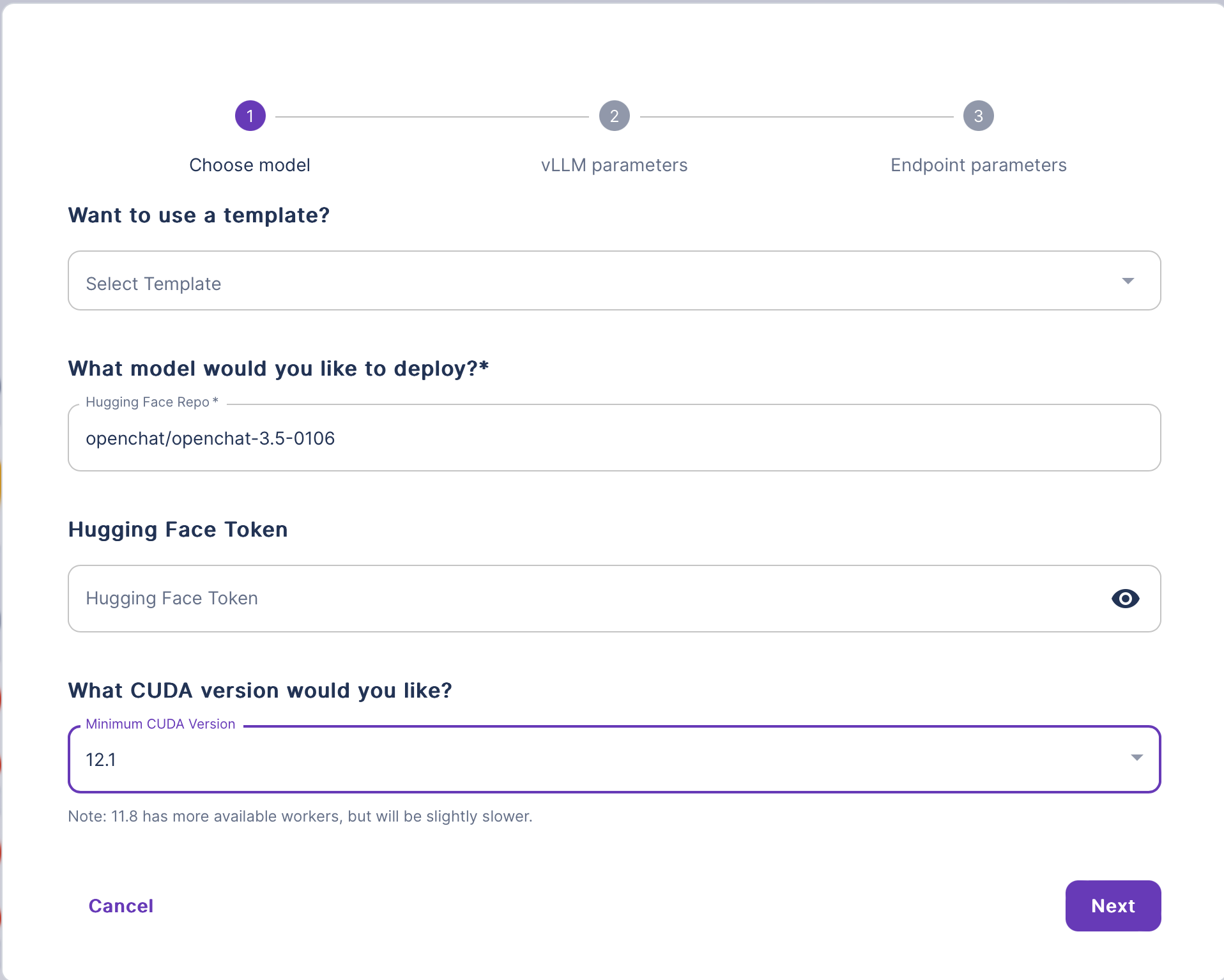
In the vLLM deploy wizard, provide the following information:
(Optional) Enter a template name.
Enter the name of your Hugging Face LLM model.
(Optional) Enter your Hugging Face token.
Select the desired CUDA version.
Click Next and review the configurations on the vLLM Parameters page.
Click Next again to proceed to the Endpoint Parameters page:
Prioritize your Worker Configuration by selecting the order of GPUs you want your Workers to use.
Specify the number of Active, Max, and GPU Workers.
Configure additional Container settings:
Provide the desired Container Disk size.
Review and modify the Environment Variables if necessary.
Click Deploy to start the deployment process.
Once the deployment is complete, your LLM will be accessible via an Endpoint. You can interact with your model using the provided API.
💡
Runpod supports any model architecture that can run on vLLM with configurable templates.
By integrating vLLM into the Configurable Templates feature, Runpod simplifies the process of deploying and running large language models. Users can focus on selecting their desired model and customizing the template parameters, while vLLM takes care of the low-level details of model loading, hardware configuration, and execution.
What's new in Runpod Serverless: Faster cold starts, batch inference, and no-Docker deploys
Whether you're already running production endpoints on Runpod or you're sizing us up for the first time, here's a plain-language tour of what Runpod Serverless does today, why it's faster and cheaper than it was six months ago, and how to deploy your first endpoint in minutes.
Beyond the Notebook: The Engineering Realities of Production AI Agents
Shift from stateless inference to stateful architectures to resolve infrastructure bottlenecks like memory management, concurrency limits, and runaway jobs in production AI agents.



.jpeg)