.jpeg)
How Runpod Serverless billing works when a job fails to complete
Why your balance can drop even when nothing succeeds, how to find where the money went, and how to keep it from happening again.
All
 Skip to main content
Blog
Learn how to optimize Model Context Protocol (MCP) tools to prevent oversized responses from exhausting your AI agent's context window.


An agent calls one tool. The tool does exactly what it was built to do and returns every record it knows about. The response alone is larger than the model's entire context window, and the session ends right there, taking the agent's working state with it.
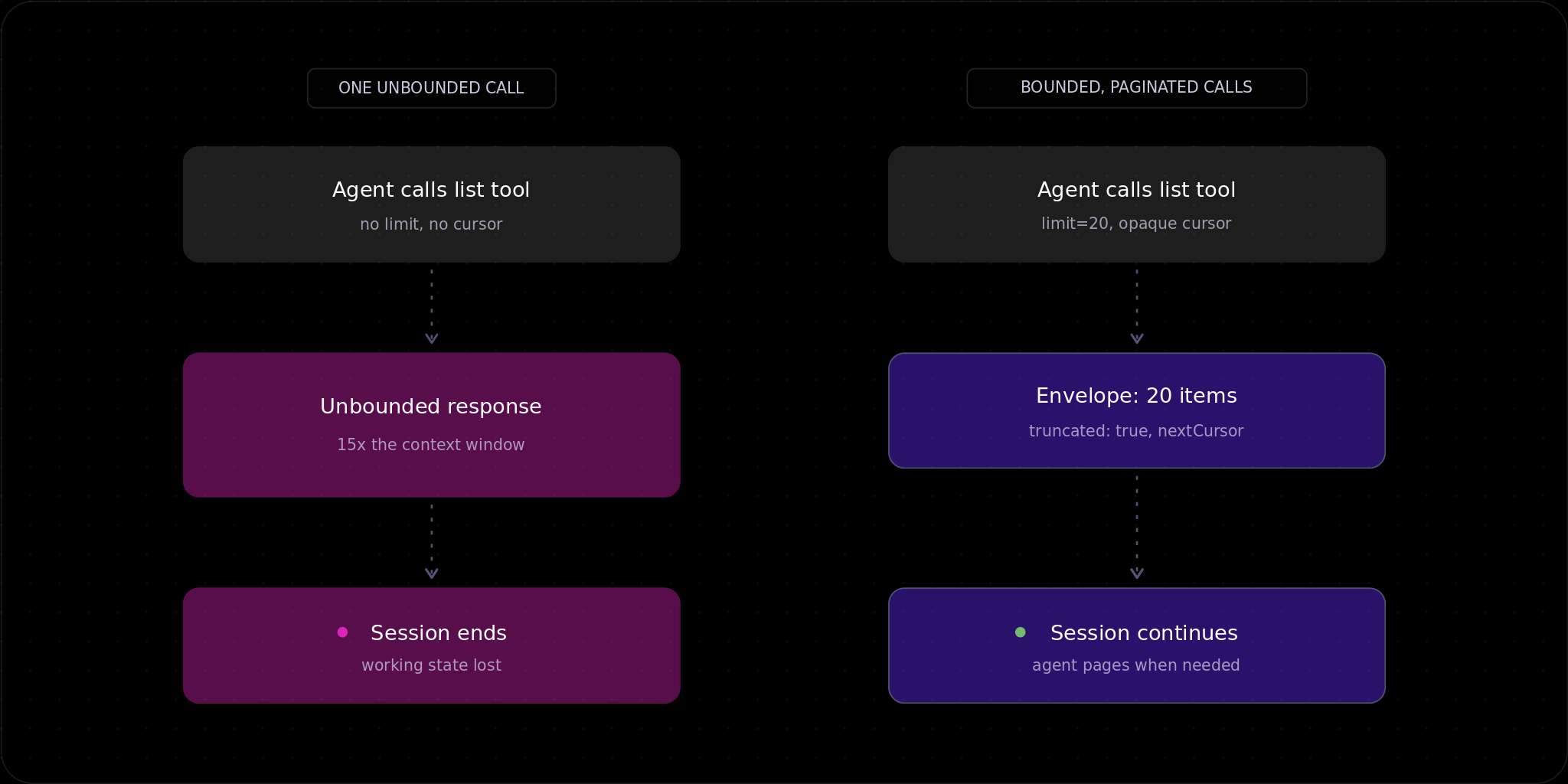
We found this failure mode in Runpod's Model Context Protocol (MCP) server. An internal audit in June traced a single unpaginated list call, returning roughly 15 times the size of Claude Code's context window on one real account.
The same failure hides in every MCP tool that wraps a REST endpoint designed before anyone had a token budget. List-everything endpoints, log tails, search results and file trees all assume the consumer can skim. An agent cannot skim, and context is a resource your tool spends on the agent's behalf. If you do not budget it, nobody does. If it happens while the agent is deploying infrastructure or halfway through a migration, the cleanup costs more than the restart.
The economics also favor fixing this early. Agent-sourced requests are a small but growing percentage of total traffic on our platform, and we've seen a 300x increase in MCP usage since June.
A human who hits an unpaginated REST endpoint in a browser scrolls past what they do not need. The response might be ugly, but it is free to ignore. An agent gets no such option. Most MCP clients forward the entire tool result straight into the large language model (LLM) context window on the next turn, so the model pays token cost for every byte whether or not the byte was useful.
In a GitHub discussion on MCP response size limits, developers report browser-automation tools consuming 50k–500k tokens for a single page read when the tool returns raw page content. At the top of that range, one page read costs more than double a 200,000-token context window before the model has reasoned about anything.
MCP's specification defines cursor-based pagination for list operations. A request carries an opaque cursor string, a response carries a nextCursor when more results exist and the server decides the page size.
What the spec does not define, as of the current version, is any limit on response size. An open proposal in the MCP repository would add a max_response_bytes capability negotiated at initialization, letting a server choose to paginate, summarize or error instead of dumping everything. Until something like that lands, capping response size is your responsibility as a tool builder, because the protocol will not do it for you.
After the audit, every list-style tool in our server gained two parameters: a limit with a default of 20 and a hard cap of 100, and an opaque cursor. Responses moved into an envelope that carries the items plus the metadata an agent needs to reason about what it received.
{
 "items": ["..."],
 "totalCount": 3187,
 "returned": 20,
 "offset": 0,
 "truncated": true,
 "nextCursor": "eyJvZmZzZXQiOjIwfQ=="
 }
The field values above are illustrative, but the field set is the real contract. An agent reading this envelope knows how much exists, how much it got and how to get more.
We enforce the cap client-side, in the tool wrapper itself, because the REST API underneath did not yet support server-side pagination at the time this fix was implemented. The wrapper fetches, slices and windows the data before any of it reaches the model. That is the pragmatic move when you do not control the upstream API.
A client or server that silently drops data past a size limit is worse than one that fails outright. An error is visible. A silently truncated result convinces the model it is reasoning over the complete picture when it is not, and every conclusion downstream inherits the gap. The truncated flag plus nextCursor is the fix, because the agent can tell it got a partial answer and decide for itself whether the task needs the rest.
Pagination bounds the cost of calling a tool. Registration costs context before any call happens. Every tool you expose ships its name, description and full parameter schema into the model's context, and the model then spends reasoning tokens rereading tool descriptions while it chooses. You can measure it: serialize your full tool list the way your MCP client sends it and count the tokens. Do not expose 40 narrow tools when six well-designed ones cover the same surface, and do not pad a tool description with output detail the model does not need. A description exists to answer one question: should the model pick this tool for this task?
For results too large to usefully inline, current MCP tooling guidance and our own fix point the same direction: return a resource URI the agent can fetch on demand instead of embedding the payload in the tool response. File contents, logs and generated images all fit this pattern.
The second half of our fix prevented nothing and mattered anyway. Every request now carries a structured identifier of the form caller=mcp; client=<name>; client_version=<ver>; transport=<stdio|http>. The client name and version come from the client's own initialize handshake, so treat them as self-reported telemetry labels, not a trust boundary. Attribution is how we noticed agent traffic patterns in the first place, and it is how we now watch paginated responses behave in production instead of assuming the fix worked.
Log one more field while you are in there: the size of every tool result, in bytes or tokens, next to the caller tag. Attribution tells you who is calling; response size tells you which tool is spending the most of your callers' context.
From the server side, this failure is invisible. The tool call succeeds, the response goes out and the session dies later, on the client, when the oversized result gets forwarded into the model's context. Your logs show a completed request. The user sees a session that ends abruptly right after a single tool call, often with a context-length error from the client, and nothing connects the two events unless you built the connection yourself.
If you percentile response size per tool, the tool that kills sessions shows up as an outlier long before a user files a ticket neither of you can reproduce. Our own audit surfaced the 15x number by measuring a real account's responses, and you can run the same check against your largest tenant today.
If you are building an MCP server, these are the best practices we now hold our own tools to:
Manage GPU workloads on Runpod with coding agents like Claude Code, Codex and Cursor.
Blog Posts