
Rebuilding our PyTorch templates
Our PyTorch templates now cover 2.6 through 2.13 across multiple CUDA and Ubuntu versions, with a new CUDA dropdown in the Pod deploy flow so you can match a template to your GPU and workload.
All
 Skip to main content
Blog
GLM-5.3 is now available on Runpod's public endpoints. Here's how to try it in the Playground, call it with curl, and use it through the OpenAI SDK in Python.


We now have GLM-5.3 available on our public endpoints. This blog post walks you through getting started with it on Runpod. What’s notable is that our pricing is more competitive than our competitors’. Text generation will cost GLM-5.3 - $2.42 per 1m output tokens, $0.77 per 1m input tokens ($0.143 per 1m cached input tokens).
GLM-5.3 is a new AI model from Z.ai. It’s especially good at writing code and handling long, multi-step tasks on its own, like fixing a big software project or working through a problem one step at a time. It’s an improved version of their previous model and was trained longer on more practice tasks. To get started, you will need to create an API key.
Before integrating GLM-5.3 into your application, it's helpful to experiment with the model and explore its capabilities. This blog post walks you through how to do so.
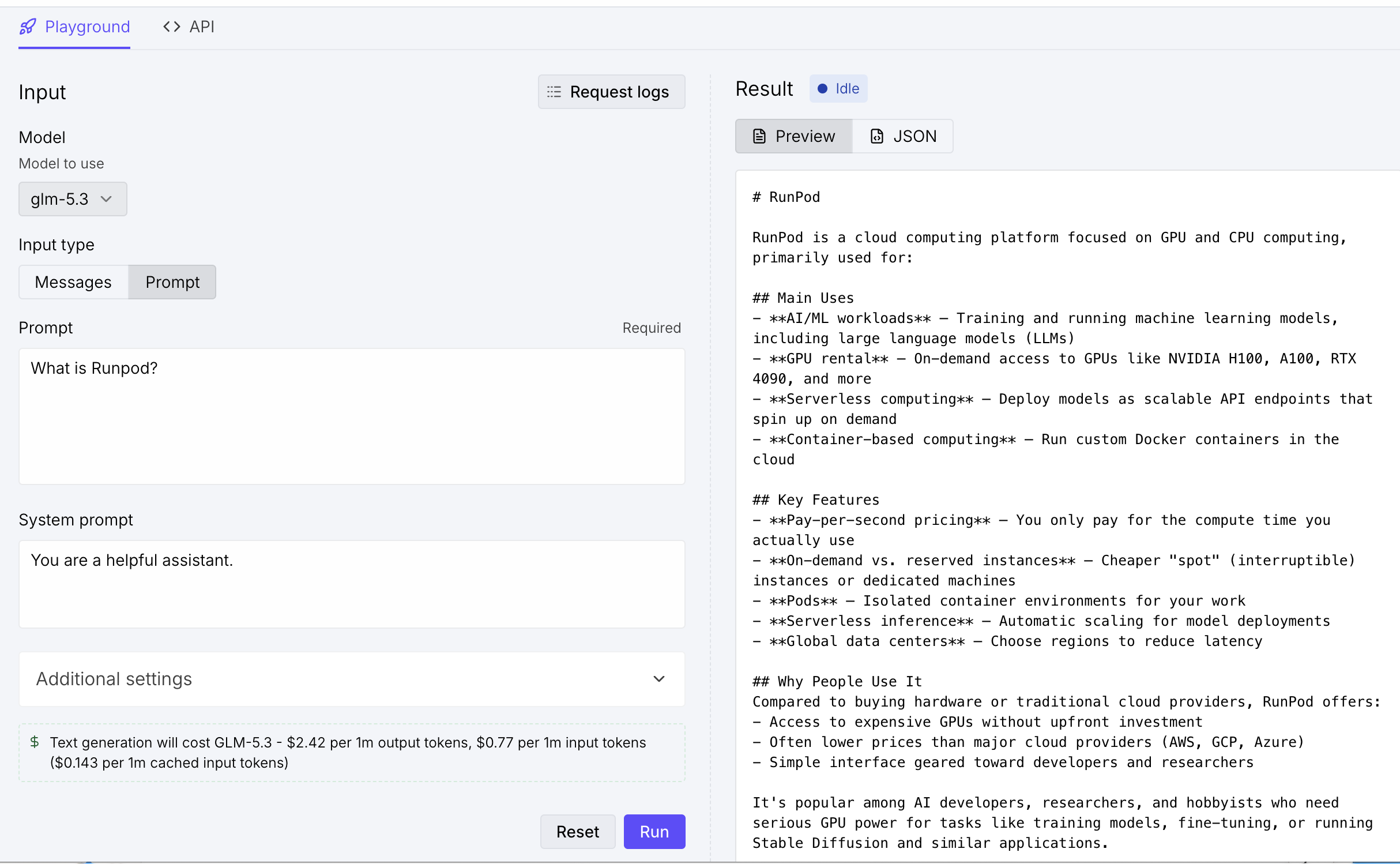
To get started, you can use the Playground. If you click on The Hub, under "Public Endpoints," you will see a listing for "GLM-5.3". You can edit the system and user messages, adjust sampling parameters such as max_tokens and temperature, set the reasoning_effort, and make the request directly.
The response you get back should look like this once it's completed:
To get started making requests with this endpoint, you can use curl. The Playground's API tab gives you a request that sends the input to /run. Runpod accepts the job immediately and returns an id, but the completion is not ready yet. The script below saves that ID and sends a GET request to /status/{job_id} every two seconds. While the job is queued or running, it prints the current status. When the status changes to COMPLETED, the model's response is available under output.
The request body uses the OpenAI-style messages format, with a system message to set the assistant's behavior and a user message containing the prompt. sampling_params controls generation settings like max_tokens and temperature, and reasoning_effort sets how much the model thinks before answering. The example uses low, which keeps responses fast; raise it for harder coding or multi-step tasks.
This example uses jq to read the JSON responses. Make sure it is installed, then set RUNPOD_API_KEY in your environment before running the script:
export RUNPOD_API_KEY="YOUR_API_KEY"Keeping the API key in an environment variable prevents it from being copied directly into the script.
BASE_URL="https://api.runpod.ai/v2/b1dd8hy2hqo1nb"

RUN_RESPONSE=$(curl --silent --show-error --fail \
  --request POST \
  --url "$BASE_URL/run" \
  --header "Content-Type: application/json" \
  --header "Authorization: Bearer $RUNPOD_API_KEY" \
  --data '{
    "input": {
      "messages": [
        {"role": "system", "content": "You are a helpful assistant."},
        {"role": "user", "content": "What is Runpod?"}
      ],
      "sampling_params": {
        "max_tokens": 4096,
        "temperature": 1
      },
      "model": "glm-5.3",
      "reasoning_effort": "low"
    }
  }')

JOB_ID=$(printf '%s' "$RUN_RESPONSE" | jq --raw-output '.id // empty')

if [ -z "$JOB_ID" ]; then
  printf 'The job submission did not return an ID:\n%s\n' "$RUN_RESPONSE" >&2
  exit 1
fi

printf 'Job submitted: %s\n' "$JOB_ID"

while true; do
  STATUS_RESPONSE=$(curl --silent --show-error --fail \
    --request GET \
    --url "$BASE_URL/status/$JOB_ID" \
    --header "Authorization: Bearer $RUNPOD_API_KEY")

  STATUS=$(printf '%s' "$STATUS_RESPONSE" | jq --raw-output '.status')

  case "$STATUS" in
    COMPLETED)
      printf '%s' "$STATUS_RESPONSE" | jq '.output'
      break
      ;;
    FAILED|CANCELLED|TIMED_OUT)
      printf 'Job ended with status %s:\n%s\n' \
        "$STATUS" "$STATUS_RESPONSE" >&2
      exit 1
      ;;
    *)
      printf 'Status: %s. Waiting...\n' "$STATUS"
      sleep 2
      ;;
  esac
done
The script prints the job ID as soon as Runpod accepts the request. During processing, you will see status messages such as IN_QUEUE and IN_PROGRESS. A successful job ends by printing the output object, which contains the model's reply. If the job reaches FAILED, CANCELLED, or TIMED_OUT instead, the script prints the full status response and exits with an error so the failure is not mistaken for a successful result.
Because this endpoint is OpenAI-compatible, you can skip the submit-and-poll flow in Python and use the OpenAI SDK directly. Point the client at the endpoint's /openai/v1 base URL, pass your Runpod API key as the api_key, and the chat completion is returned in a single call.
Install the openai package if it is not already available:
python -m pip install openai
As in the curl example, set RUNPOD_API_KEY in your environment before running the script. The messages, max_tokens, temperature, and reasoning_effort values map directly onto the SDK's chat.completions.create arguments, so the request is the same one the Playground generated, just in a different shape.
import os

from openai import OpenAI


client = OpenAI(
    base_url="https://api.runpod.ai/v2/b1dd8hy2hqo1nb/openai/v1",
    api_key=os.environ["RUNPOD_API_KEY"],
)

completion = client.chat.completions.create(
    model="glm-5.3",
    messages=[
        {"role": "system", "content": "You are a helpful assistant."},
        {"role": "user", "content": "What is Runpod?"},
    ],
    max_tokens=4096,
    temperature=1,
    reasoning_effort="low",
)

print(completion.choices[0].message.content)
The script prints the model's reply from completion.choices[0].message.content. If the request fails, the SDK raises an openai.APIError subclass with the status code and response body, which gives you the details needed for troubleshooting. To stream tokens as they are generated instead of waiting for the full reply, add stream=True and iterate over the returned chunks.
Because the client speaks the OpenAI protocol, this same setup works with any tool that accepts a custom OpenAI base URL.
GLM-5.3 is Z.ai's latest model, built for writing code and working through long, multi-step tasks on its own, and it's now available on Runpod's public endpoints at a lower price than you'll find elsewhere. Be sure to let us know on Discord, in the #built-on-runpod channel, if you build anything with it.
Blog Posts

.jpeg)
.jpeg)