MiniMax H3: The Open-Weight Omni-Modal Video Model, and What It Takes to Run It
Explore the MiniMax H3 open-weight omni-modal video model, its architecture, hardware requirements, and what developers need to run it on Runpod.
A note on the license
We would be remiss if we did not mention that the license appears to not authorize use in the United States, European Union, United Kingdom, or South Korea. It prohibits using, running, modifying, distributing, hosting, or even using the model’s outputs inside those territories. Runpod does not provide legal advice or guidance, and customers are responsible for ensuring they are complying with model licensing agreements (and it is also worth noting that we have data centers outside of these declared countries so you have options for those compliance needs.)
Introducing MiniMax H3
Video generation has been the last major modality where the closed labs kept a comfortable moat. Weights stayed private, iteration was slow, and if you wanted frontier-quality video you rented it through someone else's API.
That changed twice in the space of three days. MiniMax announced H3 on July 31, 2026 as an API-only product, then published the weights to Hugging Face on August 3 under the MiniMax H3 Community License. It's the strongest open-weight video model released to date, and unlike most of the "open" video releases before it, the audio isn't a separate stage bolted on afterward.
Here's what H3 actually is, what MiniMax did and didn't open-source, and how to size GPUs for it on Runpod.
What makes H3 different
To date, many video stacks have been a collection of specialists. One model for text-to-video, another for image-to-video, another for first-and-last-frame interpolation, separate models for subject reference and motion reference, a distinct pipeline for editing, and then a whole second stack for voice, sound effects, and music. You stitch them together and hope the seams don't show. This was most evident in the Wan 2.1-2.2 era, where it was video only at first and then S2V came out to do speech, and then later releases of Wan combined these stacks under one umbrella.
H3 collapses that. It reads text, images, video, and audio as one unified context, and you describe the relationship between those inputs in plain language. MiniMax's own demo prompt makes the point better than a spec sheet does: reference the camera movement from Video 1, have the character in Image 2 sing, and match the vocals to Audio 3. This is all done in a single generation. In the end, the final output is video with dialogue, foley, score, and room tone produced in the same pass as the picture, timed to the cut.
MiniMax H3 – core specifications
Architecture
33.1B dense, single-stream Omni Transformer~13B of that sits in AdaLN branches, which can be precomputed and cached for inference-only deployment
Text encoder
Qwen3-VL-32B
Position encoding
3D multimodal RoPE across (t, h, w)
Duration
4–15 seconds, integer values only
Frame rate
24 fps
Resolution
768p locallyUp to 2K via the hosted H3-Regenerate-2K stage
Audio
32 kHz native stereo, generated in the same pass as the picture
Aspect ratios
21:9 through 9:16 – includes 16:9, 4:3, 1:1, 3:4
Languages
11 – ar, zh, en, fr, de, it, ja, ko, pt, ru, es
References per generation
Up to 9 images, 3 video clips, 3 audio tracks
Open checkpoints
H3-Base only – FL2VA and Ref2VA, CFG-distilled
License
MiniMax H3 Community License AgreementSource-available, with territory restrictions – check the repo before deploying
Source: MiniMax H3 model card, August 3, 2026.
On the independent Artificial Analysis leaderboards, H3 has been placing first in video editing, with strong but not category-leading positions in text-to-video and image-to-video. Read that as: the editing and reference-control story is the real differentiator, not raw text-to-video fidelity.
The architecture, briefly
Four pieces do the heavy lifting, and two of them matter for anyone thinking about inference cost.
Contextual Omni Representation is the captioning and annotation layer. Rather than describing only the target video, it describes the relationships between context and target, and among elements within the context. MiniMax reports distilling roughly 100K tokens of source material down to about 4K on average. This is why H3 follows compound cross-modal instructions instead of picking one and ignoring the rest.
H3-VAE is a full tokenizer rewrite with a much higher compression ratio, which MiniMax credits with a ~4x gain in effective sequence length. This is the load-bearing piece. Without it, native 2K doesn't pencil out economically at any price.
H3-Omni Transformer deliberately abandons the Hailuo-02 architecture. Multimodal context tripled sequence-length variance, so the training architecture separates understanding and generation workloads and tunes hardware utilization for each. Reported result: end-to-end training throughput up nearly 30%.
In-Context Regeneration replaces the conventional super-resolution module. Instead of upscaling with a separate network, the base model regenerates its own low-resolution output while re-reading the original multimodal context. The practical payoff is small text and brand marks that survive the trip to 2K. If you're producing anything with legible typography, signage, or a logo in frame, this is the feature that matters. Although typography has been relatively solved in images for some time, in videos that hasn’t quite been the case yet, especially with open source models.
A full technical report is promised but not yet published, so all four of these are currently Minimax’s account rather than a peer-reviewed spec.
Getting started with MiniMax H3 on Runpod
The easy part: ComfyUI has day 0 support for Minimax and templates already set up. So you can get started today with just a few quick downloads.
Here are the specs for sizing a GPU:
First, deploy a pod using the official Runpod ComfyUI template with ~600 GB of volume disk; we’re going to pull the entire repo which will allow you to test each quant and decide what’s best for your use case.
Once the pod is up and running, we’ll need to download the models. Because we’ll be downloading a lot, it’s highly recommended that you authorize with a token to Huggingface for faster download speeds (it’s worth noting that one of the principal sources of download speed complaints we see is trying to pull models with a bare wget; the hf CLI is always the preferred method.)
You'll be asked to paste your token:
Then change into your ComfyUI models folder:
Download the entire repo with the following. This will automatically distribute the files into the appropriate subfolders.
Lastly, on a fresh pod it’s generally good practice to update and restart ComfyUI when you’re using day-0 implementations like this.
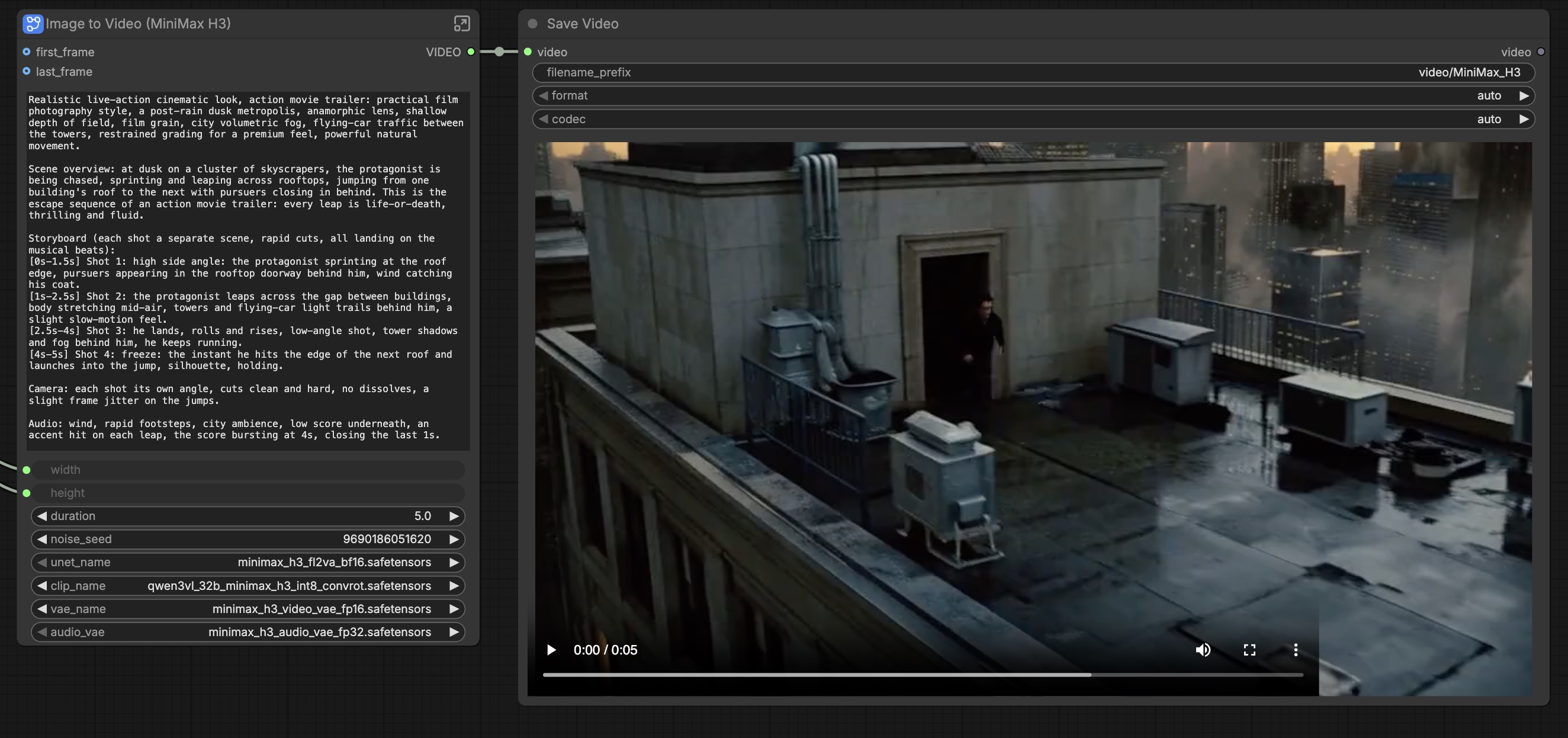
Once you're up and running, go to Templates on the left and select the Minimax H3 Text to Image template.
At this point, you're ready to generate your first video. You just need to select the specific quantizations you'd like for your video (higher precision uses more memory for better outputs.) Click Generate, and then you should see your video appear.
Should you build on it?
If you need 768p audio-video generation with serious reference control, want to keep footage and prompts on infrastructure you control, or plan to fine-tune, H3-Base is the most capable open checkpoint available for the job right now. The reference system includes nine images, three video clips, three audio tracks in one context which is an unusually generous control surface, and single-pass native audio removes an entire stage from most production pipelines. Initial discussions from the community appear very positive as the model seems to address both the length and generation time shortcomings of the early Wan modesl while vastly improving prompt adherance from its LTX2/2.3 successor.
Ready to try it? Spin up a Pod with the GPU config that matches your quantization target, or deploy H3-Base to a Serverless endpoint for burst generation. If you build something worth sharing, publish it to the Runpod Hub so others can deploy it in one click.


.jpeg)
.png)
.png)
.png)