Batch Inference is generally available on Runpod
Run the work that can wait as Batch Inference and keep real-time capacity for live traffic.
All
 Skip to main content
Blog
Benchmarks on one A40 show when a Serverless endpoint costs less than an always-on Pod, and what latency, storage and debugging trade-offs come with the switch.


Run a persistent inference API on a Runpod Pod when it serves steady traffic, and on Runpod Serverless when its workers can scale to zero between requests. In our benchmark on an A40 GPU, a busy Serverless worker cost about 2.3 times as much per token as a Pod on the same GPU. Serverless costs less only when its flex workers would be billed for under about 29 minutes of each hour.
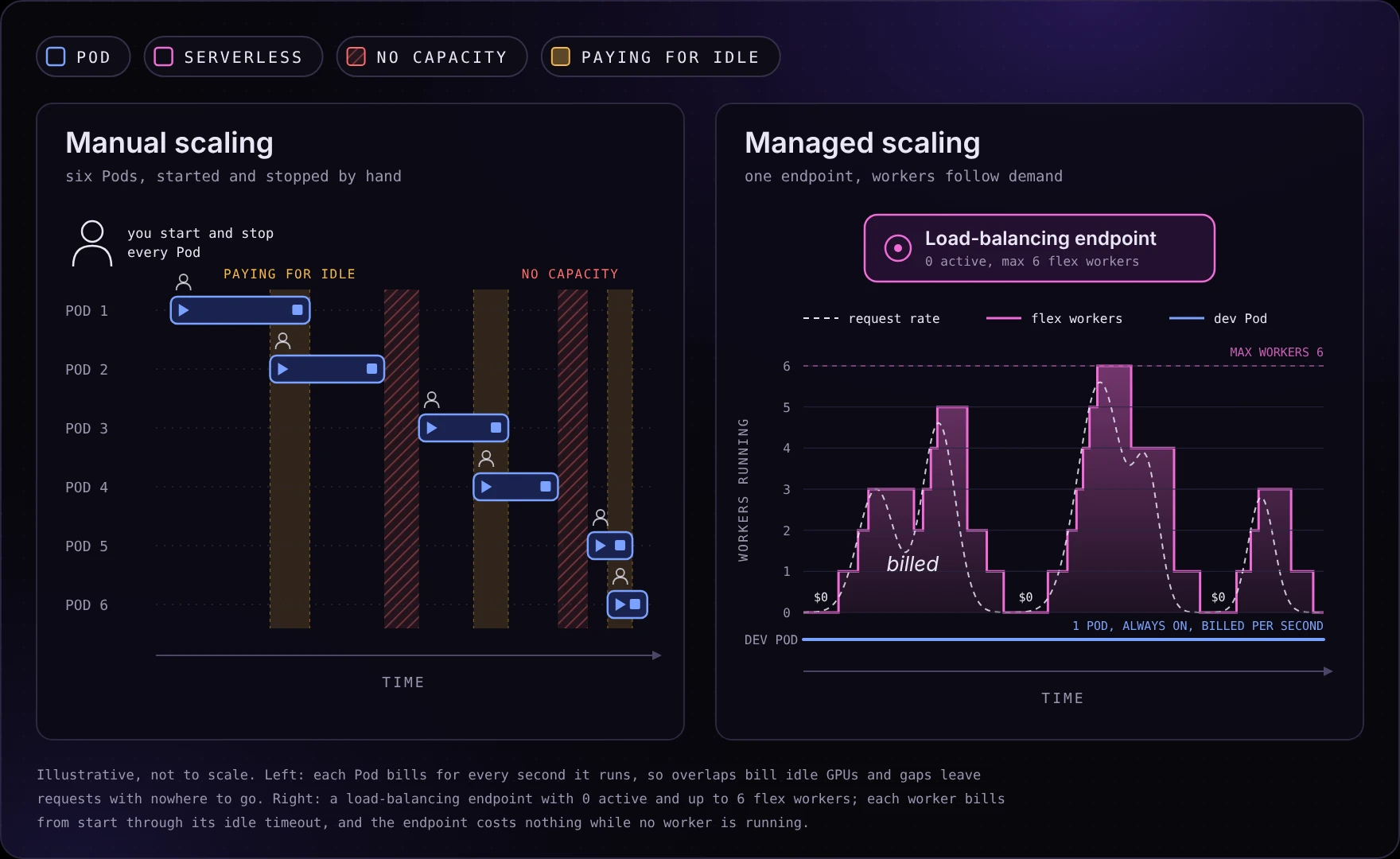
A customer ran a model API on six single-GPU Pods using the stock PyTorch template and a shared 50 GB network volume. They manually added Pods as demand rose and stopped them when it fell. They then asked us for guidance on persistent inference APIs, security, storage and scaling.
Manually starting and stopping Pods is autoscaling by hand. Whether Serverless is a better fit depends on billed worker time, latency requirements, storage and whether the serving process needs interactive access. This post compares Pods and Serverless endpoints on Runpod. It does not cover Flash, which has its own section in the Runpod documentation.
A Pod is a container running on a specific GPU machine that you rent by the second. You get a shell over SSH, a web terminal or JupyterLab, you can expose ports through our HTTP proxy and you pay for the GPU for every second the Pod is running, whether or not a request arrives. Storage comes in three layers. The container disk holds the image and scratch files. The volume disk holds persistent data for that Pod. A network volume is data center-scoped storage that outlives any individual Pod and can be mounted by the next one.
A Serverless endpoint is a stable URL in front of a pool of workers that we start and stop for you. A Serverless worker is a container running your handler on a GPU, and you set the bounds on how many exist. Active workers run continuously and bill every second whether or not a request arrives, and our Serverless pricing page lists discounts on active workers through sales. Flex workers start when demand arrives and shut down after an idle timeout, and you pay per second while they run. When no worker is running, the endpoint costs nothing. Endpoints come in two types:
/run and poll /status/{id}, or call /runsync and wait for the result. This type fits batch work and long-running jobs, because a job waits in the queue until a worker is free instead of failing, and failed jobs are retried automatically. That guarantee holds only within the job's time-to-live, which defaults to 24 hours and starts counting at submission, and each job's execution timeout defaults to 600 seconds.PORT environment variable (80 by default) and answers health checks on PORT_HEALTH, which the load balancer polls at /ping by default. PORT_HEALTH also defaults to 80 and does not follow PORT, so if you move the server to another port, set PORT_HEALTH to match. Otherwise the load balancer polls port 80, gets no answer and never marks the worker ready, and a worker with misconfigured ports stays up for 8 minutes returning 502 errors before it terminates. Set HEALTH_CHECK_PATH if your server exposes health elsewhere, such as /health. Return 200 when ready and 204 while initializing. The endpoint has no backlog: when every worker is busy, it drops requests rather than buffering them, and it does not retry failures.Both types use the same worker model, the same billing model and the same GPU tiers, so choosing one changes how clients call your server, not what you pay for compute.
Figure 1. Request routing through a Pod, a queue-based Serverless endpoint and a load-balancing Serverless endpoint.
A Pod bills continuously while running, so its cost per token falls as throughput rises. Serverless bills for worker time, so it saves money only when workers sit idle long enough to scale down. Compare both at the throughput and latency your workload requires.
For a Pod, cost per million output tokens is its hourly price divided by the number of tokens it produces in an hour:
$ per million tokens = hourly price / (tokens per second × 3600) × 1,000,000Our internal benchmark suite measured this using an A40 Pod serving Qwen2.5-14B in FP8 and a 48 GB Serverless endpoint whose workers all ran on A40s, with vLLM 0.32.0 on both sides. The suite sends requests using an open-loop Poisson arrival pattern against production Pods and endpoints.
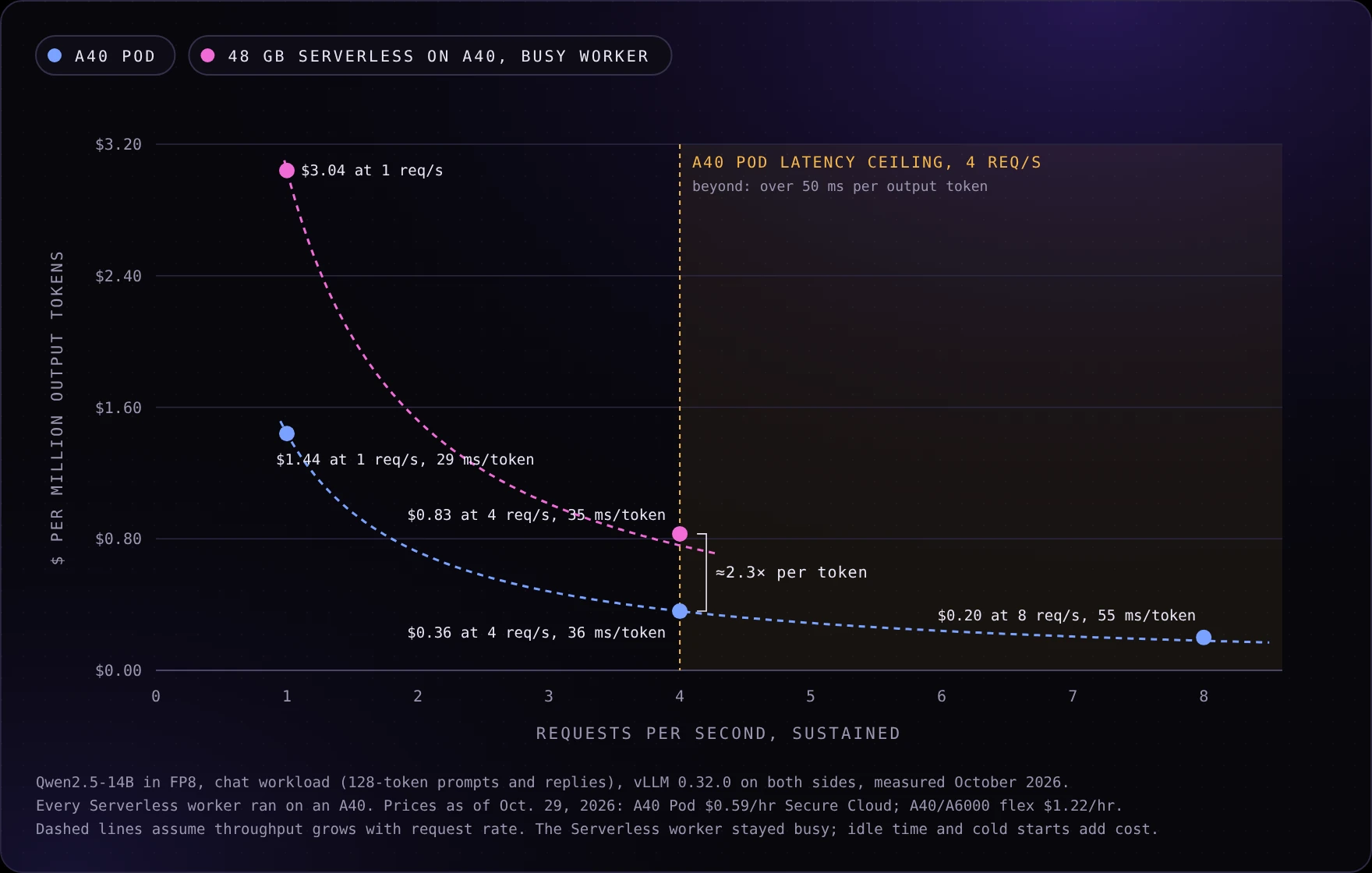
Four requests per second was the highest tested rate on the Pod that met the benchmark's latency targets: one second to first token and 50 milliseconds per output token. At that rate, the busy Serverless worker produced slightly fewer tokens per second and cost about 2.3 times as much per token, because it runs the same GPU at roughly twice the hourly price.
| Configuration | Throughput | Cost per million output tokens |
|---|---|---|
| A40 Pod, 1 req/s | 114 tokens/s | $1.44 |
| A40 Pod, 4 req/s | 454 tokens/s | $0.36 |
| 48 GB Serverless on A40, 4 req/s | 409 tokens/s | $0.83 |
Measured in October 2026; the Pod results match the July and August runs within about 1% across three runs in two data centers. Costs use October 29, 2026 prices. The workload used random 128-token prompts and 128-token responses. The A40 lacks FP8-specific acceleration, so FP8 reduces memory consumption without accelerating its arithmetic.
At eight requests per second, the A40 Pod reaches approximately $0.20 per million tokens, but output latency rises to 55 milliseconds per token, just over the benchmark's 50-millisecond target. An A6000 Pod at the same Secure Cloud price held the target at that rate, at 40 milliseconds per token and about $0.19 per million tokens, so the card you pick sets the ceiling as much as the price does.
A busy Serverless worker cost more per token than the Pod at every rate the benchmark tested: $3.04 against $1.44 per million tokens at 1 request per second, and $0.83 against $0.36 at 4 requests per second. The gap is structural rather than specific to this workload. The Serverless worker runs the same A40 at roughly twice the hourly price, so Serverless saves money only when its workers stop running. The question that decides the choice is how much of each hour a worker would be billed, and the next section calculates that threshold.
A second comparison looks at billed GPU time rather than measured cost per token, which captures the one way Serverless saves money: workers that scale to zero stop billing.
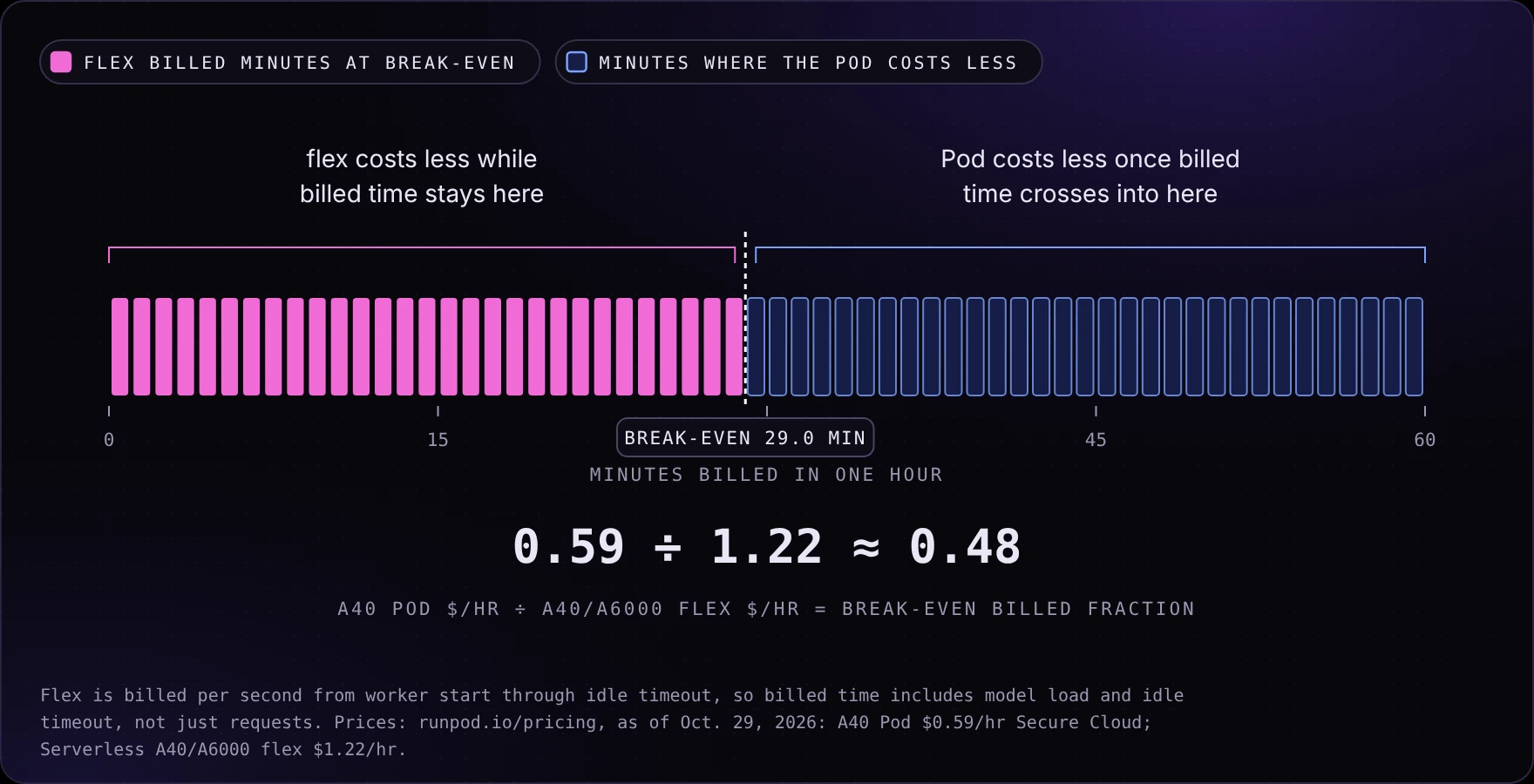
For comparable throughput, the billed-time break-even between an always-on A40 Pod and A40/A6000 flex workers is the ratio of their hourly prices. At 4 requests per second the Serverless worker produced about 10% fewer tokens per second than the Pod, so it needs slightly more billed time for the same work.
Break-even billed fraction = Pod hourly price / flex worker hourly priceAt October 29, 2026 prices, that ratio was approximately 0.48. An always-on A40 Pod therefore has a lower GPU-time bill when equivalent flex capacity would be billed for more than about 48% of each hour, or 29 minutes. Current rates are {{gpu:a40}}/hr for an A40 Pod on Secure Cloud and {{sls:a6000-a40}}/hr for A40/A6000 flex workers.
Model loading and idle timeouts count toward worker billing.
Measure throughput and latency first, then compare the cost of enough capacity to serve actual traffic, including idle time and worker startup.
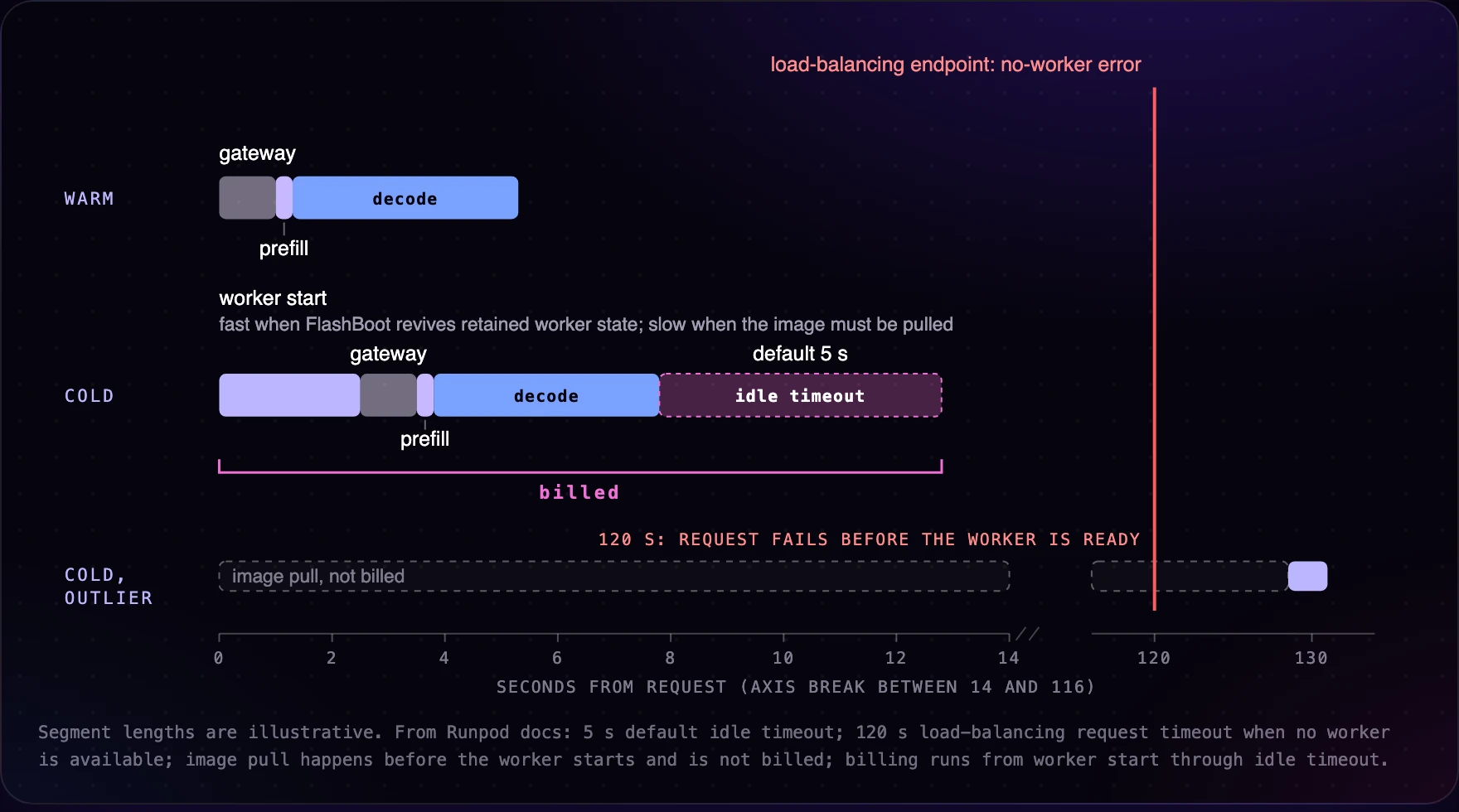
Even a warm Serverless worker adds gateway latency. Cold starts add another delay when no worker is running.
On the same A40 hardware and vLLM version, with a warm worker and one request at a time, a queue-based Serverless endpoint reached its first token in 0.43 to 0.53 seconds, against 0.04 to 0.06 seconds on a direct Pod connection. That is about half a second of gateway overhead. Under load the gap grows: at 4 requests per second on one worker, the first token took 2.7 to 3.2 seconds on Serverless against 0.13 seconds on the Pod, although tokens streamed at the same speed once they started. These figures come from queue-based endpoints. We did not measure load-balancing endpoints, which skip the queue, so do not assume that either the idle overhead or its growth under load carries over to them. If your product requires sub-second first tokens, benchmark the endpoint type you plan to deploy against that target before choosing.
Cold starts occur when a request arrives and no worker is running. FlashBoot shortens them by retaining worker state after a worker scales down, so a revived worker skips most of a fresh boot. On endpoints that had already provisioned a worker, the benchmark measured a median cold start of about 1.5 seconds across 151 trials in August, timed from the request to the first response. A separate re-run of 15 trials on the current worker image confirmed the typical case: 13 cold starts woke a sleeping worker in 1.0 to 2.0 seconds. The other 2 of the 15 needed a full worker boot and took about four minutes each. A persistent API that scales to zero must plan for that tail, either by keeping an active worker or by accepting that an occasional request will wait minutes. The first worker on a brand-new endpoint takes longer still, because it must download the model, so a client that sends the first request to a new endpoint should expect to wait minutes.
You have three levers against cold starts, and each one costs money or effort:
New endpoints have FlashBoot enabled by default, according to the endpoint settings reference. The REST API reference does not list a default for the flashboot field, so set it explicitly when you create endpoints from infrastructure code.
Low-traffic endpoints also scale down on their own. After 3 days with no requests, Runpod reduces the endpoint's maximum workers to 2 and sends you an email. After 7 days, it sets the maximum to 0, and the endpoint stays at its reduced limit until you raise it yourself. An API that sits unused for a week therefore cannot start a worker when traffic returns, so monitor the limit on any endpoint that must stay reachable.
Load-balancing endpoints add hard limits that a client must respect. A request that finds no available worker errors after 2 minutes, and request processing is capped at 5.5 minutes. Request and response payloads are capped at 30 MB. A client that waits 15 minutes for a response is waiting on a reply that cannot arrive. Poll the health route until a worker reports ready, then send the real request. For long jobs, use a queue-based endpoint and the asynchronous /run pattern instead.
Serverless workers are stateless by design. Anything a handler writes to local disk is gone when the worker stops, and the next request may land on a different worker on a different machine. If your inference path depends on state that accumulates across requests, such as a local cache you populate at runtime, session files or a fine-tuned adapter you download lazily, you must move that state somewhere durable or keep it in the client.
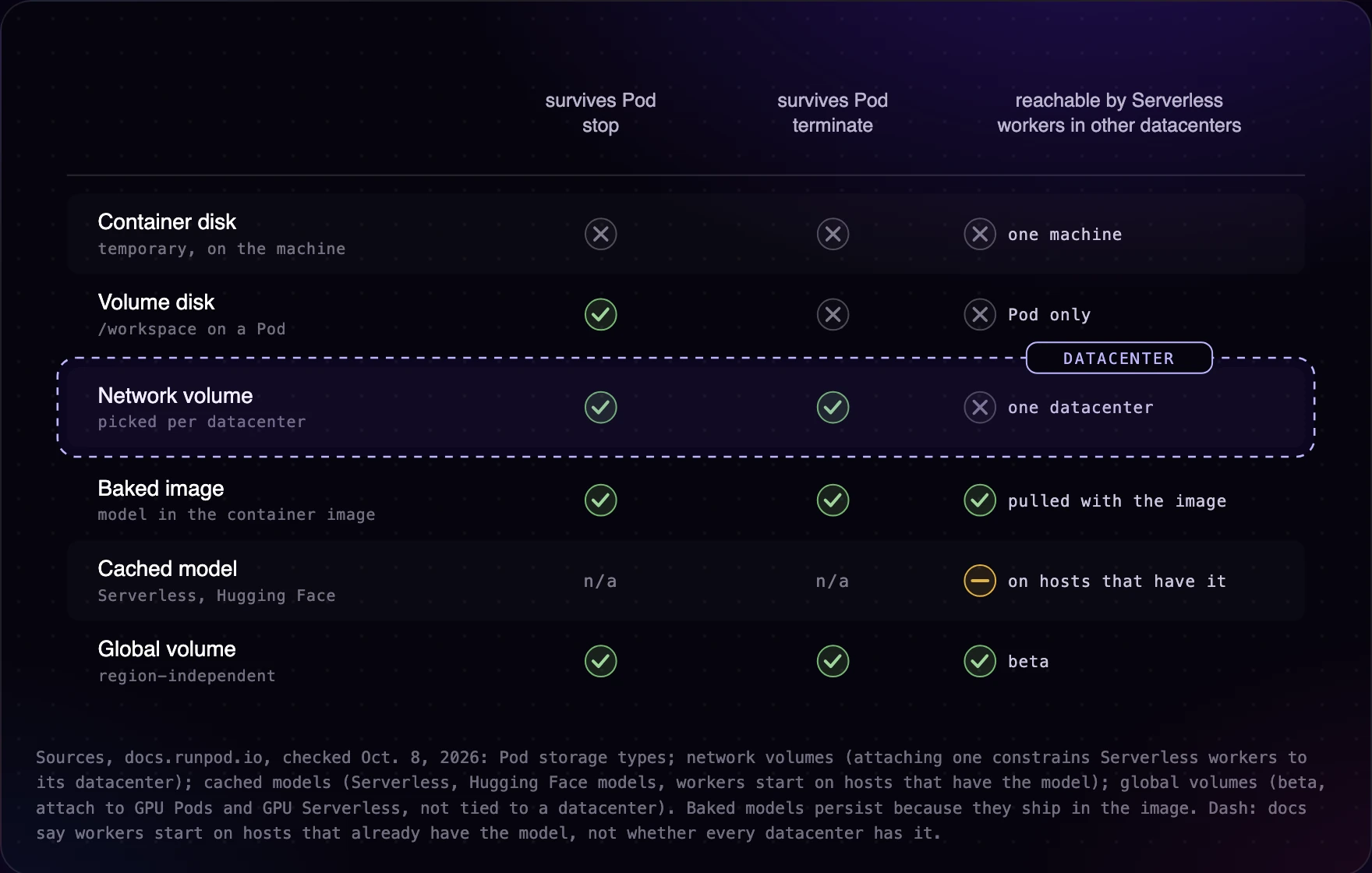
Pods hold state better, though the guarantees differ by storage layer. Data on the container disk does not survive a stop. Data on the volume disk survives a stop and is deleted when you terminate the Pod, and a stopped Pod keeps paying for it. Data on a network volume survives termination and can be attached to the next Pod. Network volumes are available for Pods on Secure Cloud only, and you attach one when you deploy the Pod. The six-Pod customer used a network volume, which is why recreating Pods did not lose their model weights.
Network volumes carry a constraint on both products. A network volume lives in one data center, so every Pod or Serverless worker that mounts it must run in that data center. On a Serverless endpoint, a single attached network volume restricts every worker to that data center's GPU supply, which narrows both scale-up capacity and failover. You can attach one network volume per data center in several data centers to widen placement, but data does not sync between them, so you copy it yourself. On a Pod, the volume decides where the Pod runs, and you need a free GPU of the right type in that data center when you deploy. Global volumes, region-independent storage in beta for GPU Pods and GPU Serverless endpoints at the time of writing, remove that restriction, with trade-offs. A global volume mounts at /runpod-volume on Serverless workers, the same path a network volume uses, and at /workspace on Pods, or at /workspace-global when the Pod also has a network volume. An endpoint can attach network volumes or one global volume, not both. Global volumes are eventually consistent, so a change made after a worker starts may not be visible to that worker immediately, and they do not support file locking, atomic rename, hard links or permission bits. They bill for storage plus read and write requests rather than storage alone. That makes them a good fit for read-heavy data that changes rarely, such as model weights, and a poor fit for weights you plan to replace while workers are running.
For a persistent inference API, the storage decision comes down to where model weights load from. If they can be baked into the image or served from cached models, Serverless can place workers wherever GPUs are free. If they must come from a single network volume, you have accepted a single-data center footprint, and you should check that data center's supply for your GPU type before you commit.
A Pod gives you a root shell on a running container. You can attach a debugger, inspect GPU memory with nvidia-smi while a request runs, edit code in place and restart the server without rebuilding an image. That is the right environment for developing a handler, profiling a model and anything else that needs interactive access. You also own everything a scheduler would otherwise do: restarting a crashed server, replacing a Pod when its host has a problem, adding capacity when traffic rises and removing it when traffic falls.
With Serverless, Runpod manages worker scaling and replacement, but you give up interactive shell access to production workers. Changes ship as a new image or template version. The autoscaler adds workers as demand rises, removes idle workers, falls back to another GPU type when necessary, and removes unhealthy workers from routing.
Sizing the maximum worker count is a capacity calculation, and Little's law gives you the number. The average number of requests in flight equals the arrival rate multiplied by the average end-to-end latency:
in-flight requests = arrival rate × end-to-end latency
max workers ≈ peak in-flight requests / requests each worker serves concurrently
As an illustration, 10 requests per second at a 4-second average end-to-end latency means 40 requests in flight. If each worker runs a batching engine such as vLLM and serves 8 concurrent requests within your latency target, you need 5 workers at peak, and setting the maximum about 20% higher, at 6, absorbs spikes and cold starts. A handler that processes one request at a time needs 40. Measure per-worker concurrency at your latency target on a single Pod before you set the endpoint's limits, because that measurement drives the whole calculation.
Max workers only caps concurrency. The endpoint's scaling type decides whether the autoscaler ever reaches that cap. Queue delay scaling adds workers when requests wait longer than a threshold, 4 seconds by default. Request count scaling sizes the pool from queued plus in-flight requests, and Runpod recommends it for LLM workloads. An endpoint with five or more workers also places some of them on the lower-priority GPU types you selected, so measure throughput on every GPU type in your list.
On a Pod, you control the exposed ports and the processes inside the container, and you can encrypt the volume disk at rest, although container disks and network volumes cannot be encrypted. On a Serverless endpoint, clients reach your workers through the endpoint URL with a Runpod API key by default, and exposing a worker's public IP and port is an opt-in setting for persistent connections such as WebSockets. If your compliance requirements depend on specific isolation guarantees for either product, ask us to confirm them rather than inferring them from the architecture.
Answer these five questions in order. Latency and debugging requirements can eliminate Serverless before cost enters the discussion.
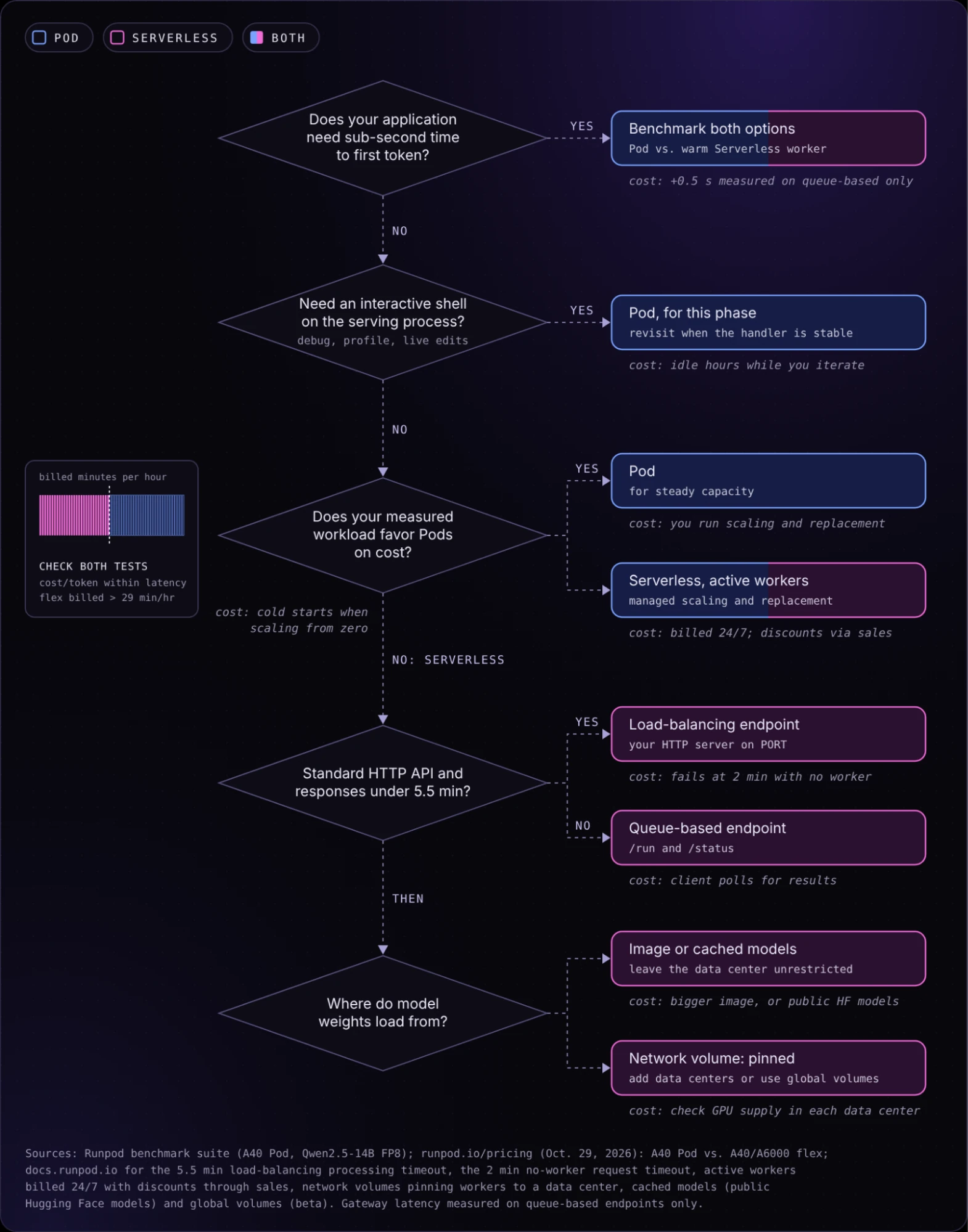
Manually starting and stopping six Pods suggests variable demand, but it does not establish utilization or cost savings. Stopping a Pod also does not stop every charge. As of October 29, 2026, a stopped Pod's volume disk bills at $0.20 per GB per month, double the $0.10 rate while it runs, so the hours the customer counted as savings still carried a storage premium. The shared network volume bills at the same rate whether or not a Pod mounts it.
Confirm the customer's latency and production debugging requirements before migrating. The stock PyTorch template does not include an inference server, so the customer's model API is a server process they started and exposed on an HTTP port. That is the shape a load-balancing endpoint expects, and migrating it means building the same server into an image and adding a /ping health route.
Keep one Pod for development and profiling, and test a Serverless load-balancing endpoint for inference. Start with zero active workers, up to six flex workers (raise the maximum from its default of three), FlashBoot and a 60-second idle timeout. Bake weights into the image or use cached models. These are starting settings, not a validated capacity plan. Our gateway latency numbers come from queue-based endpoints, so measure time to first token on this load-balancing endpoint before you compare it with the Pods.
Compare a week of endpoint billing and latency against the Pod baseline. If Pods are less expensive at the observed load or gateway latency is unacceptable, retain Pods for steady traffic and consider Serverless for bursts.
Serverless is cheaper only when its workers scale to zero for much of each hour. On the same A40 GPU, a busy Serverless worker cost about 2.3 times as much per token as a Pod in our October 2026 benchmark. At October 29, 2026 prices, an always-on A40 Pod has the lower GPU bill once A40/A6000 flex workers would be billed for more than about 29 minutes of each hour.
In our tests, a warm queue-based endpoint reached its first token about half a second later than a direct Pod connection, and the gap grew to several seconds at 4 requests per second on one worker. We did not measure load-balancing endpoints.
With FlashBoot, 13 of 15 cold starts in our re-run woke a sleeping worker in 1.0 to 2.0 seconds, and the other 2 took about four minutes because they needed a full worker boot. The first worker on a new endpoint takes longer because it must download the model.
Yes. A load-balancing endpoint forwards HTTP requests to your server unchanged, so an OpenAI-compatible vLLM server keeps its routes. Set PORT and PORT_HEALTH, answer health checks at /ping and keep each response under the 5.5-minute processing limit.
Yes. A stopped Pod releases its GPU but keeps billing for its volume disk, at a higher rate than while it runs. Network volumes bill whether or not a Pod is attached.
Benchmark your model at expected load, check throughput and latency against the cost break-even, then validate the choice using actual worker billing.
Runpod Serverless runs your container as an autoscaling endpoint that scales to zero and bills by the second.
Blog Posts