
Running your own inference endpoint changes the economics of RAG. You pick the GPU, you run your own model weights, and you pay for GPU time instead of per-token fees to an API vendor you don’t control.
Every LangChain RAG tutorial takes the same shortcut: plug in OpenAI’s API and call it done. That works for a demo. It gets uncomfortable in production, where you’re metered per token, throttled by limits someone else set, and shipping your documents to a third party you may not have a BAA with.
Long-context models were supposed to make retrieval unnecessary, but in practice, they moved the problem. You still pay for every token you put in the window, the window goes stale the moment your documents change, and an answer assembled from an undifferentiated 200,000-token blob is hard to audit. Retrieval stayed because it’s the cheap way to keep an answer current, attributable, and scoped to documents the model never trained on. What changed is where it sits, now usually a tool an agent calls rather than a pipeline a user queries directly.
This guide builds a full retrieval-augmented generation (RAG) pipeline using LangChain, with a Runpod Serverless endpoint running vLLM as the LLM backend. The framework patterns and retrieval logic are the standard ones. What changes is who runs inference.
What Makes a RAG Pipeline Production-Ready
The gap between a RAG notebook and a RAG service is mostly unglamorous plumbing: vectors that outlive the process, chunk boundaries someone actually chose, a plan for when the endpoint doesn’t answer, logs that explain a bad result, and a bill that tracks something you can forecast.
- Persistence. Notebook demos build an index in memory, then throw it away when the kernel restarts. A production system stores embeddings to disk or a managed vector database, so you’re not re-embedding 50,000 documents on every deploy.
- Chunking strategy. The default
RecursiveCharacterTextSplitterwith 1,000-character chunks is fine for a demo, but chunk size affects retrieval quality directly. Too large and retrieved chunks carry noise, too small and they lose the context that made them meaningful. - Error handling. LLM endpoints time out. Embedding batches fail on malformed input. A chain that calls a network service needs a bounded retry, a defined failure path, and structured logging.
- Observability. You want to know when retrieval comes back empty-handed, when the model answers confidently from weak context, and where your latency actually goes.
- Cost predictability. Whatever you end up spending, you can derive it from numbers your own pipeline produces, which is a different exercise from estimating token counts against someone else’s price list.
Architecture Overview
Four stages carry a document from raw file to grounded answer: ingestion, vector storage, retrieval, and generation. GPU compute matters most in two of them, embedding generation when you run the embedding model yourself, and text generation on the Runpod endpoint.
One detail the diagram makes explicit, because it trips people up: the query goes through the same embedding model as the documents. Similarity search compares vectors, so a query only finds anything if it was embedded by the model that produced the stored vectors.

Embedding can run on CPU with sentence-transformers for a modest corpus, or on a dedicated endpoint when ingestion volume justifies it. Generation, where retrieved chunks become an answer, is the step that wants a Runpod Serverless endpoint with vLLM behind it.
Prerequisites
Before you start, have the following ready:
- A Runpod account with billing enabled, and enough credit to run a GPU worker. Endpoint deployment stops at the payment check, not at configuration.
- Python 3.10 or newer.
sentence-transformersrequires it, and an older interpreter is the most common reason the install below fails to resolve. - A Hugging Face account and access token. Gated models,
meta-llama/Llama-3.1-8B-Instructamong them, need the license accepted on the model page before the endpoint can pull weights. - About 8 GB of free RAM on whatever machine runs the pipeline. Chroma holds its index in memory, which is what caps corpus size later.
- A directory of documents to index at
./data. Markdown, plain text, or anythingpathlibcan read.
Familiarity with LangChain’s chain syntax helps but is not assumed. Every chain here is built from scratch.
Setting Up a Runpod Serverless Endpoint
A Runpod Serverless vLLM endpoint gives you a GPU you choose running weights you choose, reachable two ways: through Runpod’s own job API, which the LangChain integration uses, and through an OpenAI-compatible route that any OpenAI-shaped client can call. The first path carries this tutorial. The second is what makes the LlamaIndex section later a drop-in.
1. Deploy the endpoint
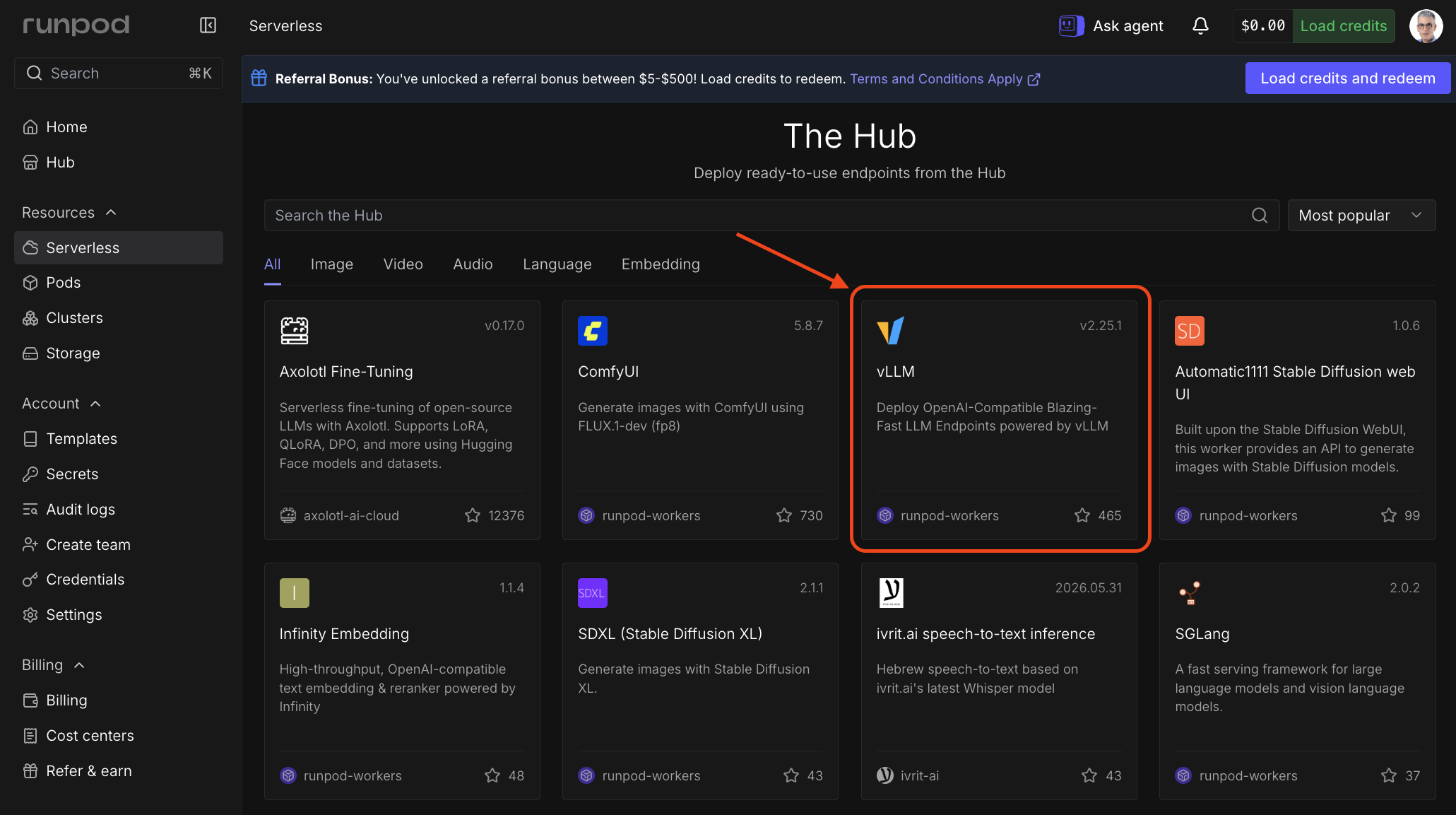
In the Runpod console, open Serverless and scroll to The Hub, then select the vLLM card. You can also go straight to the vLLM worker listing. Use this listing rather than a Hub search: it is published under Runpod’s own runpod-workers account, and the Hub carries community listings that a search will mix in alongside it.
Click the deploy button, which names the worker version it will deploy (v2.25.1 at the time of writing). Pin that version deliberately, for the same reason the packages above are pinned.
The deploy flow then asks for the model and its settings. Every one of them is an environment variable underneath, which is worth knowing because the console’s field labels change over time while the variable names have stayed put, and because these are exactly what you edit after deployment:
This endpoint serves generation only, so it takes a chat model; embeddings come from a separate, much smaller model covered in Building the Embedding Layer. meta-llama/Llama-3.1-8B-Instruct fits on a single GPU and follows instructions well enough for grounded question answering. It’s a gated model, so accept the license on its Hugging Face model page before deploying, or the worker cannot pull the weights.
MAX_MODEL_LEN should match your expected context length. A RAG setup passing three to five retrieved chunks plus a prompt template generally fits comfortably in 8,192 tokens, though you should confirm against your own chunk sizes. GPU_MEMORY_UTILIZATION sets the fraction of VRAM vLLM reserves, most of which becomes KV cache. Raise it toward 0.95 when you have measured headroom and want more room for concurrent requests or longer context; lower it to 0.85 if the worker fails to start with an out-of-memory error.
Pick a GPU appropriate for your model size when the flow asks. An A100 80GB leaves room to experiment while you tune the rest of the pipeline. Creating the endpoint takes several minutes while Runpod provisions the worker and downloads the model.
If you want a shorter path and can accept the defaults, Serverless, then Get started, then Deploy LLM from Hugging Face takes a model ID and builds a vLLM endpoint for you, leaving the settings above to environment variables afterward.
Once the endpoint is live, the Requests tab on the endpoint detail page lets you send a test request before wiring up LangChain. Copy the endpoint ID, which you’ll need in the next step.
To change any of these later, open the endpoint detail page, select Manage, then Edit Endpoint, expand Public Environment Variables, and click Save Endpoint.
2. Install the LangChain integration
Pin the packages whose interfaces move fastest. LangChain’s integration surface changes across major versions, and an unpinned install is the most common reason a working RAG script stops working a month later. The ranges below are chosen for compatibility rather than recency, for a reason worth reading before you bump them.
pip install -qU \
  "langchain>=0.3.30,<1.0" \
  "langchain-runpod>=0.2,<0.3" \
  "langchain-text-splitters>=0.3,<1.0" \
  "langchain-chroma>=0.2,<1.0" \
  "langchain-huggingface>=0.3,<1.0" \
  "sentence-transformers>=5.6,<6.0"
Or the same set as a requirements.txt, pinned to the exact versions this tutorial was tested against:
langchain==0.3.30
langchain-core==0.3.86
langchain-runpod==0.2.0
langchain-text-splitters==0.3.11
langchain-chroma==0.2.6
langchain-huggingface==0.3.1
sentence-transformers==5.7.0
Then pip install -r requirements.txt. Run pip freeze > requirements.lock after a working install if you want the full transitive set.
These pins hold the stack on the LangChain 0.3 line, which is the line langchain-runpod supports. The integration requires langchain-core>=0.3.15,<0.4, so asking for it alongside LangChain 1.x produces an unsatisfiable resolution rather than a warning. Note the shape of that failure if you hit it: pip reports the conflict against langchain rather than against the package that caused it. Two smaller consequences follow. langchain-core and httpx are deliberately left unpinned above so the integration’s own ceilings select them, and langchain-community still carries the pieces LangChain 1.x later moved out, ContextualCompressionRetriever among them. If you are starting a project that does not need ChatRunPod, LangChain 1.x driving the endpoint’s OpenAI-compatible route is the more current path.
3. Configure credentials
Read credentials from the environment and fail at startup if they’re missing, rather than surfacing a KeyError deep inside a request.
import os

REQUIRED_VARS = ("RUNPOD_API_KEY", "RUNPOD_ENDPOINT_ID")

missing = [var for var in REQUIRED_VARS if not os.environ.get(var)]
if missing:
    raise RuntimeError(
        f"Missing required environment variable(s): {', '.join(missing)}. "
        "Create an API key under Settings in the Runpod console, and copy the "
        "endpoint ID from your Serverless endpoint page. Set both in your "
        "shell or in the endpoint's environment variables."
    )

RUNPOD_API_KEY = os.environ["RUNPOD_API_KEY"]
RUNPOD_ENDPOINT_ID = os.environ["RUNPOD_ENDPOINT_ID"]
4. Initialize the LLM
The langchain-runpod package exposes ChatRunPod for chat-style models. It is addressed by endpoint, not by model name: endpoint_id is what routes the request, while model_name is metadata that travels with the call.
from langchain_runpod import ChatRunPod

llm = ChatRunPod(
    endpoint_id=RUNPOD_ENDPOINT_ID,
    api_key=RUNPOD_API_KEY,
    # Metadata only. The weights are whatever you deployed to the endpoint.
    model_name="meta-llama/Llama-3.1-8B-Instruct",
    # Near-zero temperature keeps answers anchored to retrieved context
    # instead of inventing plausible-sounding detail.
    temperature=0.1,
    max_tokens=512,
    # ChatRunPod submits a job and polls for the result, so give the poll
    # loop enough room to cover a cold worker without hanging forever.
    timeout=120,
    poll_interval=1.0,
    max_polling_attempts=120,
)
That polling detail matters more than it looks. ChatRunPod posts to Runpod’s job API and then polls for completion, which is why the knobs above are poll-shaped rather than a single request timeout, and why the error handling later catches what it does.
Building the Embedding Layer
The embedding layer comes down to picking a model and picking somewhere to put what it produces.
1. Choosing an embedding model
BAAI/bge-base-en-v1.5 is a sensible default for English-language RAG, producing 768-dimensional vectors and running comfortably on CPU for batch ingestion. For multilingual corpora or a specialized domain, compare candidates from the MTEB leaderboard against your own documents rather than on benchmark rank alone. If OpenAI is already in your stack, text-embedding-3-small also works, though it reintroduces an external dependency at the one step you were about to self-host.
For astack, sentence-transformers keeps embedding local. HuggingFaceEmbeddings wraps it:
from langchain_huggingface import HuggingFaceEmbeddings

embeddings = HuggingFaceEmbeddings(
    model_name="BAAI/bge-base-en-v1.5",
    model_kwargs={"device": "cpu"},
)
2. Loading documents
Everything downstream operates on LangChain Document objects, so start by producing them. Set metadata["source"] while you’re here, because that field is what makes a bad answer traceable later.
from pathlib import Path

from langchain_core.documents import Document

def load_documents(root: str = "./data", pattern: str = "**/*.md") -> list[Document]:
    docs = []
    for path in Path(root).glob(pattern):
        text = path.read_text(encoding="utf-8", errors="replace").strip()
        if not text:
            continue  # empty files produce empty vectors, which match nothing
        docs.append(
            Document(page_content=text, metadata={"source": str(path)})
        )
    return docs

raw_docs = load_documents()
Skipping empty files at load time is worth the two lines. An empty string still embeds successfully, and the resulting vector sits in your index matching nothing in particular.
3. Batching and chunking
RecursiveCharacterTextSplitter splits on paragraph, sentence, and word boundaries before falling back to raw character counts, which preserves more meaning than a fixed-width split. In production, 512-character chunks with 50 characters of overlap is a reasonable starting point, and the Production Considerations section works through how to tune it.
from langchain_text_splitters import RecursiveCharacterTextSplitter

splitter = RecursiveCharacterTextSplitter(
    chunk_size=512,
    chunk_overlap=50,
)

docs = splitter.split_documents(raw_docs)
4. Storing vectors
Chroma persists to a local directory when you give it one, which is enough to survive restarts without standing up a separate service:
from langchain_chroma import Chroma

vectorstore = Chroma.from_documents(
    documents=docs,
    embedding=embeddings,
    persist_directory="./chroma_db",
)
Once built, load it on subsequent runs instead of re-embedding:
vectorstore = Chroma(
    persist_directory="./chroma_db",
    embedding_function=embeddings,
)
Persisted is not the same as disk-backed at query time. Chroma writes to that directory, but the HNSW index has to sit in system RAM to serve a query or an update, so the corpus you can hold is capped by the memory on the box. Chroma’s single-node sizing guidance puts it at N = R × 0.245, where N is millions of embeddings and R is gigabytes of RAM, measured on 1,024-dimensional vectors carrying a little metadata. The 768-dimensional vectors here are smaller, so 8 GB holds a corpus on the order of two million chunks.
Know that ceiling before you meet it. Past it, the operating system starts swapping the index, and Chroma’s guidance is blunt that the result is unusable rather than merely slow. That is not a degradation you can absorb in a latency budget.
FAISS is the usual next step, though not because it escapes that ceiling, since a flat or HNSW index is equally RAM-resident. What it gives you is control over the index type, including quantized variants like IVF-PQ that trade some recall for a large reduction in memory. It lives in langchain-community and needs faiss-cpu (or faiss-gpu) installed alongside it, and it leaves index persistence to you through save_local() and load_local().
The Retrieval and Generation Loop
The LangChain Expression Language chain pulls the most similar chunks from your vector store and hands them to the Runpod-backed model. Retrieving four chunks is a reasonable starting point for an 8B model, generous enough to answer most questions and small enough to leave prompt budget free.
from langchain_core.prompts import ChatPromptTemplate
from langchain_core.output_parsers import StrOutputParser
from langchain_core.runnables import RunnablePassthrough

retriever = vectorstore.as_retriever(
    search_type="similarity",
    search_kwargs={"k": 4},
)

prompt = ChatPromptTemplate.from_template("""
You are a helpful assistant. Answer the question based on the provided context only.

Context:
{context}

Question: {question}

Answer:
""")

def format_docs(docs):
    return "\n\n".join(doc.page_content for doc in docs)

chain = (
    {"context": retriever | format_docs, "question": RunnablePassthrough()}
    | prompt
    | llm
    | StrOutputParser()
)
That chain works, and in a notebook you would call chain.invoke() on it and move on. In production the call crosses a network boundary to a GPU worker that can be cold, saturated, or briefly unreachable, so it needs a bounded retry and a defined failure path.
Which failures you catch depends on how the integration reports them, and ChatRunPod uses two channels. Transport problems surface as httpx exceptions. Everything on the job side, including a polling loop that gives up waiting on a cold worker, surfaces as ValueError. Catching only the first set is the easy mistake, because it misses the failure that serverless makes most likely.
import logging
import time

import httpx

logger = logging.getLogger(__name__)

MAX_ATTEMPTS = 3
BACKOFF_SECONDS = 2

RETRYABLE = (
    httpx.TimeoutException,
    httpx.ConnectError,
    httpx.RemoteProtocolError,
    # langchain-runpod raises ValueError for job-side failures, including
    # "max polling attempts exceeded" on a worker that never came up. The
    # startup check already ruled out the missing-credential ValueError.
    ValueError,
)

def answer(question: str) -> str:
    """Run the RAG chain with bounded retries on transient failures.

    Raises after the attempt ceiling so the caller decides what a failed
    answer means, rather than returning an empty string that reads like a
    real response.
    """
    started = time.perf_counter()
    for attempt in range(1, MAX_ATTEMPTS + 1):
        try:
            result = chain.invoke(question)
        except RETRYABLE as exc:
            logger.warning(
                "rag.chain.retryable_failure",
                extra={"attempt": attempt, "error": type(exc).__name__},
                exc_info=True,
            )
            if attempt == MAX_ATTEMPTS:
                raise RuntimeError(
                    f"RAG chain failed after {MAX_ATTEMPTS} attempts"
                ) from exc
            time.sleep(BACKOFF_SECONDS * attempt)
            continue

        logger.info(
            "rag.chain.ok",
            extra={
                "attempts": attempt,
                "duration_ms": round((time.perf_counter() - started) * 1000),
            },
        )
        return result
Each piece of that is load-bearing. The attempt ceiling keeps a degraded endpoint from becoming an unbounded retry loop. The exception tuple covers both of the integration’s failure channels rather than the more obvious one. And from exc preserves the original traceback, which is the whole point of logging a failure you intend to debug later.
This sits on top of the per-call resilience already configured on the client. ChatRunPod handles its own polling and transport retries inside a single invoke(); the loop above is what happens when a whole call still fails.
For streaming responses, swap chain.invoke() for chain.stream():
for chunk in chain.stream("How does the ingest pipeline handle a malformed file?"):
    print(chunk, end="", flush=True)
One caveat before you build a UI on this. langchain-runpod simulates streaming: it waits for the complete job result, then yields it in chunks. You get the streaming interface without the latency benefit, so a token appearing on screen does not mean the model is still generating. Token-level streaming needs the endpoint’s OpenAI-compatible route instead, driven by a client that speaks it directly.
Production Considerations
Under real traffic, the parts of this pipeline that never complained on your laptop start to. Cold workers add latency you didn’t measure, one malformed file can stop an ingest run, and chunk boundaries you picked by feel decide whether answers are right.
Latency
Retrieval and generation both contribute, in very different proportions. Retrieval from Chroma runs in single-digit milliseconds for any corpus that fits in RAM, so generation dominates, and generation latency tracks model size, GPU type, and how many output tokens you ask for.
Cold starts are the other half of the picture. A cold start happens when a worker has scaled to zero and has to initialize before it can serve. Runpod’s FlashBoot delivers sub-200ms cold starts on H100 endpoints, which is short enough to disappear into a request that was already going to take a second to generate. When your application cannot absorb any cold start at all, set Active Workers to 1 or more, which keeps that many workers warm at all times. Active workers bill continuously, including while idle.
Error handling beyond the chain
The retry above covers the generation call. Ingestion needs the same treatment for a different reason: one malformed document should not abort a 50,000-document run. Add documents in batches so a failure costs you one batch instead of the whole corpus, and keep the failures for a second pass.
BATCH_SIZE = 256

vectorstore = Chroma(
    persist_directory="./chroma_db",
    embedding_function=embeddings,
)

failed = []
for start in range(0, len(docs), BATCH_SIZE):
    batch = docs[start:start + BATCH_SIZE]
    try:
        vectorstore.add_documents(batch)
    except Exception:
        logger.warning(
            "ingest.batch_failed",
            extra={"offset": start, "size": len(batch)},
            exc_info=True,
        )
        failed.extend(batch)

if failed:
    logger.warning("ingest.partial", extra={"skipped": len(failed)})
Batching matters for cost as well as resilience. Embedding is the expensive half of ingestion, so a validation pass that embeds every document to see whether it embeds cleanly doubles the bill for the whole corpus. Let the write attempt be the test, then re-drive the batches that failed one document at a time to find the culprit.
Observability
Latency you already have. The duration_ms that answer() logs on the success path is your end-to-end number, recorded next to the attempt count so a slow answer and a retried answer stay distinguishable.
Retrieval quality and grounding both come from the retrieval step, which means instrumenting it and putting the instrumented version into the chain rather than leaving it beside it:
from langchain_core.runnables import RunnableLambda

def retrieve_with_telemetry(question: str):
    results = vectorstore.similarity_search_with_score(question, k=4)

    logger.info(
        "rag.retrieval",
        extra={
            "returned": len(results),
            # Chroma returns a distance, so a smaller number is a closer match.
            "top_distance": results[0][1] if results else None,
            # The grounding trail: which chunks produced the answer.
            "sources": [
                doc.metadata.get("source", "unknown") for doc, _ in results
            ],
        },
    )
    return [doc for doc, _ in results]

chain = (
    {
        "context": RunnableLambda(retrieve_with_telemetry) | format_docs,
        "question": RunnablePassthrough(),
    }
    | prompt
    | llm
    | StrOutputParser()
)
Swapping retriever for RunnableLambda(retrieve_with_telemetry) is the whole change, and now every answer leaves a trail. Read the number in the right direction: similarity_search_with_score returns a distance, not a similarity, so a smaller value is a closer match. A retrieval that comes back empty, or whose best distance sits well above your normal range, means the question fell outside the corpus, and counting those tells you how often you have nothing useful to say. The sources list is what turns a reported bad answer into a five-minute investigation instead of an attempt to reproduce the query.
Chunking strategy
Chunk size trades precision against context, and which one you want depends on the documents. Dense reference material like API documentation does well with smaller chunks, because each fragment already stands alone and a tight chunk matches a specific question cleanly. Long-form prose needs more room, because splitting an argument mid-thread produces chunks that retrieve well and explain nothing.
Watch the units when you compare against published advice. chunk_size counts characters, while most chunking guidance is quoted in tokens, and the two differ by roughly a factor of four. Guidance of “256 to 512 tokens” therefore means something like 1,000 to 2,000 characters, which is well above the 512 this tutorial starts from. That gap is deliberate rather than an error in either direction: smaller chunks let four retrieved results cover four distinct points instead of one padded one, which suits question answering over reference material. If your answers come back thin or truncated mid-explanation, move up toward the token-derived range and reduce k to keep the prompt budget flat. Use chunk_overlap at any size so a definition and its explanation don’t land on opposite sides of a boundary.
To check your own numbers, take your top 20 evaluation questions, retrieve for each, and read the results. If the right passage is missing from the top four, fix chunking before you reach for a larger k. Raising k widens the net; better boundaries change what there is to catch.
Re-ranking
Similarity search ranks by cosine distance from the query embedding, which is fast and works well until the query is ambiguous or the corpus grows large. A cross-encoder re-ranker scores each retrieved chunk against the query text itself, trading compute for sharper ordering.
The pattern is to retrieve wider than you need, then let the re-ranker cut it down. Cohere’s re-ranker is a common choice, and it is the one step in this pipeline that reaches outside your own infrastructure:
pip install -qU "langchain-cohere>=0.4,<0.5"
export COHERE_API_KEY="your-cohere-api-key"
from langchain_cohere import CohereRerank
reranker = CohereRerank(model="rerank-v4.0-fast", top_n=3)
def retrieve_reranked(question: str, candidate_k: int = 20):
"""Retrieve a wide candidate set, then rerank down to the best few."""
candidates = vectorstore.similarity_search(question, k=candidate_k)
return reranker.compress_documents(candidates, question)Retrieving 20 candidates to keep 3 is deliberate: a re-ranker can only reorder what similarity search already found, so a narrow first pass gives it nothing to work with. If you prefer the wrapper form, ContextualCompressionRetriever composes a retriever and a compressor into a single retriever, and on the 0.3 line it ships in langchain.retrievers.
Re-ranking typically adds 100-400ms depending on the model and candidate count. Where a wrong-but-plausible answer costs more than a slower one, that is a fair trade.
Cost predictability
The two billing models have different shapes, which is why the comparison turns on volume rather than on a headline rate. A per-token API charges for input plus output on every call, so cost rises in a straight line with traffic and never falls. A Serverless GPU charges for the seconds a worker is running, so cost rises with busy time, and the same second serves whatever concurrency vLLM can batch into it.
You can measure your side of that, but measure the right number. The duration_ms from answer() is application latency: it covers retrieval, queue delay, polling, retries, and generation. Runpod bills the worker rather than your request, from when a worker starts until it fully stops, which takes in container initialization and the idle timeout after a request finishes. One worker also serves several requests at once. So duration_ms overstates cost whenever a call retried and understates it whenever the worker was batching, and the two errors do not cancel.
Derive cost per answer from the bill instead:
# cost_per_answer = endpoint_cost_for_period / successful_answers_in_period
# Compare against: (input_tokens + output_tokens) * per_token_rate
Take the endpoint’s spend over a representative period from the Runpod console, divide by the answers you served in that period, and compare against the token count for those same answers at your current API’s rate. For a forward-looking estimate before you have a bill, multiply the hourly rate for your GPU by the hours you expect workers to be running, which is not the sum of your request durations. Keep duration_ms as your latency indicator, where it is exactly the right measurement. The crossover sits wherever those two cost lines meet, and it moves in your favor as request volume rises, because a busy worker spreads its billed seconds across concurrent requests while the token cost is not shared.
Idle workers push the crossover away from you, since an active worker bills whether or not it serves traffic. Batching pulls it closer, because vLLM serves concurrent requests from one worker without a proportional increase in GPU time, up to the MAX_CONCURRENCY ceiling the worker sets, which defaults to 30 requests. Steady traffic reaches the crossover much sooner than occasional bursts.
RAG rarely stays a standalone pipeline for long. For how these components behave inside larger agent systems, Agentic AI Workflows Explained covers the infrastructure patterns at scale.
The LlamaIndex Alternative
This is where the endpoint’s OpenAI-compatible route earns its keep. LlamaIndex needs no Runpod-specific integration at all: point OpenAILike at the endpoint’s OpenAI URL, pass your Runpod API key, and it behaves like any other OpenAI-shaped backend.
pip install -qU \
  "llama-index-core>=0.14,<0.15" \
  "llama-index-llms-openai-like>=0.7,<0.8" \
  "llama-index-embeddings-huggingface>=0.7,<0.8"
from llama_index.core import VectorStoreIndex, SimpleDirectoryReader, Settings
from llama_index.llms.openai_like import OpenAILike
from llama_index.embeddings.huggingface import HuggingFaceEmbedding
# The OpenAI-compatible route, not the job API the LangChain path uses.
Settings.llm = OpenAILike(
model="meta-llama/Llama-3.1-8B-Instruct",
api_base=f"https://api.runpod.ai/v2/{RUNPOD_ENDPOINT_ID}/openai/v1",
api_key=RUNPOD_API_KEY, # your Runpod key, not an OpenAI key
is_chat_model=True,
max_tokens=512,
temperature=0.1,
)
Settings.embed_model = HuggingFaceEmbedding(
model_name="BAAI/bge-base-en-v1.5"
)
documents = SimpleDirectoryReader("./data").load_data()
index = VectorStoreIndex.from_documents(documents)
query_engine = index.as_query_engine(similarity_top_k=4)
try:
response = query_engine.query("What is retrieval-augmented generation?")
except Exception:
logger.warning("llamaindex.query_failed", exc_info=True)
raiseHere the model string does real work, because the OpenAI-compatible route expects the served model name, which is the Hugging Face ID you deployed unless you overrode it. That is the opposite of the LangChain path, where routing is by endpoint and the model name is metadata.
VectorStoreIndex chunks documents for you inside from_documents(), which is convenient to start and worth overriding once you care about the numbers. Set Settings.chunk_size and Settings.chunk_overlap explicitly for production.
The frameworks differ in where they put the control. LangChain exposes each step for you to assemble, while LlamaIndex covers the standard retrieval path in fewer lines. Both reach the same endpoint.
For the wider set of tradeoffs in running model-backed services at scale, Engineering Realities: Running LLM Agents in Production works through them in detail.
Frequently Asked Questions
What is a RAG pipeline and how does it work?
A retrieval-augmented generation (RAG) pipeline pairs vector search with a language model. A user query is embedded and matched against stored document chunks, and the closest chunks are passed to the model as context, so the answer is grounded in your documents rather than in whatever the model absorbed during training.
When does self-hosting on Runpod Serverless not pay off versus the OpenAI API?
When traffic is low or spiky. GPU-second billing rewards keeping a worker busy, so a pipeline serving a handful of queries a day spends most of its GPU time idle or cold, and a per-token API will be both cheaper and less work. Self-hosting starts winning with steady volume, with a compliance requirement that rules out sending documents to a third party, or when a specific open-weights model is the reason the pipeline works at all. Run the crossover calculation above before switching, not after.
Do I need a GPU for the embedding step as well?
Not usually. BAAI/bge-base-en-v1.5 runs on CPU fast enough for batch ingestion of a corpus in the tens of thousands of documents, and embedding is a one-time cost per document rather than a per-query one. A dedicated embedding endpoint earns its place when you are re-indexing continuously or ingesting fast enough that CPU embedding becomes the bottleneck in your pipeline.
Shipping It
A RAG pipeline is ready for production when it has persistent vectors that survive restarts, deliberately chosen chunk boundaries, failure paths that reflect real client reporting, sufficient logging to analyze poor responses afterward, and a cost model based on your measurements. Runpod Serverless with vLLM offers the generation layer on your selected hardware, using your chosen weights, and charges are based on GPU usage.
Deploy a Serverless vLLM endpoint and point this pipeline at it.


