dstack is an open-source, GPU-native orchestrator that automates provisioning, scaling, and policies for ML teams, helping cut 3-7× GPU waste while.
What orchestration means for ML teams
Orchestration is the automation layer that makes compute, data, and runs dependable and cost-effective. In practice that means you declare what you want (which GPU, which image, what data) and an automation plane provisions resources, mounts volumes, runs jobs, collects metrics, and tears things down when work is done.
Good orchestration reduces cognitive overhead, speeds iteration, and directly lowers cloud spend by avoiding manual “just-in-case” provisioning and by enabling policies that prevent waste.
How this space compares to familiar tools:
Kubernetes — very flexible and production-ready, but operationally heavy for day-to-day model iteration and experimentation.
Slurm — great for large HPC and batch workloads, but less focused on interactive developer ergonomics and fast iteration.
ML teams benefit from orchestration that is GPU-aware, developer-friendly, and policy-driven so teams can iterate quickly without paying for avoidable waste
What dstack is
dstack is an open-source, lightweight alternative to Kubernetes and Slurm — easier to operate day-to-day and built with a GPU-native design. It natively integrates with modern neo-clouds, so you can manage infrastructure on Runpod, other providers, or on-prem clusters from a single control plane.
It exposes three first-class primitives you declare in .dstack.yml:
Dev environments — interactive GPU workspaces (VS Code / browser IDEs) for fast iteration.
Tasks — ad-hoc or scheduled jobs for training, evaluation, and batch processing.
Services — persistent endpoints for model serving and web apps.
dstack is declarative and CLI-first: apply a YAML and dstack apply makes the desired state real (create/update/monitor).
It functions both as an orchestrator (scheduling & provisioning) and as a team control plane (policies, metrics, and reusable project defaults), optimized for dev workflows while supporting production tasks and services.
The cost problem: how teams can overpay 3–7x
Poor automation, forgotten sessions and low GPU utilization multiply your effective cost per useful GPU-hour. Two compact scenarios show how this happens.
Scenario A — ~3.5x
Wall-clock job: 8 h; idle padding/forgotten time: 6 h → paid = 14 h.
GPU utilization during job: 50% → effective GPU-hours = 8 × 0.5 = 4 h.
Overpay factor = 14 / 4 = 3.5x.
Scenario B — 7x
Wall-clock job: 10 h; idle: 18 h → paid = 28 h.
Utilization: 40% → effective = 10 × 0.4 = 4 h.
Overpay factor = 28 / 4 = 7x.
Even small idle padding plus mediocre utilization compounds quickly. The fix is simple in principle: reduce paid hours (auto-shutdown), increase utilization (better pipelines / profiling), and use policies (utilization-based termination, spot strategies, team defaults).
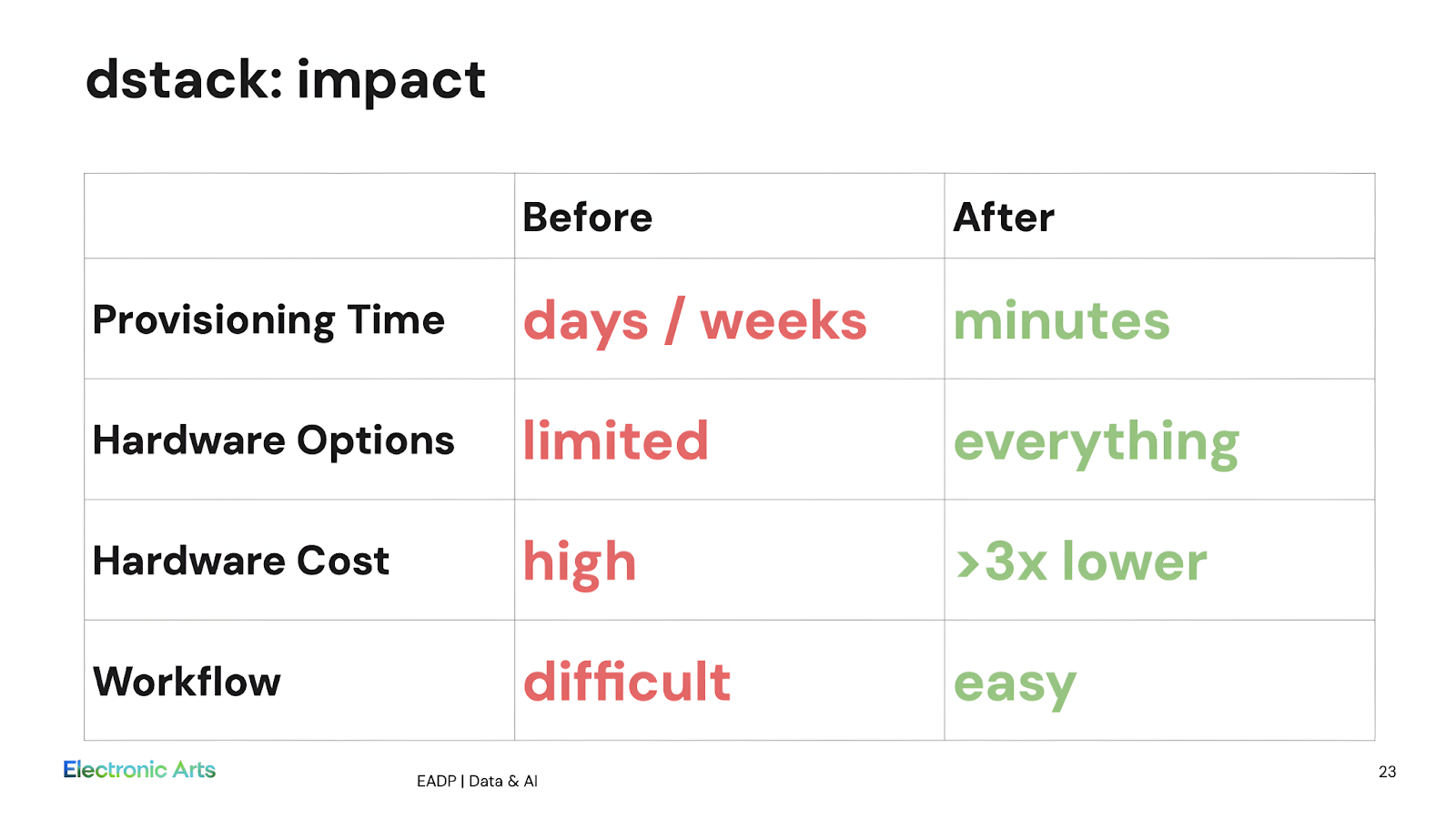
EA case study: Electronic Arts uses dstack to streamline provisioning, improve utilization, and cut GPU costs.
"dstack provisions compute on demand and automatically shuts it down when no longer needed. That alone saves you over three times in cost." -- Wah Loon Keng, Sr. AI Engineer, Electronic Arts
How dstack reduces waste
dstack provides general automation — declarative provisioning, unified logs/metrics, and managed lifecycle — and layered on top are focused policy primitives you can apply per-resource or as project defaults to cut waste.
For interactive work, set inactivity_duration so dev environments stop after a period with no attached user. Example:
For dev environments and tasks, use utilization_policy to terminate tasks when GPUs stay under a utilization threshold for a time window:
To reduce hourly spend, prefer spot instances with spot_policy and a price cap; combine with checkpointing and retries for resilience:
Last but not least, dstack’s multi-cloud and hybrid support lets you route jobs to the cheapest or closest backend without changing definitions.
Using dstack with Runpod
Runpod is natively supported as a dstack backend. That means your dstack server can request Runpod pods directly, letting you combine dstack ergonomics with Runpod’s GPU portfolio.
Quick steps:
Create a Runpod API key in the Runpod console (Settings → API Keys).
Add Runpod to your dstack server config.
Write a task, dev-environment, or service in .dstack.yml and run dstack apply. Monitor startup with dstack logs.
Example backend snippet (~/.dstack/server/config.yml):
Set various policies in your run configurations to balance cost and resilience on Runpod.
Practical options & team defaults
Other useful options to configure and bake into team defaults:
Retry policy. Configure retries and backoff to handle transient failures (especially important with spot instances).
Scheduling. Schedule non-urgent jobs to off-peak windows to take advantage of cheaper capacity or lower contention.
Plugins for team defaults. Use server-side plugins and project-level defaults to enforce safe policies (utilization thresholds, inactivity windows, resource limits) across your team.
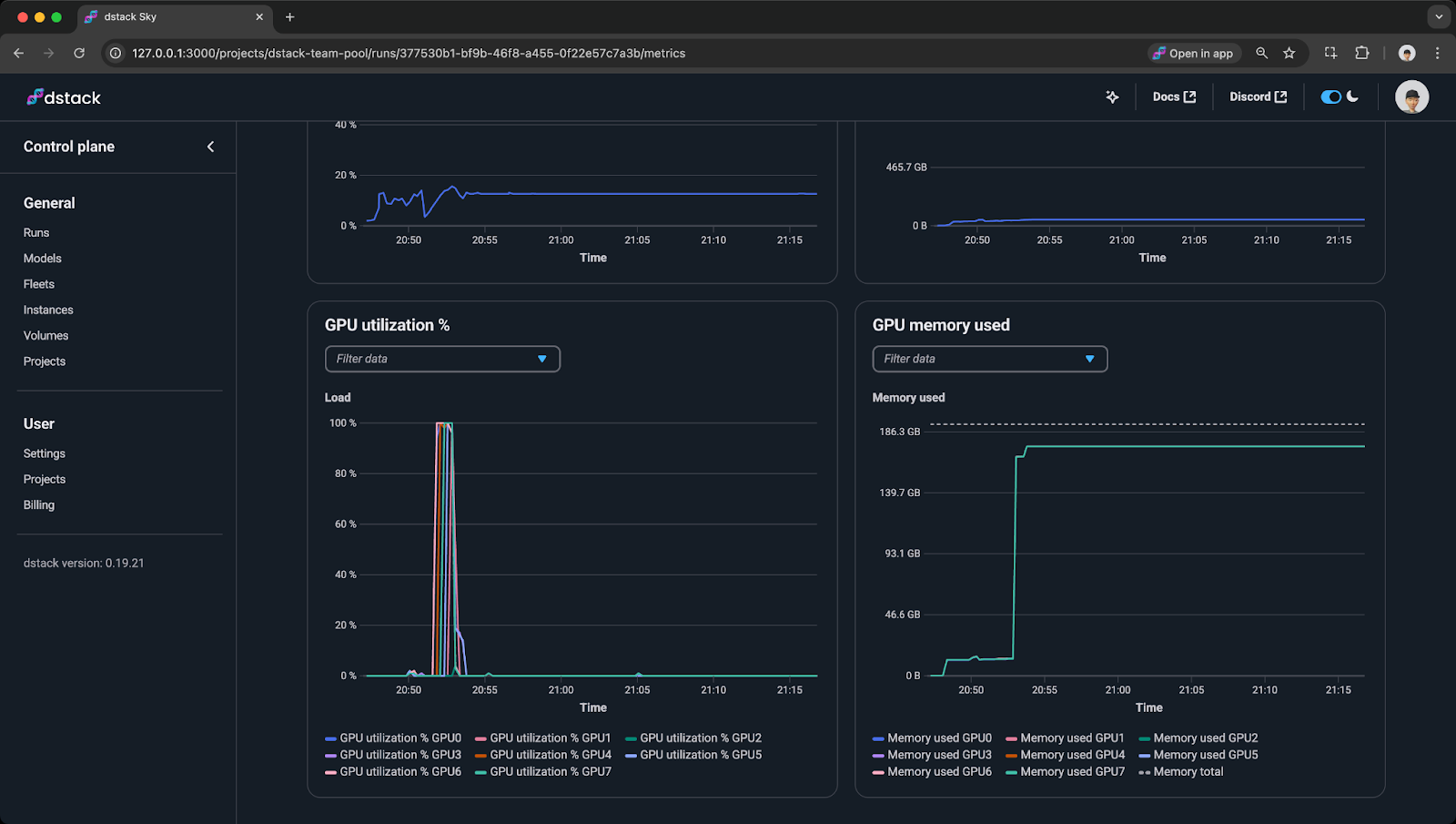
dstack provides a GPU-native control plane that covers the full ML lifecycle — from development to training to inference. Its orchestration combines automation, policy-driven resource management, and utilization monitoring, helping teams eliminate idle and under-used GPUs while speeding iteration.
With Runpod’s flexible GPU options, dstack lets teams focus on building and deploying models, turning orchestration into both efficiency and real cost savings.
What's new in Runpod Serverless: Faster cold starts, batch inference, and no-Docker deploys
Whether you're already running production endpoints on Runpod or you're sizing us up for the first time, here's a plain-language tour of what Runpod Serverless does today, why it's faster and cheaper than it was six months ago, and how to deploy your first endpoint in minutes.
Beyond the Notebook: The Engineering Realities of Production AI Agents
Shift from stateless inference to stateful architectures to resolve infrastructure bottlenecks like memory management, concurrency limits, and runaway jobs in production AI agents.



.jpeg)