
Last updated October 19, 2026.
Quick answer
To run Automatic1111 on Runpod, deploy a Pod from a community A1111 template, choose a 16 GB or 24 GB GPU and attach a Secure Cloud network volume at /workspace so your models persist. Runpod, an AI developer cloud, runs A1111 on a 24 GB RTX A5000 Pod for {{gpu:rtx-a5000}}/hr on Secure Cloud, billed per second, which is enough for SDXL at 1024x1024.
Before you deploy, know one fact that most A1111 tutorials leave out. Automatic1111 has been frozen since July 2024 and cannot load Flux checkpoints. It remains a good choice for existing SD 1.5 and SDXL workflows. For new projects, Forge Neo keeps the same interface with current model support, and ComfyUI is the image-generation template Runpod maintains officially. If you want images from code rather than a UI, Runpod Serverless or Public Endpoints fit better than a Pod.
Key facts
Choose the right setup before you deploy
The first decision is how you will generate images, because that picks the Runpod product. The second is which interface fits the workflow you already have.
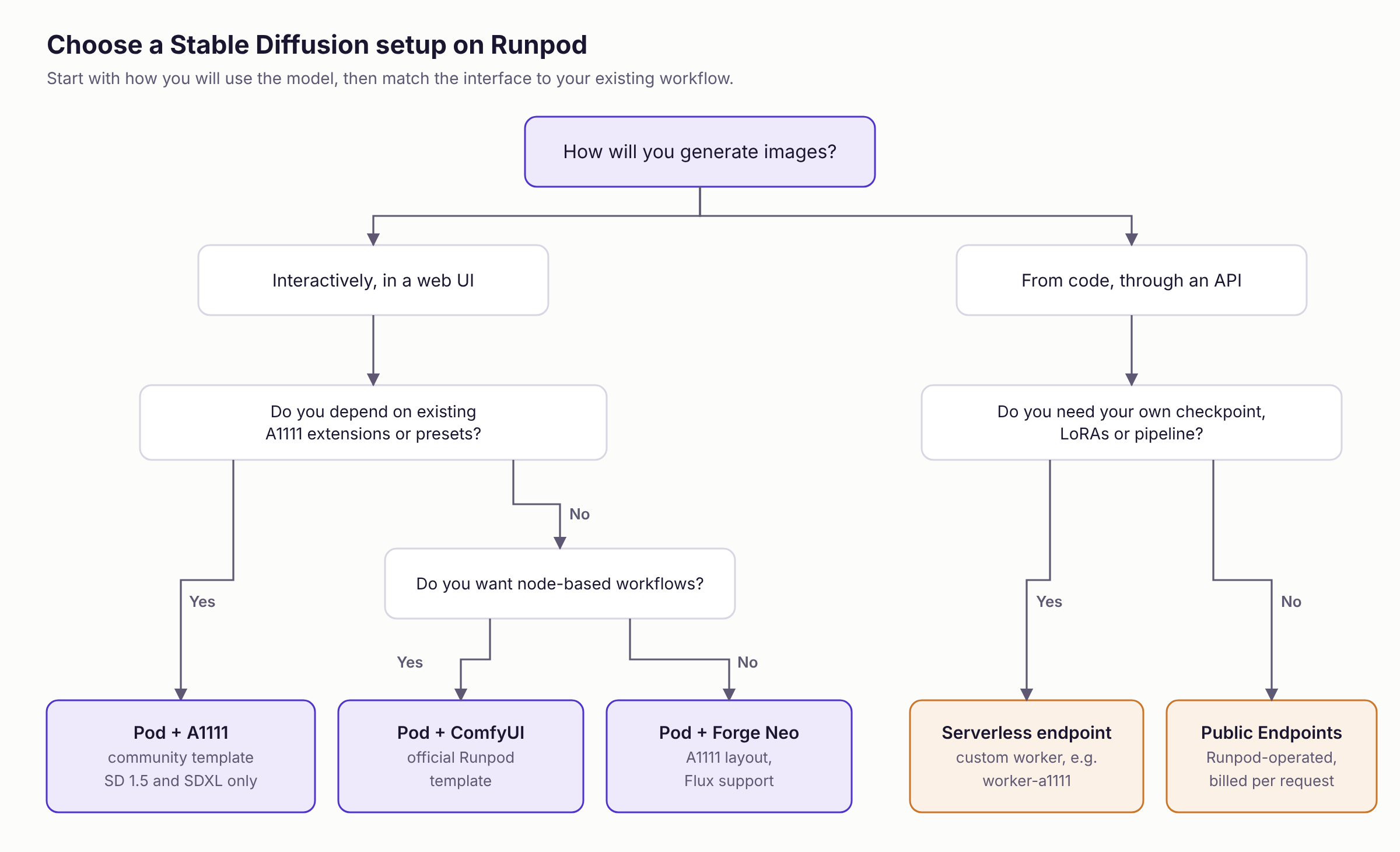
The rest of this guide covers the first row in depth, because A1111 on a Pod is what most people searching for this guide want, and then the Serverless path.
What Automatic1111 is and where it stands
Automatic1111 is an open-source browser interface for Stable Diffusion, maintained at github.com/AUTOMATIC1111/stable-diffusion-webui. It wraps the model in a Gradio UI that exposes samplers, generation parameters, checkpoint switching and an extension system, so you can generate images without writing code.
Its core features became the template every later UI copied:
- txt2img generates images from a prompt, with control over sampler, steps, classifier-free guidance (CFG) scale, resolution and seed.
- img2img transforms an existing image using a prompt and a denoising strength.
- Inpainting regenerates only the region you mask.
- LoRA files and textual inversion embeddings load alongside the base checkpoint to add styles, characters or concepts.
- The checkpoint dropdown switches between SD 1.5, SD 2.x and SDXL models, including community fine-tunes such as Pony Diffusion, without a restart.
- Extensions add ControlNet, face and hand detailing, regional prompting, upscalers and scripting.
A1111 includes built-in training for textual inversion embeddings and hypernetworks. It does not train LoRAs. LoRA and DreamBooth training run in separate tools such as kohya_ss, which you can run on a separate Pod before copying the resulting .safetensors file into A1111.
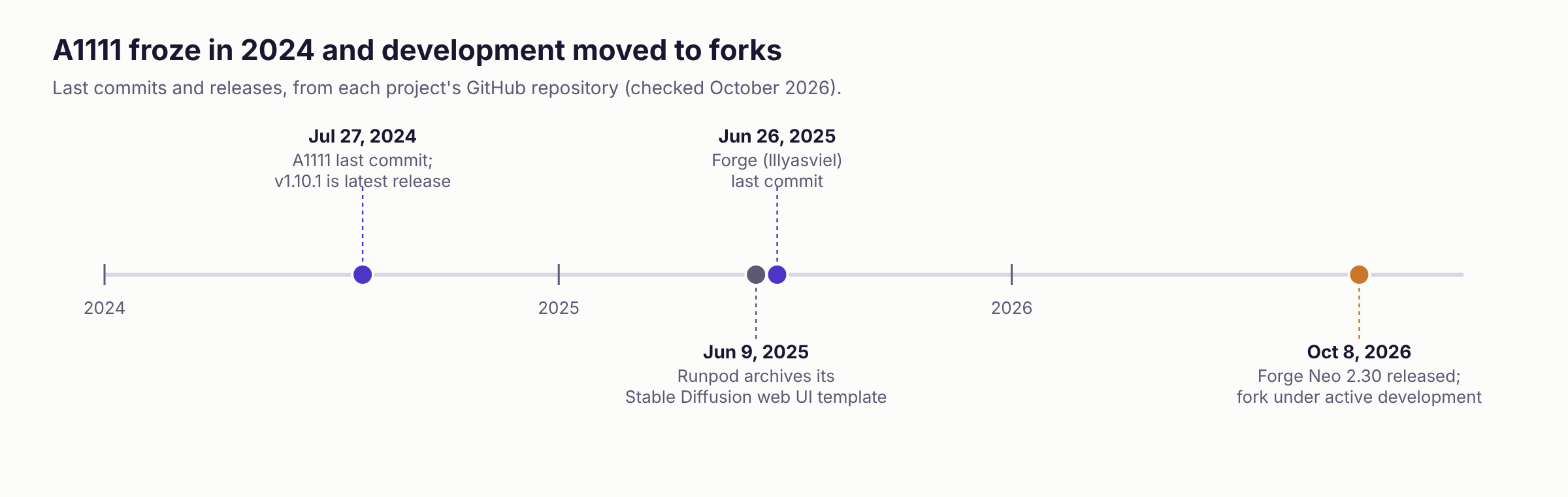
The freeze matters for more than features. A1111 1.10.1 pins dependency versions from mid-2024, including its default PyTorch and CUDA build. Extensions that track newer libraries can break against it, and the newest GPU architectures need CUDA versions it never shipped with. The Forge maintainers summarize it directly, describing the original web UI as "almost static now."
Automatic1111 vs Forge vs Forge Neo vs ComfyUI
Stable Diffusion WebUI Forge, at github.com/lllyasviel/stable-diffusion-webui-forge, is built on top of A1111 1.10.1. It keeps the A1111 interface, checkpoint format and most of the extension ecosystem, and replaces the backend with one that manages VRAM more aggressively and runs faster, especially on SDXL. Forge added Flux support, including NF4 and GGUF quantized checkpoints that fit on smaller cards. Its last commit landed in June 2025.
Forge Neo, at github.com/Haoming02/sd-webui-forge-classic on the neo branch, describes itself as a continuation of Forge's latest version. Its stated goal is running current popular models through the same interface. As of October 2026 its feature list includes Qwen-Image-2.1, Z-Image, Krea 2, Flux.2-Klein 4B and 9B and Wan 2.2 14B, none of which A1111 or the original Forge can load. It does not support FLUX.2-Dev.
ComfyUI, at github.com/Comfy-Org/ComfyUI, takes a different approach. You build generation pipelines as node graphs instead of filling in a fixed form, and its extensions are custom nodes rather than A1111 extensions, so A1111 extensions do not carry over. It is under active development, with commits as recent as October 18, 2026, and it is the image-generation template Runpod maintains officially. The trade is a steeper learning curve for full control over every step of the pipeline.
The VRAM savings matter less on a 24 GB or 48 GB cloud GPU than on an 8 GB laptop card. Maintenance status matters more, because a frozen UI means frozen dependencies. Choose A1111 when your existing extensions and presets are the asset you are protecting. Choose Forge Neo when you are starting fresh and want the familiar layout. Choose ComfyUI when you want to build and reuse pipelines, or when you need a model the other three cannot load.
Deploy Automatic1111 on a Runpod Pod
A Pod is a container running on a dedicated GPU that you rent by the second and reach through your browser. The deployment takes five steps.
1. Create an account and add credits
Sign up at runpod.io and add credits before you deploy. Pods bill per second while they run, so a 20-minute test costs 20 minutes of GPU time.
2. Choose a template
A template defines a Pod's container image, start command, exposed ports and environment variables. Runpod does not maintain an official A1111 template, so every current option is published by community maintainers.
In the Runpod console, start a new Pod deployment and search the template list for "A1111," "Automatic1111" or "Stable Diffusion." Check four things before you pick one:
- Read the last-updated date and image tag. An old image pins old PyTorch and CUDA versions.
- Check the CUDA version the image targets if you plan to use a Blackwell GPU such as the RTX 5090, RTX PRO 6000 or B200. These cards need a CUDA 12.8 or newer PyTorch build, which A1111's default install does not use.
- Note the exposed HTTP ports so you know which one serves the web UI.
- Look at whether checkpoints are baked into the image. Baked-in models make the image larger and the first pull slower.
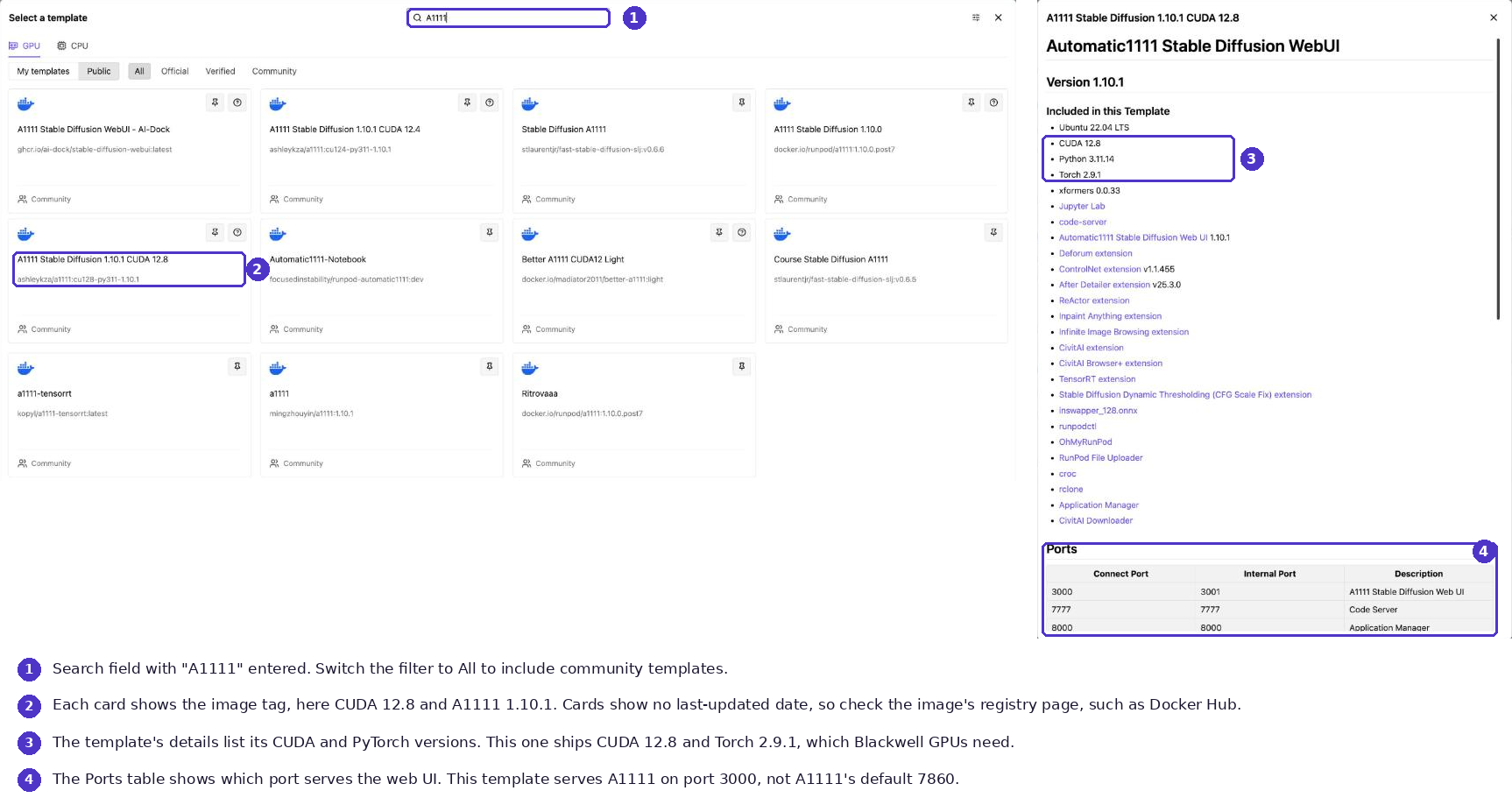
Search for "Forge Neo" the same way if you chose the fork. Template listings change as maintainers publish new versions, so check the console rather than copying an image tag from any guide, including this one.
3. Choose a GPU
VRAM decides the card, and the GPU types reference lists the memory on each one. The model's weights must fit in GPU memory alongside activations, the VAE decode at full resolution and anything you stack on top, such as a refiner, ControlNet or several LoRAs.
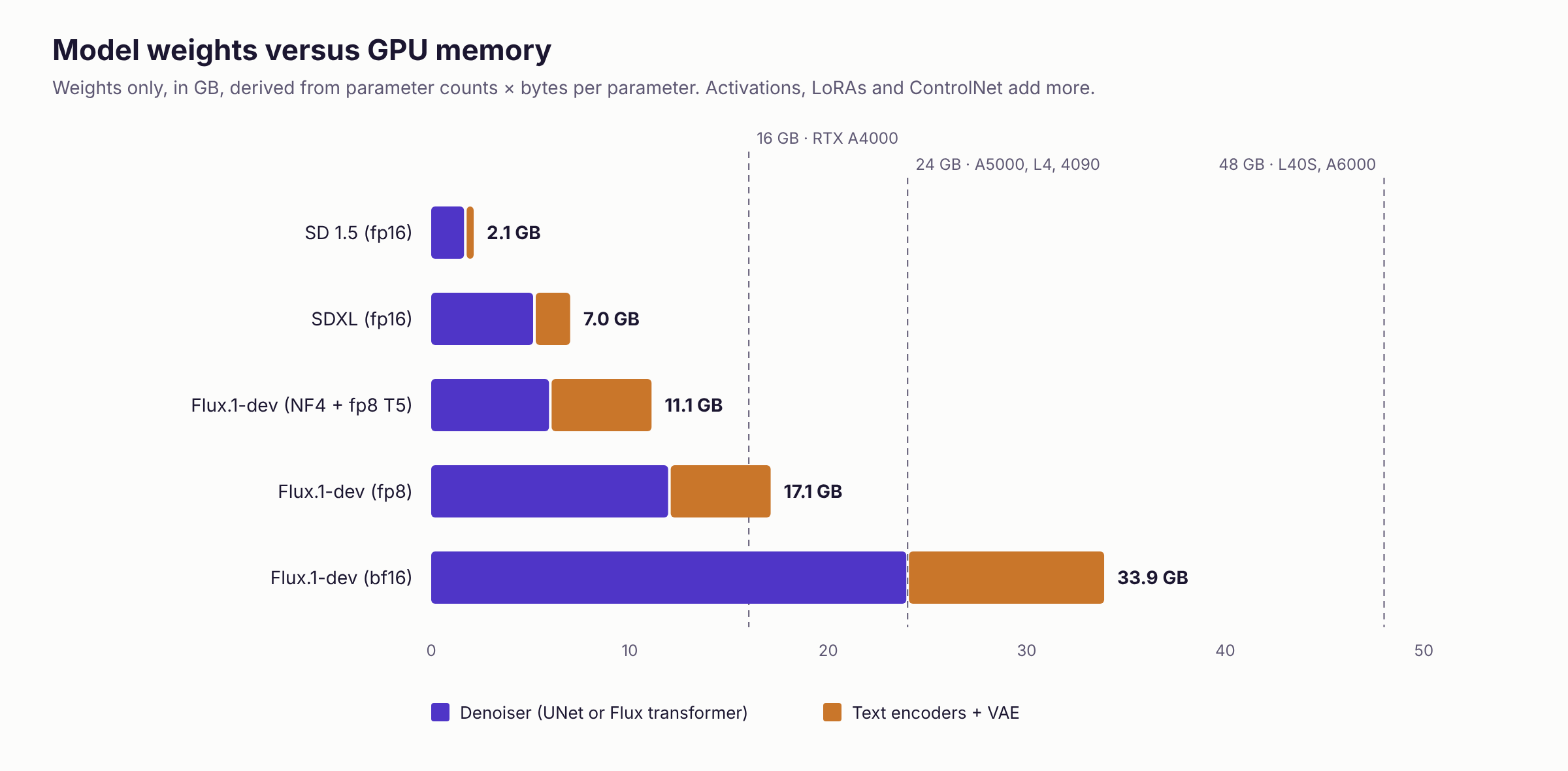
The arithmetic behind Figure 3 is parameter count multiplied by bytes per parameter. SDXL's UNet has about 2.6 billion parameters, so at 2 bytes each in fp16 it needs about 5.2 GB, and its two text encoders and VAE add about 1.8 GB. Flux.1-dev's transformer has about 12 billion parameters, so bf16 weights alone take about 24 GB, and its T5-XXL text encoder adds about 9.5 GB more. These figures are derived, not measured, and real usage runs higher once activations are included.
Two practical conclusions follow. SDXL fits on a 16 GB card, but a 24 GB card gives you room for a refiner and ControlNet at 1024x1024 without memory flags. Flux.1-dev in bf16 does not fit on a 24 GB card, so on 24 GB you run an fp8 or NF4 checkpoint in Forge, Forge Neo or ComfyUI, or move to a 48 GB card.
Deploy the Pod on Secure Cloud, which runs in datacenter facilities. Secure Cloud is also where network volumes are available, so it is the tier that lets your models and extensions survive the Pod. An RTX A5000 on Secure Cloud is {{gpu:rtx-a5000}}/hr. Current Secure Cloud rates for every GPU are on the Runpod pricing page.
4. Attach a network volume
A Pod has three kinds of storage, and only one of them outlives the Pod. The container disk is scratch space that is wiped when the Pod stops or restarts. The volume disk, mounted at /workspace by default, survives stop and start but is deleted when you terminate the Pod. A network volume exists independently of any Pod. If you plan to come back, create one first and attach it at deployment. Network volumes are Secure Cloud only, and they cannot be attached or detached later without deleting the Pod.
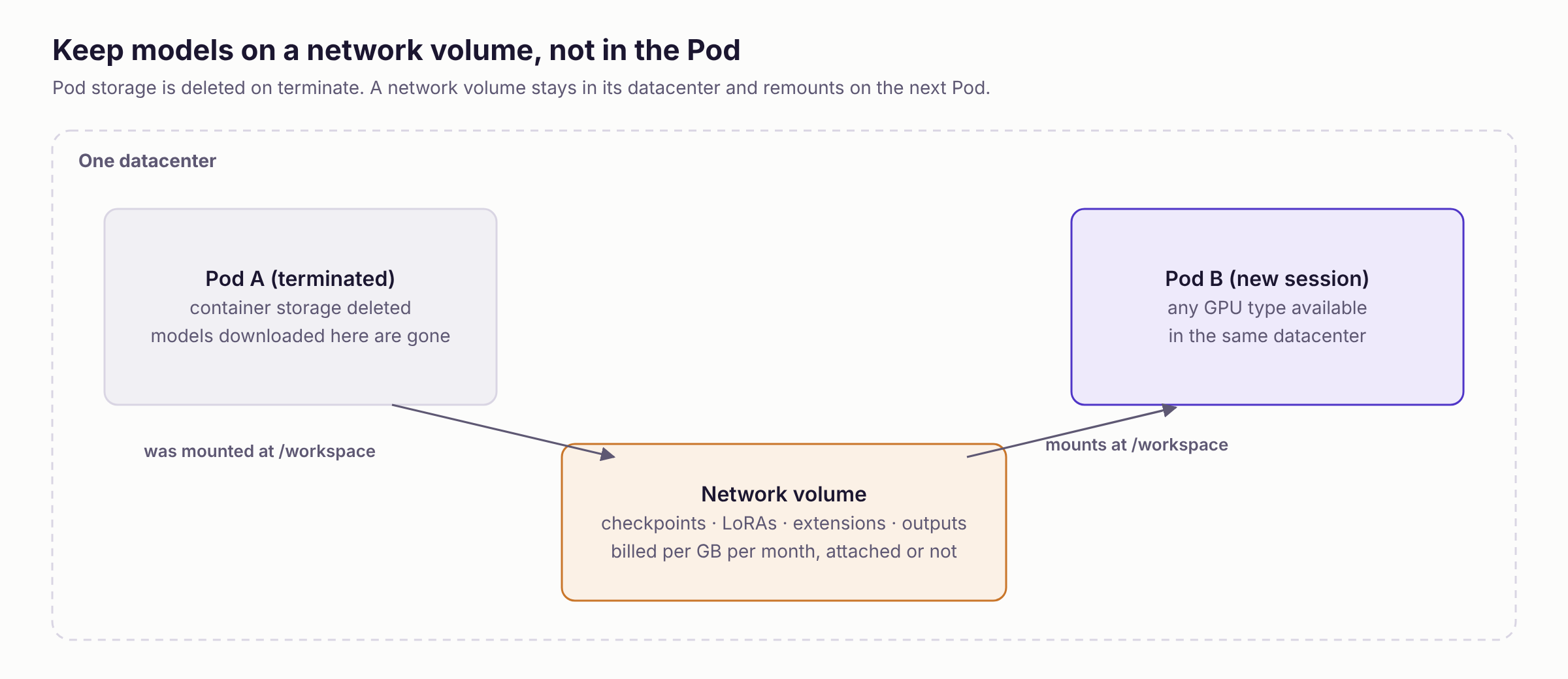
A network volume is persistent storage that survives termination and remounts on the next Pod, so checkpoints, LoRAs, embeddings, extensions and outputs are ready when you return. It comes with two constraints. The volume lives in one datacenter, so later Pods must deploy there, and not every datacenter supports network volumes. The volume also bills per GB per month whether or not a Pod is attached, at $0.07/GB/month for the first 1 TB and $0.05/GB/month beyond as of October 2026. Charges continue while the Pod is stopped.
To size one, add up your model files. An SDXL checkpoint is about 6.9 GB, SD 1.5 checkpoints run 2 GB to 4 GB and LoRAs typically run from tens to a few hundred megabytes. Five SDXL checkpoints, a LoRA library and an output folder fit in 50 GB to 100 GB. Start at the low end, because you can increase a volume's size later but never decrease it. On Pods the network volume replaces the default volume disk at /workspace, which is where most A1111 templates install the web UI.
5. Launch and connect
Deploy the Pod and wait for its status to show Running. Open the Pod, click Connect and select the HTTP service for the web UI. The connection options guide covers the alternatives, including SSH and the web terminal. A1111 listens on port 7860 by default, but the template decides which port it exposes, so use the one shown in the template. Runpod serves the UI through its HTTP proxy at an address of the form https://<pod-id>-<port>.proxy.runpod.net.
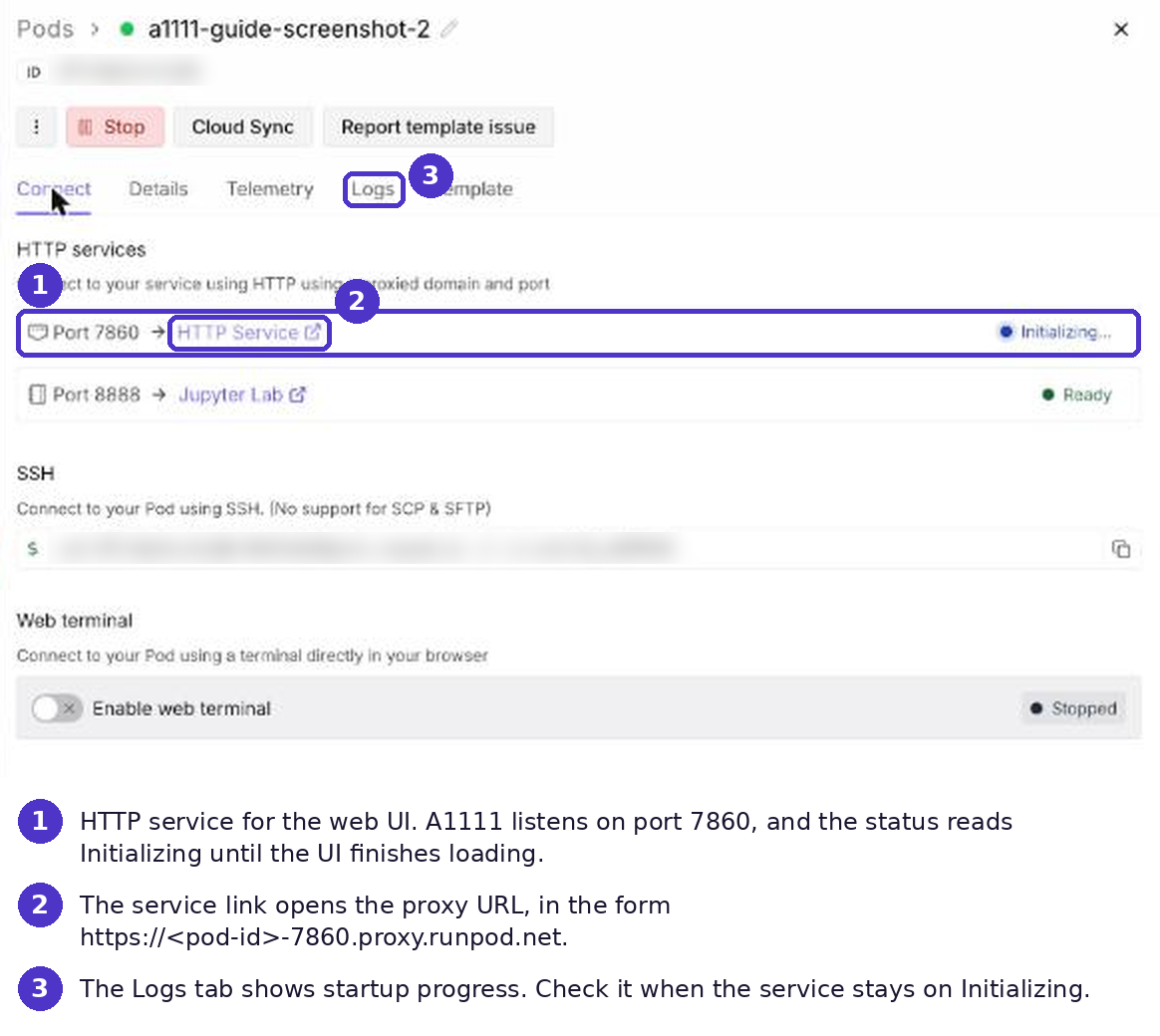
The first load can take a few minutes while the UI installs dependencies and loads the default checkpoint. If the proxy returns an error, the UI is still starting. Watch the Pod logs until A1111 reports that it is running on its local URL, then refresh.
Stop the Pod when you finish a session. Stopping halts GPU billing and keeps everything under /workspace, but it wipes the container disk, so keep models and extensions under /workspace. Terminate the Pod when you no longer need that machine.
Load models
The checkpoint a template ships with depends on the template, so check the dropdown before you download anything. Download new models directly on the Pod, because a datacenter connection is faster than uploading from your machine.
- Open the Pod's web terminal from the Connect panel.
- Change into the models folder, for example
cd /workspace/stable-diffusion-webui/models/Stable-diffusion. - Download the file with
wgetorhuggingface-cli download. Gated Hugging Face repositories require you to accept the license and log in withhuggingface-cli loginfirst. - In the UI, click the refresh icon next to the checkpoint dropdown and select the model.
Each model type has its own folder under stable-diffusion-webui:
Flux checkpoints do not load in A1111. Run them in Forge, Forge Neo or ComfyUI.
Install extensions
Install extensions from the Extensions tab, either from the built-in index or by pasting a GitHub URL under Install from URL, then restart the UI. Three extensions cover most workflows:
- ControlNet (sd-webui-controlnet) conditions generation on depth maps, pose skeletons, edge maps and other structural inputs, and its models download separately into
models/ControlNet/. - ADetailer finds faces and hands in a finished image and re-runs inpainting on them at higher detail.
- Regional Prompter applies different prompts to different areas of one image.
Extensions install into the web UI folder, so with a network volume at /workspace they persist across Pods. Without one, you reinstall them every session.
Because A1111 no longer changes, check each extension's repository for the last A1111 version it supports. Extensions that track newer PyTorch or Gradio releases can break against the frozen core, and some now target Forge first.
Fix common problems
Most A1111 failures on a cloud GPU come from memory, precision or version mismatches. Set launch flags in the COMMANDLINE_ARGS variable, either in the template's environment variables or in webui-user.sh, and restart the UI.
Call A1111 from code
A1111 has a REST API. Add --api to COMMANDLINE_ARGS and the UI exposes endpoints such as /sdapi/v1/txt2img, with interactive documentation at /docs. On a Pod you call it through the same proxy URL as the UI, which works well for scripts and batch jobs you run while the Pod is up.
A Pod bills for every second it runs, whether or not requests arrive. For an application with irregular traffic, Serverless is the cheaper shape.
Serve Stable Diffusion through Serverless
Runpod Serverless runs your container as workers that start when requests arrive and scale back to zero when the queue is empty. You pay for the time workers spend processing jobs, not for idle time.
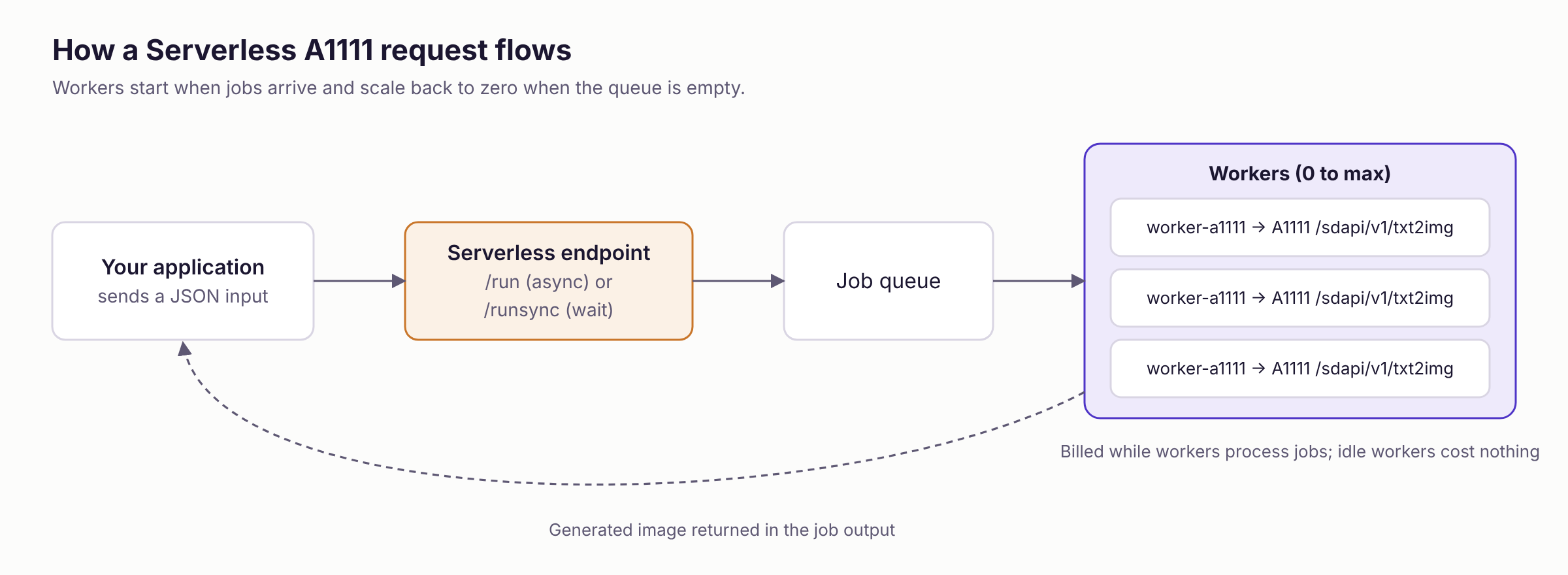
Runpod publishes an A1111 worker at github.com/runpod-workers/worker-a1111. It runs A1111, exposes its txt2img API and ships with the Deliberate v6 checkpoint. The request's input object accepts any parameter that A1111's /sdapi/v1/txt2img endpoint accepts:
Plan for three limits. The worker exposes txt2img only, so img2img, inpainting and ControlNet need a modified handler. Using your own checkpoint means rebuilding the image with it or loading it from a network volume attached to the endpoint. The first request after the endpoint scales to zero waits for a worker to start. Reach for FlashBoot and model caching before you reach for always-on capacity. Pulling the container image and downloading cached models happen while the worker is scaled down and are not billed. Keep a minimum of one active worker only if your application cannot tolerate the remaining delay, because an active worker bills around the clock.
On the 24 GB card group that covers the L4, RTX A5000 and RTX 3090, Flex workers, which scale to zero, run {{sls:l4-a5000-3090}}/hr. Active worker pricing is available through Runpod sales, and the Serverless pricing docs explain what is billed in each worker state.
If you do not need your own model, Public Endpoints are the shortest path. Runpod operates the model and you pay per request with nothing to deploy. Check the Public Endpoints catalog in the console for the current image models.
Get started
Pick the path that matches your decision from Figure 1:
- To run A1111, open the Runpod console, create a network volume in a Secure Cloud datacenter that offers your GPU, then deploy a Pod from a community A1111 template with the volume attached.
- To run Forge Neo or ComfyUI, follow the same steps with a Forge Neo template or the official ComfyUI template.
- To serve images from an application, create a Serverless endpoint from the worker-a1111 repository and send it the JSON request shown above.
- To call a hosted model, open Public Endpoints in the console.
The Runpod documentation at docs.runpod.io covers Pods, network volumes and Serverless endpoints in detail.
FAQs
What is Automatic1111?
Automatic1111 is an open-source browser interface for Stable Diffusion that provides txt2img, img2img, inpainting, LoRA loading and an extension system without writing code. Its latest release is v1.10.1, and its code has not changed since July 2024.
Is Automatic1111 still maintained?
No. The last commit to its default branch landed on July 27, 2024. It still works for SD 1.5 and SDXL, but it does not receive fixes, new model support or dependency updates. Forge Neo is the actively maintained fork with the same interface.
Is Automatic1111 free?
The software is free and open source under the AGPL-3.0 license. The GPU you run it on is not. On Runpod you pay per second for the Pod while it runs, plus network volume storage per GB per month. Pods run on account credits, so add credits before you deploy.
Is Automatic1111 safe to run?
The core project is open source and widely used, but a frozen codebase carries two risks. Its dependencies are pinned to mid-2024 releases and no longer receive security patches, and extensions are third-party code that runs with full access to your Pod. Install extensions only from repositories you recognize, and run A1111 on a Pod rather than on a machine that holds sensitive data.
Can I run Automatic1111 without a local GPU?
Yes. Deploy a community A1111 template on a Runpod Pod, choose a GPU and open the web UI in your browser. Nothing installs on your own computer.
Does Runpod have an official Automatic1111 template?
No. Runpod archived its Stable Diffusion web UI template in June 2025, so current A1111 templates are community-maintained. Runpod maintains an official ComfyUI template for image generation.
Is ComfyUI better than Automatic1111?
ComfyUI is better for new work, and A1111 is better only for preserving an existing workflow. ComfyUI is under active development, loads model families A1111 cannot, such as Flux, and has an official Runpod template. Use A1111 if you depend on existing A1111 extensions and presets and generate with SD 1.5 or SDXL. Use Forge Neo for a new deployment that wants the A1111 layout with Flux support and active maintenance. Use ComfyUI for node-based pipelines and the widest model coverage.
Does Automatic1111 support Flux?
No. A1111 does not load Flux checkpoints. Forge, Forge Neo and ComfyUI do.
How much VRAM does SDXL need?
SDXL's weights take about 7 GB in fp16, so it runs on a 16 GB card. A 24 GB card such as the RTX A5000 or L4 leaves room for a refiner and ControlNet at 1024x1024. The RTX A5000 is {{gpu:rtx-a5000}}/hr on Secure Cloud.
How much VRAM does Flux.1-dev need?
Flux.1-dev's transformer weights take about 24 GB in bf16 and its T5 text encoder about 9.5 GB more, so full precision needs a 48 GB card such as the L40S. On a 24 GB card, run an fp8 or NF4 checkpoint in Forge, Forge Neo or ComfyUI.
Can I use my own models and LoRAs?
Yes. Download any checkpoint or LoRA from Hugging Face or Civitai into the matching models/ subfolder on the Pod. Keep them on a network volume so you download each file once.
How much does it cost to run Automatic1111 on Runpod?
You pay for the GPU while the Pod runs, billed per second, plus network volume storage at $0.07/GB/month for the first 1 TB as of October 2026. On Secure Cloud an RTX A4000 is {{gpu:rtx-a4000}}/hr and an RTX A5000 is {{gpu:rtx-a5000}}/hr. Stop the Pod between sessions to stop GPU charges.
Do my models and outputs persist between sessions?
Files under /workspace survive stopping a Pod but are deleted when you terminate it. To keep them beyond the Pod, attach a Secure Cloud network volume at deployment, and deploy later Pods in the same datacenter so it remounts at /workspace.
Can I use Automatic1111 as an API?
Yes. Start A1111 with the --api flag to expose endpoints such as /sdapi/v1/txt2img on a Pod. For production traffic, deploy the worker-a1111 image on Runpod Serverless so workers scale with requests and you stop paying when traffic stops.
Related guides
- Serverless GPU: what it is, when to use it, and how to choose a provider
- RTX 4090 NVLink Support, Specs, VRAM, and AI Performance
- Nvidia H200 GPU: Specs, VRAM, Price, and AI Performance
- Nvidia H100 GPU: Specs, VRAM, Price, and AI Performance
- Nvidia B200 GPU: Specs, VRAM, Price, and AI Performance
- AI Model Serving Architecture for Scalable APIs
Author profile: The Runpod Team


